
 WhatsApp: +86 16626708626
 Email:
  Phone: +86 16626708626
Description
Key Technical Specifications
| Parameter | Specification |
|---|---|
| Manufacturer | Bently Nevada |
| Model | 3500/15 127610-01 |
| Product Type | Legacy AC Power Supply Module |
| System | 3500 Machinery Protection System |
| Rack | 3500/05 System Rack |
| Module Height | Half-height |
| Rack Location | Left-side dedicated power-supply position |
| High-Voltage AC PIM | 125840-01 |
| High-Voltage AC Input | 175–264 VAC RMS |
| Low-Voltage AC PIM | 125840-02 |
| Low-Voltage AC Input | 85–132 VAC RMS |
| Input Frequency | 47–63 Hz |
| Maximum HV AC Input Current | 2.3 A RMS |
| Maximum LV AC Input Current | 4.5 A RMS |
| Maximum Input Power | 194 W |
| Minimum Efficiency | 0.8 typical specification |
| Power Factor | 0.5 minimum typical |
| Rack Loading | No minimum rack load required |
| Dimensions | 120.7 × 50.8 × 251.5 mm |
| Weight | 1.39 kg |
| Storage Temperature | -40 to +85 °C |
| Humidity | Up to 95%, non-condensing |
The 127610-01 is the legacy AC power-supply module itself; it does not determine the AC input voltage independently. The associated rear PIM determines whether the installation is low-voltage AC or high-voltage AC. The OEM documentation lists 125840-01 for high-voltage AC and 125840-02 for low-voltage AC.
For older hardware revisions, the allowable AC input range can be narrower than the current published range. Bently Nevada documentation notes older combinations may be limited to 85–125 VAC RMS for low-voltage AC and 175–250 VAC RMS for high-voltage AC, so the module and PIM revision should be checked before commissioning.
Product Introduction
The Bently Nevada 3500/15 127610-01 is a legacy AC power supply module for the 3500 Machinery Protection System. It installs in one of the dedicated half-height power-supply positions on the left side of the 3500 rack and converts the incoming AC power for use by the rack’s monitoring modules.
The important selection point is the rear Power Input Module. 125840-01 provides the high-voltage AC interface at 175–264 VAC RMS, while 125840-02 provides the low-voltage AC interface at 85–132 VAC RMS. A 3500 rack can use one or two power supplies for single or redundant operation.
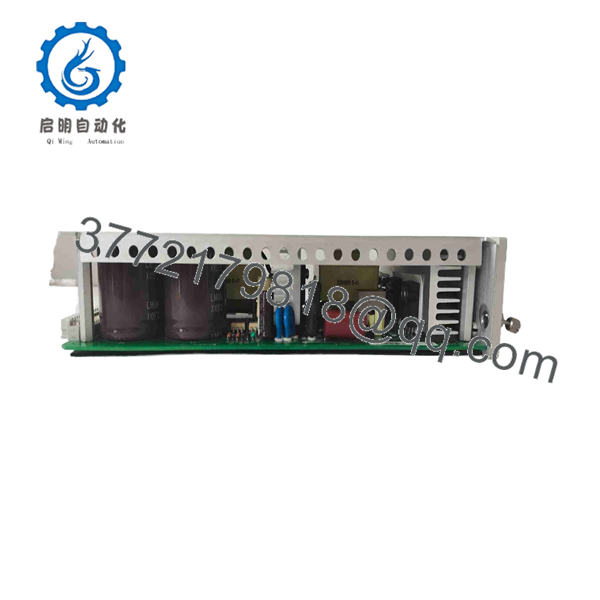
3500/15 127610-01
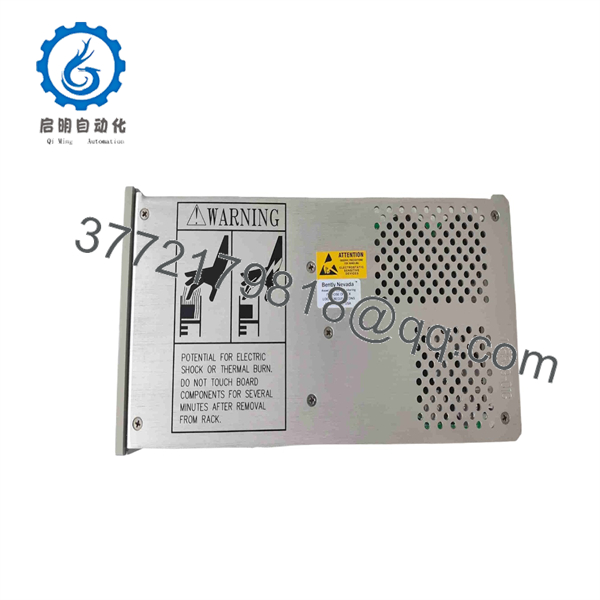
3500/15 127610-01
Installation & Configuration Guide
Stage 1 — Pre-Installation Preparation
Estimated time: 15–20 minutes
- Confirm the replacement marking is 127610-01.
- Identify the rear PIM already installed behind the power supply.
- Determine whether the rack uses 125840-01 high-voltage AC or 125840-02 low-voltage AC.
- Verify the replacement module revision against the existing rack hardware.
- Record the rack’s current power-supply arrangement and take photographs before removal.
- Apply LOTO to the AC source according to the plant procedure.
- Prepare an ESD strap, insulated screwdriver, multimeter, labels, and the applicable 3500/15 documentation.
- If two supplies are installed, identify the primary and backup positions before removing either module.
⚠️ Do not connect an AC source directly based only on the 127610-01 part number. The correct PIM and its voltage rating must match the incoming supply.
Stage 2 — Removing the Old Module
Estimated time: 10–15 minutes
- Verify that the AC source is isolated.
- Confirm the absence of hazardous voltage with an appropriately rated multimeter.
- Wait for the equipment’s required discharge period before handling the module.
- Disconnect or secure the module according to the 3500/15 service procedure.
- Remove the existing 127610-01 from the dedicated rack position.
- Inspect the PIM, connectors, rack slot, and module contacts for overheating, corrosion, or mechanical damage.
- Keep the removed module for exact revision and configuration comparison.
⚠️ Do not remove a single power supply from a live rack unless the approved 3500 service procedure confirms that the installed redundant supply can maintain rack operation. The 3500 architecture permits redundant supplies, but the actual rack configuration must be verified first.
Stage 3 — Installing the 127610-01
Estimated time: 10–15 minutes
- Confirm the PIM is the correct type for the incoming AC voltage.
- Inspect the module connector and rack receptacle.
- Carefully insert the 127610-01 into the designated left-side power-supply slot.
- Secure the module using the rack’s specified retention hardware.
- Verify that the module is fully seated.
- Check the AC wiring and PIM connections before restoring power.
- For redundant installations, confirm both supplies occupy their intended positions.
⚠️ Do not combine the legacy 127610-01 architecture with the newer Universal AC components simply because the modules have similar physical dimensions. The Universal AC architecture uses 106M1079-01 with 106M1081-01, and the legacy and universal components have specific compatibility restrictions.
Stage 4 — Power-On & Testing
Estimated time: 15–30 minutes
- Remove LOTO under the approved plant procedure.
- Energize the AC input.
- Verify the 3500/15 Supply OK indication.
- Measure the input voltage at the appropriate PIM terminals if required by the commissioning procedure.
- Confirm that the rack’s monitoring modules start normally.
- Check for power-supply alarms or abnormal LED indications.
- Verify communication and monitoring-system status.
- For redundant configurations, confirm the backup supply remains available.
- Record the installed module part number, PIM part number, revision, input voltage, and test results.
⚠️ If the Supply OK indication fails, do not repeatedly cycle power. Check the input voltage, fuse, PIM type, module seating, and applicable hardware revision before further troubleshooting.
FAQ
Q1. What is Bently Nevada 127610-01?
It is the AC Power Supply Module for the 3500/15. It is a half-height module installed in the dedicated power-supply positions on the left side of a 3500 rack.
Q2. Does 127610-01 accept both 110 VAC and 220 VAC?
The module itself is used with different AC PIMs. 125840-02 is the low-voltage AC PIM for 85–132 VAC RMS, while 125840-01 is the high-voltage AC PIM for 175–264 VAC RMS. Verify the installed PIM before applying power.
Q3. Can 127610-01 be hot-swapped?
A 3500 rack with two correctly installed power supplies can maintain operation when one supply is removed, because either supply can power the rack. However, removal should follow the approved 3500 service procedure and should not be assumed safe for every single-supply installation.
Q4. Is 127610-01 obsolete?
It is a legacy/phase-out AC power-supply architecture. Current replacement information identifies the Universal AC family, including 106M1079-01 with 106M1081-01, as the newer architecture. Exact replacement compatibility must be checked against the existing rack and PIM configuration.
Q5. Can I replace 127610-01 directly with 106M1079-01?
Not as a simple module-for-module substitution. The Universal AC design uses a corresponding 106M1081-01 Universal AC PIM, and legacy and universal components have defined compatibility restrictions. Treat the change as a power-supply architecture conversion rather than a blind spare replacement.
Q6. Does 127610-01 include the rear PIM?
No. 127610-01 is the AC power-supply module. The associated PIM is a separate component, such as 125840-01 or 125840-02. Confirm the complete assembly before ordering.
Q7. What should be verified before purchasing a replacement?
Verify the exact 127610-01 part number, hardware revision, existing PIM part number, incoming AC voltage, rack position, and whether the system uses single or redundant power supplies. For older installations, also check the revision-dependent input limits before energization.



