
 WhatsApp: +86 16626708626
 Email:
  Phone: +86 16626708626
Description
Key Technical Specifications
| Parameter | Specification |
| Manufacturer | Bently Nevada / Baker Hughes |
| Model Series | 3500/22M Transient Data Interface (TDI) |
| Main Board Part Number | 138607-01 |
| Power Consumption | 10.5 W maximum |
| Rack Position | Slot 1 (directly adjacent to the power supply modules) |
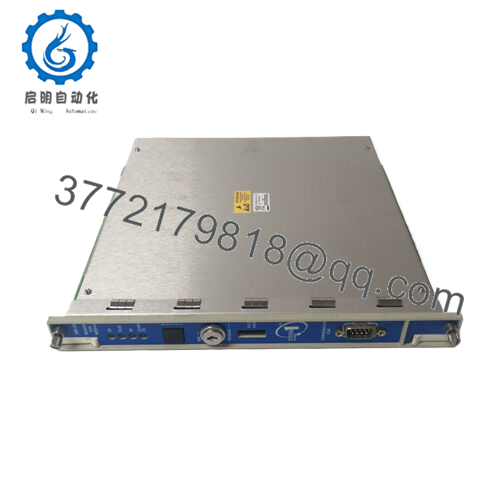
| Front Panel Interfaces | USB-B Configuration Port, Rack Reset Button, Configuration Keylock |
| Network Interfaces (Rear I/O) | 10Base-T / 100Base-TX RJ45 Ethernet or 100Base-FX Fiber-Optic |
| Diagnostic LEDs | OK, TX/RX, TM (Trip Multiply), CONFIG OK |
| Onboard OK Relay | 5 A @ 24 VDC / 120 VAC (Form C contact) |
| Supported Software | System 1 Condition Monitoring & 3500 System Configuration Software |
| Operating Temperature | −30 to +65 °C (−22 to +149 °F) |
| Storage Temperature | −40 to +85 °C (−40 to +185 °F) |
Product Introduction & Supply Chain Strategy
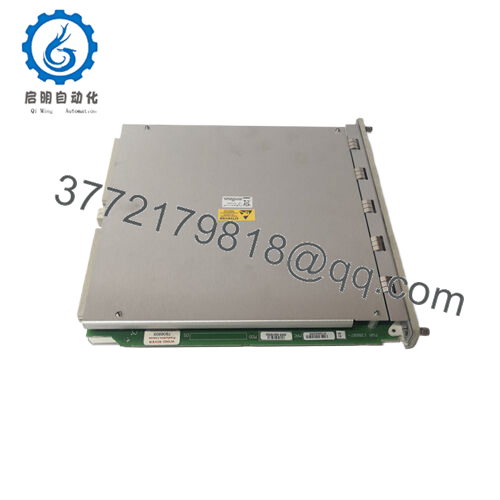
The Bently Nevada 3500/22M 138607-01 Transient Data Interface (TDI) combines the core framework management functions of a standard Rack Interface Module (RIM) with dynamic condition monitoring capabilities. It collects steady-state and transient waveform data from M-series monitor cards (e.g., 3500/40M, 3500/42M) and streams high-resolution vibration data directly to GE/Baker Hughes System 1 software over Ethernet.
Maintaining a verified New Surplus 3500/22M 138607-01 module in critical spares inventory guarantees seamless restoration when network processing hardware suffers an electrical surge or hardware degradation. Purchasing New Surplus units prevents costly software handshaking failures and transient data losses caused by aged memory or weakened Ethernet controllers common in refurbished cards.

- 350022M 138607-01
- 350022M 138607-01
Installation & Configuration Guide
Stage 1: Pre-Installation (Prep & Safety)
- Verify system authorization and check machine interlocks before servicing the central communication processor.
- Wear a grounded electrostatic discharge (ESD) wrist strap connected to the cabinet ground busbar.
- Connect an engineering laptop to the front USB-B port of the active module and export a complete backup of the current rack configuration file (
.w35extension).
Stage 2: Removal
- Unplug the front USB configuration cable and disconnect the rear RJ45 or fiber-optic network cables.
- Insert the 3500 system key into the front panel keylock and switch it to the PROGRAM mode position if extracting under maintenance conditions.
- Loosen the top and bottom captive screws on the front bezel of the 3500/22M card.
- Pull the module straight out along its guide rails using the front panel handles to prevent backplane pin bending.
Stage 3: Installation (Clone & Seat)
- Inspect the rear gold-finger connectors on the new 138607-01 board for dust, debris, or manufacturing defects.
- Verify hardware address switches on the 138607-01 card match the original node address settings (up to 127 rack addresses).
- Slide the new 3500/22M card smoothly into Slot 1 until the module seats firmly into the backplane.
- Hand-tighten both captive thumbscrews to ground the front panel shield to the chassis frame.
Stage 4: Power-On & Testing
- Observe the front panel diagnostic LEDs: the OK LED will pulse green during startup and turn solid green within seconds.
- Connect your laptop to the front USB-B port and open the 3500 Configuration Software.
- Download the backed-up configuration file to the module, verify the CONFIG OK LED turns solid green, and return the keylock to RUN mode.
- Reconnect the rear Ethernet cable and confirm data polling resumes in System 1 condition monitoring software.
Firmware/Software Versions & Upgrade Notes
- Core Functionality: The 3500/22M TDI stores the operating firmware that coordinates data sampling across all installed M-series vibration cards.
- System 1 Integration: Requires System 1 Condition Monitoring Software (Version 6.0 or higher) for transient waveform collection, and 3500 Framework Configuration Software (Version 4.0 or higher).
- Firmware Mismatch Risks: When replacing an existing TDI card, verify that the replacement card’s firmware version matches the existing rack architecture. Running mismatched firmware between the TDI and 3500/42M proximitor cards can cause transient data buffer overruns or transient capture drops in System 1.
Frequently Asked Questions (FAQ)
Is this 3500/22M module genuinely new or a refurbished part?
This product is a Brand New Surplus unit. It is not used, not pulled from a decommissioned plant, and not refurbished. All modules undergo strict quality verification to ensure OEM performance. Original anti-static packaging is retained and opened solely for physical verification and anti-static inspection before delivery.
How does the 3500/22M differ from the older 3500/20 RIM card?
The older 3500/20 RIM only provides basic rack configuration and slow serial communication (RS232/RS422). The 3500/22M TDI incorporates full 10Base-T/100Base-TX Ethernet connectivity and internal processing power to continuously collect dynamic waveform and transient data for System 1 diagnostic software.
Will a failure in the 3500/22M module trip my turbine or rotating machinery?
No. The 3500/22M operates outside the critical automatic protection loop. The individual monitor modules (such as 3500/42M or 3500/40M) execute relay trips independently. However, a failure in the 3500/22M will interrupt external DCS communications and stop System 1 vibration data logging.
Can I hot-swap the 3500/22M card while the 3500 rack is running?
Yes, the 3500/22M module supports live hot-swapping. While the card is unseated, automatic machinery protection remains active through the individual monitor cards, but remote Ethernet monitoring and alarm logging will temporarily halt.
What is the purpose of the keylock switch on the front panel?
The front panel keylock secures the configuration state of the entire rack. Turning the key to RUN prevents unauthorized remote configuration changes over the network, while switching to PROGRAM allows local or remote configuration updates through the software.
What warranty coverage is included with this New Surplus TDI card?
We provide a comprehensive 1-year replacement warranty on all New Surplus Bently Nevada hardware. If the 3500/22M unit experiences any hardware fault or port communication failure within 12 months under standard operating conditions, we replace the unit immediately from available stock.
If you need help determining the exact channel enabling disk requirements, rear I/O module matching options (e.g., RJ45 vs Fiber), or need a formal quote for stock availability, please let me know.



