
 WhatsApp: +86 16626708626
 Email:
  Phone: +86 16626708626
Description
Key Technical Specifications
| Parameter | Specification / Value |
| Supported Protocols | Modbus RTU (Serial) and Modbus TCP/IP (Ethernet) |
| Serial Ports | 2 independent RS232/RS422/RS485 configurable ports |
| Ethernet Port | 10Base-T / 100Base-TX RJ45 auto-negotiating network interface |
| Power Consumption | 5.6 Watts typical backplane power draw |
| Data Update Rate | Up to 100 ms refresh rate for static values and alarm registers |
| Communication Modes | Modbus Slave (Server) functionality for DCS polling |
| Baud Rates | Programmable from 300 to 115,200 bps for serial interfaces |
| Diagnostics | Front panel LEDs for TX/RX activity, OK status, and link integrity |
| Operating Temperature | -30°C to +65°C (-22°F to +149°F) |
| Chassis Slot Allocation | Occupies 1 full-height slot in standard 3500 19-inch rack |
Product Introduction & Supply Chain Strategy
The Bently Nevada 3500/92 Communication Gateway Module establishes a high-speed digital link between the 3500 Machinery Protection System and plant-wide Distributed Control Systems (DCS), Programmable Logic Controllers (PLCs), or SCADA platforms. It transmits critical asset data—including vibration levels, shaft positions, temperatures, and active alarm states—using standard Modbus RTU or Modbus TCP/IP protocols.
Holding this module as New Surplus provides a major Total Cost of Ownership (TCO) advantage. A failure in a gateway module completely blinds operators to machinery health in the main control room. Sourcing genuine New Surplus avoids long factory lead times while bypassing the risks associated with second-hand electronics. Refurbished serial communication cards often suffer from fried RS485 transceiver chips, degraded Ethernet transformers, and memory corruption due to past electrical surges. Buying factory-fresh surplus guarantees seamless network integration, eliminates communication dropouts, and safeguards plant operations.
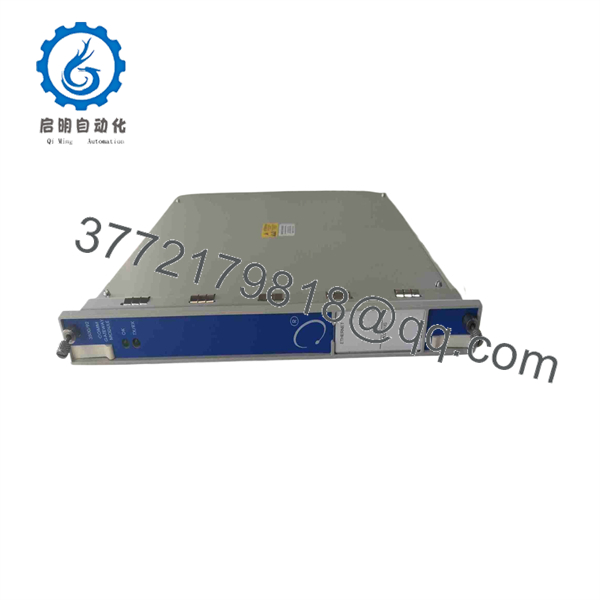
3500/92
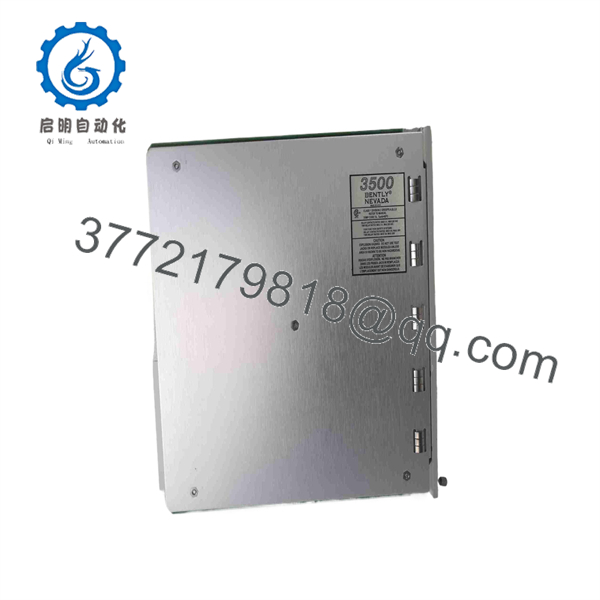
3500/92
Installation & Configuration Guide
Stage 1: Pre-Installation (Prep & Safety)
- Perform Lock-Out/Tag-Out (LOTO) on auxiliary control cabinet power feeds if required by site guidelines.
- Put on an anti-static wrist strap connected to cabinet earth ground. ESD strikes can destroy communication drivers.
- Export the Modbus register mapping memory map from the 3500 Rack Configuration Software before removing the legacy card.
- Record serial port DIP switch positions or jumper settings on the existing rear I/O module.
Stage 2: Removal
- Loosen the top and bottom captive screws on the 3500/92 front panel using a flathead screwdriver.
- Disengage the module by pulling both ejector handles outward simultaneously.
- Slide the card straight out along the chassis guide rails without twisting to protect the backplane interface pins.
- Unscrew and remove the corresponding rear I/O module (Ethernet/Serial I/O card) if replacing the full assembly.
Stage 3: Installation (Clone & Seat)
- Install the matching rear I/O module first, securing the mounting screws to 0.6 N·m (5 in-lb).
- Align the 3500/92 main card in the designated top and bottom guide rails of the rack slot.
- Slide the card in smoothly until the ejector levers contact the frame, then press both levers inward to lock the card flush.
- Reconnect the serial DB9/terminal cables or RJ45 Ethernet network patch leads to the rear I/O module.
Stage 4: Power-On & Testing
- Check cabinet auxiliary power supplies for stable voltage before powering up the 3500 rack.
- Observe the front panel LEDs: The OK LED must glow solid green, and the TX/RX LEDs should blink rapidly to indicate active data polling.
- Perform a Modbus master poll test from the DCS or a diagnostic laptop using ModScan to verify register data alignment.
- Confirm communication link integrity and status reporting in the 3500 System Monitor software.
Firmware/Software Versions & Upgrade Notes
- Recommended Firmware: Version 2.20 or higher for dual Ethernet/Serial Modbus configuration stability and enhanced register mapping.
- Software Requirement: Requires Bently Nevada 3500 Rack Configuration Software Version 4.00 or later.
- Compatibility Consideration: If replacing older 3500/90 Modbus Gateway modules, note that the 3500/92 offers significantly expanded Modbus register memory maps and faster polling response times. Ensure the DCS Modbus master polling driver matches the 3500/92 register map.
- Upgrade Warning: Never flash 3500/92 firmware while the DCS is actively relying on gateway data for operator monitoring or automated interlocks. Firmware updating halts Modbus server processing, causing communication timeout alarms on the control system. Execute firmware maintenance during planned plant outages.
Frequently Asked Questions (FAQ)
Q: Is this 3500/92 gateway card brand new or pulled from a decommissioned plant?
A: This module is 100% Brand New Surplus. It has never been deployed in an active production rack or retrieved from decommissioned equipment. It arrives in factory-sealed anti-static packaging and passes full functional QC testing on a live test rack before dispatch.
Q: Why buy New Surplus instead of refurbished or factory-direct?
A: New Surplus offers genuine OEM quality with immediate stock availability at 20% to 30% below OEM list prices, bypassing typical 12 to 16 week factory production delays. Refurbished gateway cards often suffer from latent thermal damage to transceivers and memory circuits, leading to intermittent Modbus communication drops and lost control room alarms.
Q: Can the 3500/92 module communicate via Ethernet and Serial simultaneously?
A: Yes, the 3500/92 supports simultaneous communications over both Ethernet (Modbus TCP/IP) and Serial (Modbus RTU RS232/RS422/RS485) interfaces. This allows you to stream data to a primary DCS via Ethernet while concurrently feeding a secondary PLC or historian via serial connection.
Q: Does pulling or hot-swapping the 3500/92 card cause a machine trip?
A: No. The 3500/92 is purely a communication gateway card; it does not process hardwired trip relay logic on the 3500 rack. Hot-swapping the module will interrupt Modbus data to the DCS, but it will not disrupt local vibration monitoring or hardware relay shutdowns.
Q: What quality assurance protocols do you follow before shipping?
A: Every unit goes through a comprehensive 5-step quality audit: verification of serial numbers against OEM manufacturing records, power-up testing on a live 3500 rack, Modbus communication polling verification across all ports, configuration clearing, and ESD-safe vacuum packaging inside custom foam shipping containers.
Q: What warranty is included with this gateway module?
A: We provide a 1-Year Comprehensive Replacement Warranty with this New Surplus 3500/92 module. If any operational defect occurs under normal operating conditions within 12 months, we replace the unit immediately from our dedicated safety stock.



