
 WhatsApp: +86 16626708626
 Email:
  Phone: +86 16626708626
Description
Key Technical Specifications
| Parameter | Value |
|---|---|
| Manufacturer | Bosch Rexroth Indramat |
| Model Number | DKC023-012-3-MGP-010RS |
| Product Family | DKC Drive Controllers |
| Drive Type | Servo Drive Controller |
| Rated Current | 12 A |
| DC Bus Nominal Voltage | 300 V DC |
| Firmware Type | Multi Interface General Purpose (MGP) |
| Firmware Version | 01 |
| Design Version | 3 |
| Control Voltage | 24 V DC |
| Communication Interface | Multi-interface control architecture |
| Application | Servo motors, CNC machines, industrial automation equipment |
| Installation Type | Electrical cabinet mounting |
| Protection Class | IP20 class enclosure applications |
The DKC series type code identifies the controller family, design version, rated current, DC bus voltage, and MGP firmware configuration.
Product Introduction & Supply Chain Strategy
The Bosch Rexroth Indramat DKC023-012-3-MGP-010RS is a DKC series servo drive controller used for industrial motion applications requiring controlled speed, torque, and positioning. The unit belongs to the EcoDrive motion platform and is designed for integration with Indramat servo motors and automation systems.
For plants operating legacy Indramat equipment, New Original / New Surplus DKC023-012-3-MGP-010RS inventory provides lifecycle protection without relying on uncertain replacement sources. Maintaining controlled buffer stock reduces downtime exposure, avoids emergency sourcing premiums, and improves Total Cost of Ownership (TCO) through planned spare management.
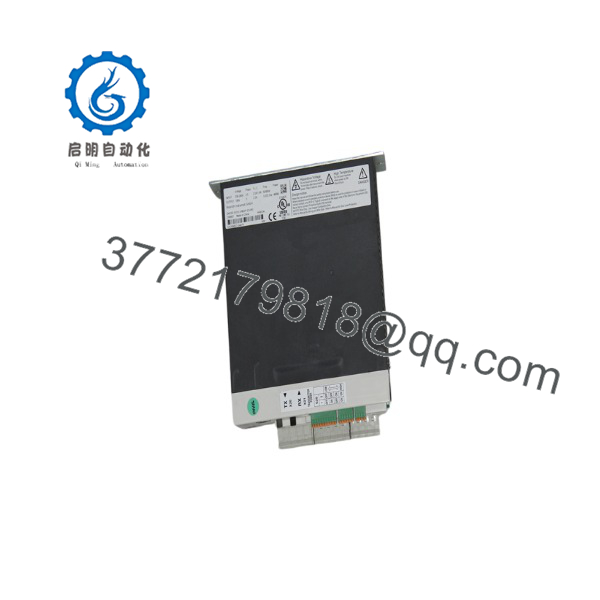
DKC023-012-3-MGP-010RS
Installation & Configuration Guide
Stage 1: Pre-Installation (Prep & Safety)
- Complete machine lock-out/tag-out procedures before accessing the drive cabinet.
- Disconnect main power and verify DC bus discharge before handling the controller.
- Wear a grounded ESD wrist strap during module handling.
- Record the existing drive configuration:
- Drive model number
- Firmware version
- Parameter settings
- Motor data
- Communication configuration
- Photograph:
- Terminal wiring
- Communication connections
- Parameter labels
- Address switches if installed
Required tools:
- ESD wrist strap
- Digital multimeter
- Insulated screwdriver set
- Rexroth commissioning software
Stage 2: Removal
- Verify the DC bus voltage has discharged to a safe level.
- Label all motor, power, and control cables.
- Disconnect terminal wiring carefully.
- Remove mounting hardware according to cabinet installation requirements.
- Extract the DKC023 module vertically to prevent connector damage.
Avoid forcing connectors. Damaged terminals can create intermittent drive faults after replacement.
Stage 3: Installation (Clone & Seat)
- Confirm the replacement unit matches:
- DKC023-012-3-MGP-010RS model
- Firmware configuration
- Current rating
- Voltage class
- Mount the replacement controller in the original cabinet position.
- Reconnect power terminals and control wiring.
- Verify motor feedback connections.
- Restore parameter settings from the previous backup.
- Confirm communication settings before enabling motion.
Stage 4: Power-On & Testing
- Check incoming power voltage before energizing.
- Verify DC bus charging behavior.
- Power on the controller.
- Check diagnostic display and status indicators.
- Confirm:
- Drive ready status
- Communication status
- Motor feedback recognition
- Fault history
- Perform controlled jog testing.
- Validate:
- Position accuracy
- Speed command response
- Safety interlocks
- Return equipment to production only after functional testing is complete.
Firmware/Software Versions & Upgrade Notes
- Recommended Firmware: Match the installed machine configuration. The MGP-01 firmware configuration should remain consistent with the original drive setup.
- Configuration Backup: Save all drive parameters before replacement.
- Compatibility Check: Confirm compatibility between DKC firmware, motor feedback type, and machine controller communication settings.
- Backward Compatibility Risk: Newer firmware revisions may require parameter conversion or controller configuration updates.
- Upgrade Warning: Avoid firmware upgrades during emergency hardware replacement unless required. Firmware changes can introduce commissioning delays and require machine validation.
Recommended documentation before replacement:
- Existing firmware identification
- Parameter file backup
- Motor identification data
- Controller communication settings
- Error history records
Frequently Asked Questions (FAQ)
Q1: Is the Bosch Rexroth Indramat DKC023-012-3-MGP-010RS a new unit?
Yes. The supplied unit is a Brand New Surplus product. It is not pulled from decommissioned equipment and not refurbished. Each unit undergoes identification verification, visual inspection, and quality checks before shipment.
Q2: Why is New Surplus pricing different from Bosch Rexroth factory supply?
New Surplus units come from global industrial inventory channels. They can provide cost advantages compared with standard OEM procurement routes while maintaining original manufacturing status.
Q3: Why should plants keep a spare?
Servo drive failures can stop entire production cells. For critical machines, maintaining 1–2 units as insurance stock reduces downtime caused by extended lead times or discontinued product availability.
Q4: Can the -012-3-MGP-010RS be installed without parameter backup?
It is not recommended. Servo drives depend on application-specific parameters including motor data, control tuning, and communication settings. Always export the existing configuration before replacement.
Q5: What is the risk of replacing this drive with a different DKC revision?
Different revisions may change firmware behavior, parameter handling, or compatibility with existing controllers. Verify the replacement model and firmware before installation.
Q6: Does the warranty cover installation-related failures?
Warranty coverage applies to the supplied hardware condition. Installation errors, incorrect wiring, parameter mistakes, or application changes are normally outside hardware warranty scope.
Q7: How should inventory be managed for long-term support?
Use lifecycle tracking, failure history, and lead time variability to establish Min/Max levels. For critical production assets, maintain buffer stock and evaluate Last-time-buy opportunities before availability becomes restricted.



