
 WhatsApp: +86 16626708626
 Email:
  Phone: +86 16626708626
Description
Key Technical Specifications
| Parameter | Value |
|---|---|
| Manufacturer | B&R Industrial Automation |
| Material Number | 5AP1130.156C-000 |
| Product Family | Automation Panel 1000 |
| Panel Model | AP1130 |
| Product Type | Industrial HMI display and multi-touch panel |
| Display Size | 15.6 in |
| Display Type | TFT color |
| Display Resolution | Full HD, 1,920 × 1,080 pixels |
| Aspect Ratio | 16:9 |
| Display Colors | 16.7 million |
| Contrast Ratio | 800:1 |
| Brightness | 40 to 450 cd/m², dimmable |
| Backlight Life | ≥50,000 h to half brightness |
| Touch Technology | Projected capacitive touch, multi-touch |
| Touch Transmittance | Approximately 88% |
| Installation Orientation | Landscape |
| Mounting Application | Control cabinet installation |
| Compatible System Units | PPC900, PPC2100, PPC3x00, PPC2200 |
| Link Module Compatibility | Supported with compatible B&R link modules |
| Front Protection Rating | IP65 per EN 60529 |
| Rear Protection Rating | IP20 with link module or system unit installed |
| UL Front Rating | Type 4X, indoor use only |
| Pollution Degree | Pollution Degree 2 per EN 61131-2 |
| Frame Material | Coated aluminum |
| Frame Color | Black |
| Gasket | Fixed 3 mm gasket |
| Width | 414 mm |
| Height | 258.5 mm |
| Weight | 3.8 kg |
| Optical Bonding | Not included; the -001 variant adds optical bonding |
B&R specifies the 5AP1130.156C-000 as a 15.6 in Full HD Automation Panel with a 1,920 × 1,080 TFT display and projected-capacitive multi-touch. It is designed for cabinet installation and supports use with B&R PPC900, PPC2100, PPC3x00, PPC2200, and compatible link modules. The -000 model is the standard version; do not confuse it with 5AP1130.156C-001, which adds optical bonding.
Product Introduction
The B&R 5AP1130.156C-000 is a 15.6 in Full HD Automation Panel 1000 HMI display for machine control, production equipment, and cabinet-mounted operator stations. It combines a 1,920 × 1,080 color TFT display with projected-capacitive multi-touch input, an aluminum front frame, and IP65 front protection. It operates as a display and touch interface with a compatible B&R PPC or link-module architecture.
This AP1130 panel is chosen when a machine requires a wide-format 16:9 operator screen, multi-touch operation, and a compact front-panel footprint. It is not a standalone PLC or complete Panel PC. The installed PPC900, PPC2100, PPC3x00, PPC2200, or link module remains critical to system startup, project storage, communications, and machine logic. Verify the exact host architecture before replacement.
Troubleshooting Quick Reference
| Symptom | Possible Cause | Relevance to This Part | Quick Check Method | Recommendation |
|---|---|---|---|---|
| Screen remains completely dark | Missing supply voltage to system unit, failed PPC, failed link module, failed display backlight | ✅ Medium | Measure the 24 V DC supply at the connected PPC or link module under load; check status LEDs and inspect display-link connections with power removed | Confirm host power and system-unit status before replacing the panel |
| Panel shows a faint image only | LED backlight degradation or brightness set near minimum | ✅ High | Shine a flashlight across the display at an angle; verify the brightness command or HMI setting from the connected system | A faint image usually indicates backlight or panel hardware; confirm the video source first |
| Panel powers up but shows no HMI project | PPC or link-module fault, missing storage media, incorrect boot configuration, broken display connection | ❌ Low to Medium | Verify the installed PPC or link module, boot media, application startup status, and cable seating | Do not replace the display until the processing unit and application deployment are verified |
| Multi-touch does not respond | Failed touch sensor, damaged front glass, touch-interface issue, software configuration fault | ✅ High | Confirm display output, test touch at multiple screen areas, inspect the glass for cracks, and test with a known-good input method if available | If all areas remain unresponsive after host checks, replace the panel or arrange professional testing |
| Touch activates the wrong location | Calibration issue, incorrect HMI scaling, damaged touch surface, electrical noise | ✅ Medium | Compare physical touch position to the displayed target across corners and center; restart the HMI and review project scaling | Check the HMI project resolution is set for 1,920 × 1,080 before condemning the hardware |
| Touch works intermittently | Moisture, contamination, grounding issue, damaged touch overlay, loose system-unit connection | ✅ Medium | Inspect the front surface and bezel for moisture; isolate power and reseat approved connections; review cabinet grounding | Correct contamination and grounding problems first; replace only after repeatable touch failure |
| Display flickers or drops out during machine motion | 24 V DC brownout, poor grounding, loose supply terminals, host-PC or link-module fault | ✅ Medium | Monitor supply voltage during motor starts, solenoid actuation, and contactor pickup; inspect terminal torque and ground bonding | Correct cabinet power quality before replacement; leave margin in the 24 V DC power budget |
| Front panel leaks dust or coolant | Damaged fixed gasket, cracked frame, uneven retaining clips, wrong panel cutout | ✅ High | Inspect the 3 mm gasket, panel cutout, clip placement, and aluminum frame for gaps or distortion | Replace the panel or gasketed assembly as needed; install evenly to maintain the IP65 front seal |
| Screen is physically intact but intermittently loses video | Loose link-module connection, failing PPC graphics path, cable strain, panel electronics fault | ✅ Medium | Power down, inspect connector retention and cable routing, then substitute a known-good compatible panel or host where available | Diagnose the host and link path before ordering; a panel swap alone may not fix video loss |
| HMI failure follows a panel replacement | Incompatible PPC or link module, incomplete firmware support, wrong display variant, incorrect project resolution | ✅ Medium | Record old hardware identifiers and firmware before removal; compare B&R Automation Studio hardware configuration with the installed assembly | Confirm compatibility and update only through an approved maintenance procedure |
This panel does not normally fail because of PLC logic, Ethernet faults, or remote I/O problems. At 3:00 AM, start by proving the host PPC or link module has stable power and is actually booting. I have seen an HMI blamed for a black screen when the real cause was a 24 V DC supply sag during a cabinet fan startup. Measure under load, not just with the machine sitting idle.
If you are stuck, provide technical support with photos of the complete nameplate, installed PPC or link module, diagnostic LEDs, panel cutout, connector arrangement, and a short video of the startup behavior.
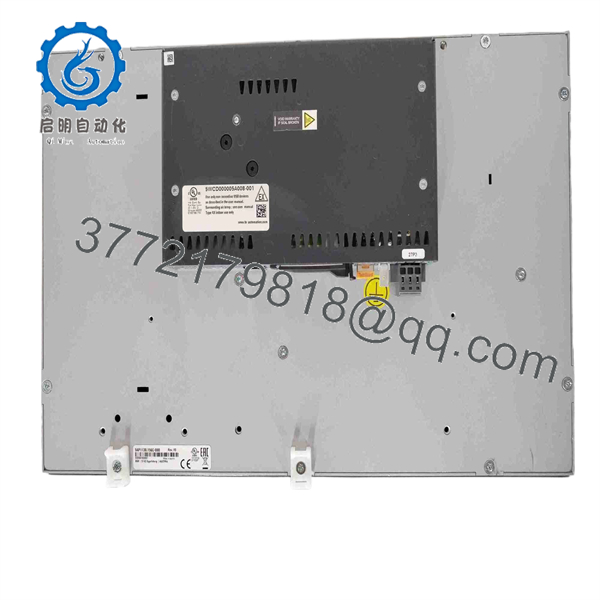
5AP1130.156C-000
Frequently Asked Questions (FAQ)
What is the B&R 5AP1130.156C-000?
The B&R 5AP1130.156C-000 is an Automation Panel 1000 display and multi-touch operator interface. It uses a 15.6 in Full HD TFT screen with a 1,920 × 1,080 resolution and projected-capacitive touch technology. It is intended for control-cabinet installation in B&R industrial computer and panel architectures.
Is the 5AP1130.156C-000 a complete Panel PC or PLC?
No. It is a display panel, not a standalone PLC or complete Panel PC. It requires a compatible B&R PPC900, PPC2100, PPC3x00, PPC2200, or link-module arrangement to provide processing, operating system, application storage, and communication functions. Do not order the display alone if the original failure involves the PPC or link module.
Can I replace 5AP1130.156C-000 with 5AP1130.156C-001?
Do not assume it is a direct replacement without checking the complete assembly and optical requirements. Both models use a 15.6 in 1,920 × 1,080 multi-touch display format, but the 5AP1130.156C-001 includes optical bonding, while the -000 version does not. Optical bonding affects display construction and may affect appearance, service expectations, and replacement approval requirements.
Can I hot-swap this Automation Panel?
No. Remove power before disconnecting the panel, PPC, or link module. These assemblies are not intended for energized removal. Hot-swapping can interrupt machine operation, damage connectors, corrupt application storage, or expose personnel to cabinet hazards. Follow site lockout/tagout procedures and wait for the host system to shut down fully.
Will I lose the HMI application if I replace the panel?
The answer depends on where the application is stored. In many installations, the project and operating system reside on the connected PPC or industrial computer rather than the display panel itself. Still, back up the Automation Studio project, document hardware identifiers and firmware, and preserve any removable storage before removal. Take pictures of every connector and card position before touching the unit. Seriously.
Why is the screen visible but multi-touch does not work?
First check for surface damage, moisture, contamination, and a software resolution mismatch. The panel uses projected-capacitive touch, so conductive contamination, a cracked front surface, incorrect grounding, or an HMI project built for a different display format can create touch problems. If the screen image is stable and touch remains dead across the entire surface after host checks, the touch subsystem may have failed.
What protection rating does this HMI provide?
The front of the 5AP1130.156C-000 is rated IP65 under EN 60529, while the rear is IP20 only when a link module or system unit is installed. B&R also lists the front as UL Type 4X for indoor use. Those ratings depend on correct mounting, an undamaged gasket, an appropriate panel cutout, and even retaining-clip pressure. The rear of the unit must remain inside a suitable control cabinet.
Why might a New Surplus unit cost less than factory supply?
New Surplus means unused inventory that may have come from a canceled machine build, plant storeroom, distributor clearance, or legacy-system spare stock. It can be less expensive because it is no longer moving through the current OEM sales channel. Ask for actual-unit photographs, B&R label and serial-number images, original packaging details, manufacturing date where available, touch-and-display test evidence, and written warranty terms before releasing a purchase order.



