
 WhatsApp: +86 16626708626
 Email:
  Phone: +86 16626708626
Description
Key Technical Specifications
| Parameter | Value |
|---|---|
| Manufacturer | B&R Industrial Automation |
| Material Number | 5AP981.1505-01 |
| Product Family | Automation Panel 900 |
| Panel Type | AP981 operator panel |
| Display Size | 15 in (381 mm) |
| Display Type | TFT color |
| Resolution | XGA 1024 × 768 pixels |
| Colors | 16.7 million |
| Contrast Ratio | 1,000:1 |
| Viewing Angle | Horizontal ±85°, Vertical ±85° |
| Touch Screen | Analog resistive |
| Touch Controller | Elo serial, 12-bit |
| Touch Transmittance | 81% ±3% |
| Backlight | LED |
| Backlight Brightness | 350 cd/m² |
| Backlight Half-Life | 70,000 h |
| USB Ports | 3 × USB 2.0 Type A |
| USB Current Capacity | 500 mA per port maximum |
| Function Keys | 20 with yellow LED |
| Soft Keys | 12 with yellow LED |
| System Keys | Alphanumeric, numeric, cursor block |
| Supply Voltage | 24 VDC ±25%, SELV |
| Maximum Current | 3.2 A |
| Typical Power Consumption | 24 W |
| Maximum Power Consumption | 32 W (42 W with USB) |
| Front Protection | IP65 / NEMA 250 Type 4X indoor |
| Rear Protection | IP20 |
| Dimensions | 435 × 430 × 54 mm |
| Weight | Approximately 5.9 kg |
| Operating Temperature | 0 to 50 °C |
| Storage Temperature | -25 to +60 °C |
| Installation Depth | 54 mm |
B&R identifies the 5AP981.1505-01 as an Automation Panel AP981 with a 15-inch XGA TFT display, analog resistive touch screen, 12 soft keys, 20 function keys, 92 system keys, three USB 2.0 interfaces, Automation Panel Link capability, and 24 VDC supply.
Product Introduction
The B&R 5AP981.1505-01 is a 15-inch Automation Panel 900 HMI designed for industrial machine operation, visualization, and control applications. It provides an XGA 1024 × 768 TFT display, resistive touchscreen, dedicated operator keys, and USB interfaces for integration with B&R automation systems.
This panel is commonly used with B&R Automation PC systems through Automation Panel Link technology or optional PPC300 insert cards. Replacement requires checking the existing communication method, Automation Studio project configuration, and installed panel options before commissioning.
Installation & Configuration Guide
Stage 1 — Pre-Installation Preparation (~10 minutes)
- Notify production personnel about the planned HMI replacement.
- Apply lockout/tagout procedures before opening the cabinet.
- Disconnect and verify the 24 VDC supply.
- Wait for stored energy discharge.
Tools Required:
- ESD wrist strap
- PH1 screwdriver
- Digital multimeter
- Wire labels
- Smartphone/camera
Data Backup:
- Save the B&R Automation Studio project.
- Back up visualization files.
- Record:
- Panel hardware revision
- Automation Panel Link type
- IP settings if applicable
- Connected USB devices
- Photograph rear connectors and cable routing.
⚠️ Do not remove the original panel before documenting the communication hardware. The display may rely on an Automation Panel Link card or PPC300 configuration.
Stage 2 — Removing the Old Panel (~10 minutes)
- Shut down the machine safely.
- Isolate 24 VDC power.
- Verify voltage absence with a multimeter.
- Label all cables.
- Disconnect:
- Power connector
- Display communication cable
- USB devices
- Optional interface cables
- Release the panel mounting hardware.
- Remove the panel carefully.
- Inspect the cabinet cutout and cable condition.
⚠️ Keep the removed unit until the replacement completes functional testing.
Stage 3 — Installing the New Panel (~10 minutes)
- Wear ESD protection.
- Verify the exact material number:
5AP981.1505-01
- Compare:
- Display size
- Key layout
- Touch type
- Rear interface arrangement
- Install the panel into the enclosure.
- Secure mounting hardware evenly.
- Connect the 24 VDC supply.
- Connect Automation Panel Link, DVI, USB, or optional interface hardware as required.
Self-Checklist:
- Correct model confirmed
- Mechanical mounting secure
- Power polarity verified
- Communication cable installed
- Grounding checked
Stage 4 — Power-On & Testing (~15 minutes)
- Verify the 24 VDC supply voltage.
- Power on the panel.
- Confirm display startup.
- Test touchscreen response.
- Verify function-key operation.
- Confirm communication with the Automation PC/controller.
- Load the visualization application.
- Test:
- Operator screens
- Alarm pages
- Machine controls
- Diagnostic displays
- Perform a controlled machine dry run.
- Record final hardware and software configuration.
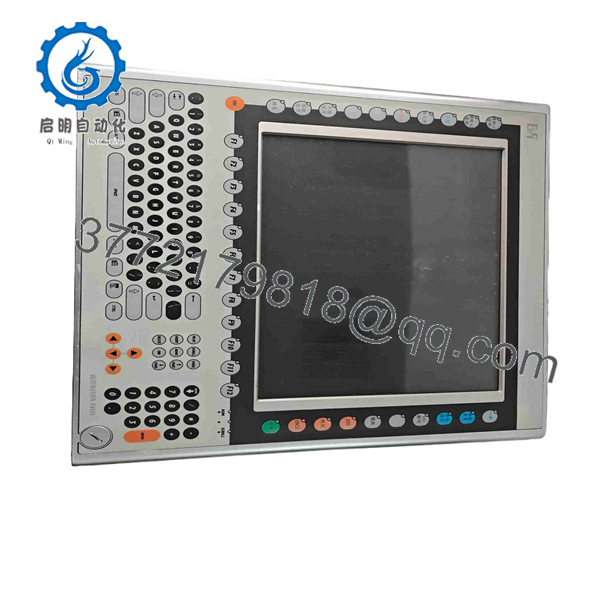
5AP981.1505-01
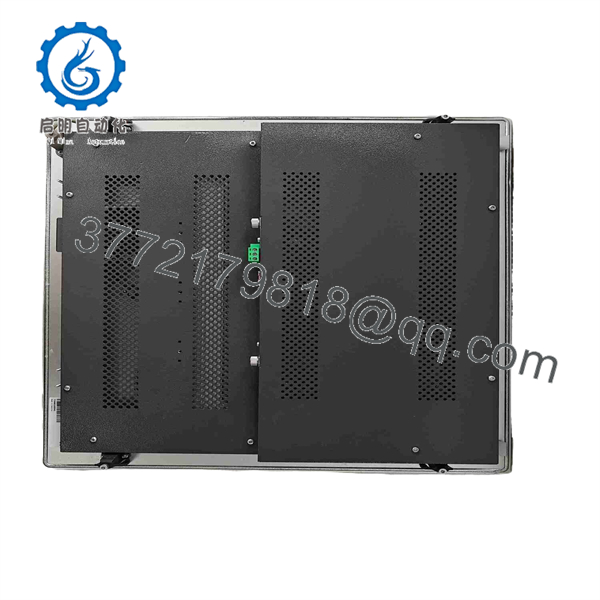
5AP981.1505-01
Technical Pitfall & Survival Guide
❗ The most common mistake is replacing the panel without checking the communication path.
The 5AP981.1505-01 can operate with different B&R system architectures. Some installations use Automation Panel Link cards, while others use PPC300 insert cards. A replacement panel that physically fits may still fail to communicate if the interface configuration does not match.
❗ Do not ignore the touch controller configuration.
This model uses an analog resistive touchscreen with an Elo serial 12-bit controller. Operating-system touch drivers and calibration settings must match the installed system.
❗ Check power capacity before installation.
The panel requires 24 VDC and can draw up to 3.2 A. Existing cabinet power supplies should have adequate reserve capacity after accounting for other connected loads.
Frequently Asked Questions (FAQ)
What is the B&R 5AP981.1505-01?
The 5AP981.1505-01 is a B&R Automation Panel AP981 industrial HMI with a 15-inch XGA TFT display, resistive touchscreen, operator keys, and USB interfaces.
Is the 5AP981.1505-01 a PLC CPU?
No. It is an HMI/operator panel. The PLC logic normally runs in a separate B&R controller or Automation PC.
What display resolution does this panel use?
It uses an XGA display with 1024 × 768 pixel resolution and supports 16.7 million colors.
Does the panel support touch operation?
Yes. It uses an analog resistive touchscreen with an Elo serial 12-bit touch controller.
Can I directly replace another B&R Automation Panel with this model?
Only after checking the complete hardware configuration. Verify the display size, communication interface, Automation Studio hardware configuration, and installed accessories before replacement.
Is the 5AP981.1505-01 obsolete?
It should be treated as a legacy industrial spare component. B&R still provides product documentation and hardware upgrade information for this material number, but lifecycle status should be confirmed for the specific project.
Why is surplus pricing lower than OEM list pricing?
Industrial HMI replacement pricing often reflects lifecycle availability. Units sold through surplus channels may be New Original / New Surplus or tested refurbished stock rather than current production inventory.
What should procurement verify before ordering?
Confirm:
- Full material number: 5AP981.1505-01
- Hardware revision
- Touchscreen condition
- Display brightness and dead pixels
- Key operation
- Rear connector condition
- Automation Panel Link or PPC300 compatibility
- Functional test report
For installed B&R systems, request identification-label photos and powered test results before installation.



