
 WhatsApp: +86 16626708626
 Email:
  Phone: +86 16626708626
Description
Key Technical Specifications
| Parameter | Value |
|---|---|
| Manufacturer | B&R Industrial Automation |
| Material Number | 5PC910.SX02-00 |
| Product Family | Automation PC 910 |
| Product Designation | APC910 2-slot system unit |
| Product Type | Configurable industrial PC system-unit chassis |
| Bus-Unit Capacity | One bus-unit slot for a 2-slot expansion bus |
| Expansion Configuration Option 1 | 2 × PCI with 5AC901.BX02-00 bus unit |
| Expansion Configuration Option 2 | 1 × PCI and 1 × PCI Express x8 with 5AC901.BX02-01 bus unit |
| Expansion Configuration Option 3 | 2 × PCI Express x4 with 5AC901.BX02-02 bus unit |
| Compact Drive Capacity | One slide-in compact-drive slot |
| Drive Capacity | One slide-in drive slot |
| Interface-Option Capacity | Two interface-option slots |
| Display Connections | Smart Display Link, DVI, monitor, and DisplayPort interfaces |
| Panel/Monitor Option | One slot for monitor or panel option |
| Mechanical Size Class | APC910 2-slot system-unit format |
| Required Configuration Items | CPU, memory, storage, bus unit, interface options, and panel/monitor option depend on ordered build |
| Product Architecture | Modular B&R industrial PC platform |
| Product Status | Legacy configuration-dependent industrial PC platform; verify the complete installed build before purchase |
B&R identifies the 5PC910.SX02-00 as the 2-slot Automation PC 910 system unit, not a fully defined industrial computer configuration. It provides a bay for one two-slot bus unit, one slide-in compact drive, one slide-in drive, two interface options, display interfaces, and a monitor/panel option. The installed bus unit determines whether the system provides two PCI slots, one PCI plus one PCI Express x8 slot, or two PCI Express x4 slots.
Product Introduction
The B&R 5PC910.SX02-00 is an Automation PC 910 two-slot system unit for modular industrial PC applications, including machine control, visualization, motion, data collection, and specialized PCI or PCIe expansion. It is the base chassis of an APC910 configuration, providing bays for a compatible expansion bus unit, slide-in storage, interface options, and monitor or panel hardware.
The key point is simple: this part number defines the system-unit chassis, not every installed component. CPU, memory, storage, operating system, expansion bus, PCI or PCIe cards, communication interfaces, and display/panel hardware can vary by machine. Match the existing configuration before ordering. A replacement chassis that looks correct can still be wrong if its bus-unit arrangement or internal options differ.
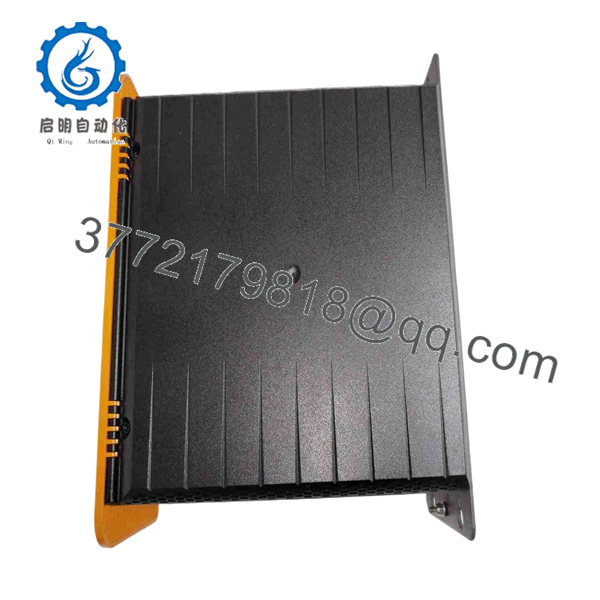
5PC910.SX02-00
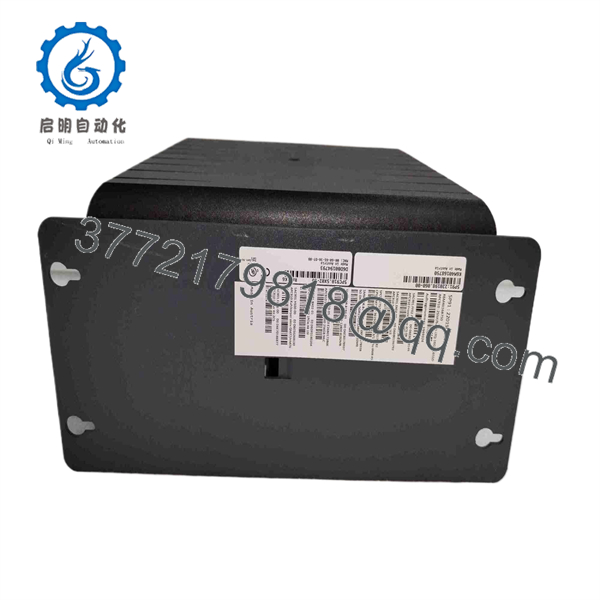
5PC910.SX02-00
Troubleshooting Quick Reference
| Symptom | Possible Cause | Relevance to This Part | Quick Check Method | Recommendation |
|---|---|---|---|---|
| APC910 has no power or no startup indication | Missing external power, blown cabinet fuse, loose input terminal, failed power subsystem | ✅ Medium | Measure the specified incoming DC supply at the system-unit input under startup load; inspect fuses, polarity, terminal torque, and protective-earth bonding | Prove stable power reaches the PC before replacing the system unit |
| System powers up but does not boot | Failed or missing boot drive, corrupted operating system, BIOS setting error, failed CPU or memory module | ✅ High | Record BIOS messages, inspect installed storage, verify boot order, and test with approved recovery media or a verified image | Back up original storage first; replace the chassis only after identifying whether the fault is in storage, CPU, memory, or the base unit |
| Expansion card is not detected | Wrong bus unit, card in the wrong slot, loose seating, BIOS setting, missing driver, failed PCI/PCIe card | ✅ High | Isolate power, wear an ESD strap, photograph the installed bus and card layout, reseat the card, then review BIOS and operating-system device lists | Confirm the installed bus unit supports the card type before replacing any hardware |
| Existing PCI card cannot be installed in replacement | Replacement has PCIe bus configuration, while the old system uses PCI | ✅ High | Check the B&R bus-unit label and card edge connector; identify whether the old configuration uses 5AC901.BX02-00, -01, or -02 | Order the correct bus-unit arrangement; PCI and PCIe cards are not mechanically interchangeable |
| No video on machine display | Loose DVI/DisplayPort/Smart Display Link cable, failed display panel, monitor option fault, graphics fault | ✅ Medium | Test the display and cable with a known-good compatible source; inspect connector retention and confirm the display interface selected by the machine build | Diagnose display hardware and cables before replacing the APC910 chassis |
| Touch panel is dark but the PC appears to run | Failed panel, link connection fault, display setting issue, panel option issue | ❌ Low to Medium | Confirm machine network activity and PC boot behavior; test with a supported external monitor where the configuration permits | The system unit may be healthy; troubleshoot the panel, Smart Display Link path, and connected display first |
| USB, serial, Ethernet, or fieldbus communication fails | Incorrect interface option, missing driver, damaged cable, network or field-device fault | ✅ Medium | Identify the installed interface option by part number; test cable and remote device, then inspect operating-system diagnostics | Do not replace the chassis until the specific interface card and field wiring have been checked |
| System freezes during production | Overtemperature, storage degradation, unstable supply, memory error, fan or airflow issue | ✅ Medium | Review event logs, monitor cabinet temperature, check supply voltage during machine events, and run approved storage or memory diagnostics | Image the storage and investigate power quality and heat before replacing the industrial PC |
| System clock resets after extended power-off periods | RTC battery depleted or configuration retention failure | ✅ Medium | Record current date, BIOS settings, and battery warnings; power down according to procedure, then check retention after a controlled interval | Follow B&R service documentation for battery replacement; preserve BIOS settings before service |
| Replacement starts but machine software will not run | Missing licenses, wrong OS image, changed network adapter identity, incorrect driver set, incompatible Automation Studio support | ❌ Low to Medium | Compare OS version, installed drivers, IP settings, license files, hardware IDs, and Automation Studio project requirements with the original system | Create a complete pre-swap backup; restore the approved machine image and configuration rather than building the system from scratch |
| Cabinet protection is compromised after replacement | Incorrect panel option, missing covers, damaged seals, incomplete cable routing | ✅ Medium | Inspect all unused openings, cable glands, cover plates, grounding straps, and mounting hardware | Restore all covers and verify cabinet ingress protection before returning the machine to service |
❗ Bus-unit warning: The 5PC910.SX02-00 is only the two-slot APC910 system unit. The expansion layout comes from the installed 5AC901.BX02 bus unit: BX02-00 provides two PCI slots, BX02-01 provides one PCI and one PCI Express x8 slot, and BX02-02 provides two PCI Express x4 slots. Do not order from the chassis part number alone.
❗ Migration warning: Take a complete photo record before removal: chassis label, bus-unit label, CPU, memory, storage, interface options, expansion cards, slot positions, display interfaces, cables, and BIOS screens. I have seen a service team move a PCI card into what looked like the same chassis, only to discover the replacement used a PCIe bus unit. The connectors are different, the machine remains down, and now the troubleshooting clock starts over.
If you are stuck, send technical support the full B&R nameplate information, installed 5AC901 bus-unit label, photos of every expansion card and slot, boot-screen photos, BIOS messages, storage labels, and the machine’s current operating-system or Automation Studio version.
Frequently Asked Questions (FAQ)
What is the B&R 5PC910.SX02-00?
The B&R 5PC910.SX02-00 is a two-slot Automation PC 910 system unit. It is the modular base chassis for an industrial PC configuration, with provisions for an expansion bus unit, slide-in compact drive, slide-in drive, two interface options, display connections, and a monitor or panel option.
Is 5PC910. a complete, ready-to-run industrial PC?
Not by itself. This material number identifies the two-slot system unit, but the installed CPU, memory, storage, operating system, bus unit, PCI or PCIe cards, interface options, and display hardware depend on the machine build. Ask for photographs and complete labels of all installed components if you need an exact replacement.
Which PCI or PCIe options can this use?
The installed B&R bus unit determines the expansion configuration. B&R lists three compatible two-slot bus-unit options: 5AC901.BX02-00 for two PCI slots, 5AC901.BX02-01 for one PCI plus one PCI Express x8 slot, and 5AC901.BX02-02 for two PCI Express x4 slots. You must match your existing expansion-card type and bus-unit configuration.
Can I use any 5PC910. as a direct replacement?
No. The enclosure part number may match while the internal build differs. Before purchase, verify the bus unit, processor, RAM, storage type and image, installed interface cards, expansion cards, monitor or panel option, operating system, BIOS configuration, network settings, and machine software requirements. Treat it as a configured industrial PC assembly, not a bare interchangeable PLC module.
Can I hot-swap the system unit?
No. Shut down the application properly, isolate the incoming power, and apply site lockout/tagout procedures before removal. Do not remove expansion cards, slide-in drives, storage, panel connections, or bus units while energized. An uncontrolled shutdown can corrupt storage, damage connectors, and interrupt a machine sequence.
Will I lose the machine program if I replace the chassis?
You can, especially if the machine application and operating system reside on the installed slide-in drive or compact drive. Make a verified disk image before removal where site policy allows. Also preserve Automation Studio projects, license files, BIOS settings, IP addresses, device drivers, PLC communication settings, and card positions. The replacement chassis does not recreate the original software environment.
Why is the replacement not recognizing my existing PCI card?
First check the bus unit. A PCI card requires a PCI slot; it cannot be installed in a PCI Express slot. The 5PC910. can use multiple bus-unit configurations, so visual similarity is not enough. Next, confirm card seating, slot order, BIOS settings, operating-system drivers, and the card’s compatibility with the installed OS. The most common mistake is assuming every two-slot uses the same expansion bus.
Why might a New Surplus system unit cost less than a factory-configured unit?
New Surplus inventory may originate from an unused project build, canceled equipment order, distributor overstock, or a plant spare-parts store. It can cost less because it is not being sold as a current factory-configured system. Ask whether it is an empty system unit or a populated assembly; request photographs of all internal labels, expansion slots, installed bus unit, storage bays, accessories, packaging, and a written functional-test and warranty statement.
What needs to be checked before ordering?
Record the full B&R part number and hardware revision, then photograph every installed component. Confirm the bus-unit model, PCI versus PCIe card type, CPU, memory, storage media, interface-option cards, display connection type, operating system, and application software version. Also check cabinet dimensions, mounting arrangement, power input, grounding, and cooling clearances. Keep these checks in mind and you will save yourself most of the typical rework time.



