
 WhatsApp: +86 16626708626
 Email:
  Phone: +86 16626708626
Description
Key Technical Specifications
| Parameter | Value |
|---|---|
| Manufacturer | Caterpillar |
| Part Number | 164-8940 |
| Product Description | Electronic Communication Module Control |
| Product Category | Electronic Control / Communication Module |
| Material | Alloy aluminum |
| Primary Function | Controls and communicates with machine electronic systems |
| Controlled Systems | Engine, transmission, hydraulics, and electrical systems |
| Machine Interfaces | Display, gauges, switches, and other electronic devices |
| Compatible Equipment | Generator sets, industrial engines, marine engines, locomotives, gas engines, and related Cat equipment |
| Listed Cat Reman Alternative | 10R-4874 |
| Compatibility Verification | Cat equipment configuration and serial-number verification required |
| Installation Requirement | Follow the applicable Cat service documentation for the specific machine |
Caterpillar identifies 164-8940 as an Electronic Communication Module Control. The manufacturer’s catalog lists alloy aluminum as the material and identifies applications across several engine, generator, marine, industrial, locomotive, and power-module configurations.
The Cat Parts Store also lists 10R-4874 as a Cat Reman communication-system module associated with 164-8940. This should be treated as an alternate/remanufactured option rather than assuming that every machine can accept it without configuration verification.
Product Introduction
The Caterpillar 164-8940 is an Electronic Communication Module Control used in Cat electronic systems to control and exchange information with machine devices. Cat lists the part for applications including generator sets, industrial engines, marine equipment, locomotives, gas engines, and the PP3516 power module.
The module interfaces with machine electronics such as displays, gauges, switches, and other control devices. Compatibility is configuration-dependent, so the equipment serial number and existing module identification should be checked before ordering or installation. Caterpillar specifically cautions that configuration changes can affect part fitment.
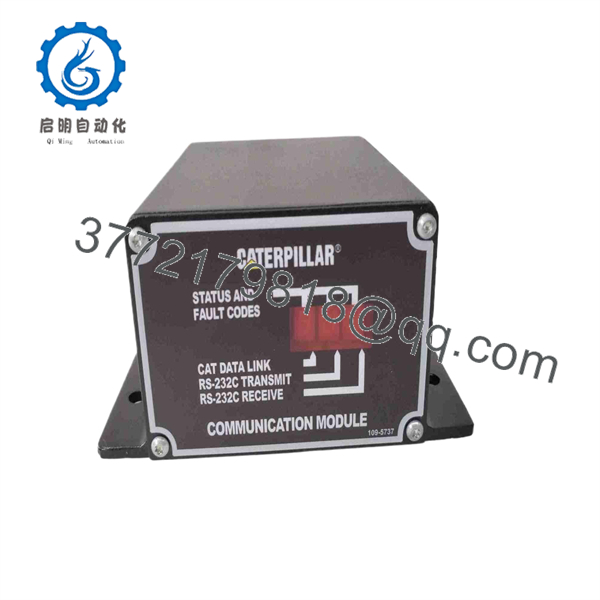
164-8940
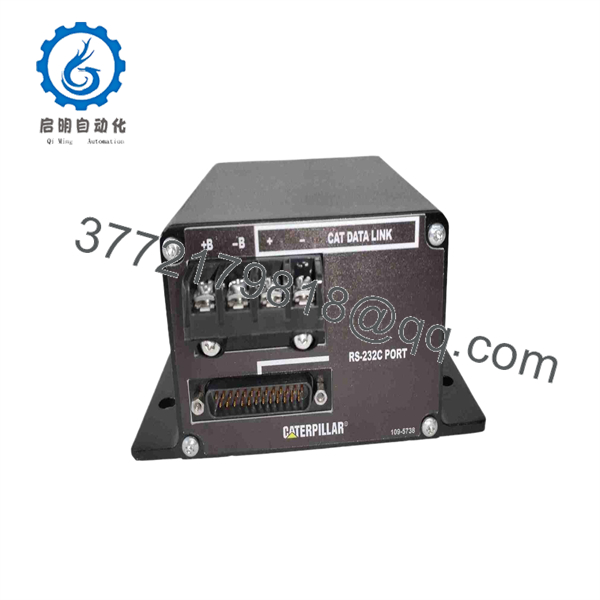
164-8940
Installation & Configuration Guide
Estimated replacement time: 30–60 minutes when the replacement part, machine documentation, and configuration data are already available.
Stage 1: Pre-Installation Preparation
⚠️ Safety First
- Notify operations and establish the required maintenance window.
- Place the machine in a safe state according to the applicable Cat service procedure.
- Apply lockout/tagout before disconnecting the module.
- Isolate electrical power according to the machine-specific service manual.
- Wait for the manufacturer’s specified discharge period before touching electrical connections. Do not assume five minutes is sufficient for every Cat installation.
Tools Required
- ESD wrist strap
- Appropriate Phillips/flat-blade screwdrivers
- Digital multimeter
- Wire labels
- Camera or smartphone for configuration photographs
- Appropriate terminal tools
- Cat service documentation for the specific machine
Data Backup
Before removing the existing 164-8940:
- Record the complete part number and any additional identification markings.
- Photograph the module from several angles.
- Photograph every connector and wire position.
- Record connector identification and harness routing.
- Record machine and engine serial numbers.
- Save applicable electronic configuration information using the approved Cat service tool and procedure.
- Do not rely on memory for connector positions or configuration settings.
The Cat Parts Store recommends checking the actual equipment configuration before purchase because changes to the manufacturer’s configuration can affect fitment.
Stage 2: Removing the Old Module
- Confirm power isolation with a multimeter using the machine-specific electrical test points.
- Remove the applicable cover, bezel, or protective hardware.
- Photograph connector locations before disconnecting anything.
- Label connectors if the harness identification is not already unambiguous.
- Disconnect the wiring without pulling on individual conductors.
- Release the applicable mounting hardware or locking mechanism.
- Remove the module carefully.
- Inspect connectors for corrosion, pushed-back terminals, contamination, or damaged locking features.
- Inspect the mating electrical interface for bent pins or physical damage.
⚠️ Keep the original module until commissioning is complete. It remains your best physical reference if a connector, configuration setting, or identification mark becomes questionable.
Stage 3: Installing the New Module
- Put on the ESD wrist strap and establish a suitable grounded work surface.
- Verify that the replacement is exactly Caterpillar 164-8940 before installation.
- Compare connector locations and physical interfaces with the removed module.
- Compare identification markings, labels, and revision information.
- Install the module using the original mounting arrangement.
- Reconnect each harness according to the photographs and machine wiring documentation.
- Confirm every connector is fully seated and mechanically locked.
- Check that no wire is pinched by the housing or mounting hardware.
- Restore any shields, grounds, brackets, or protective covers that were removed.
Self-Checklist
- Part number verified
- Connector positions verified
- Harnesses fully seated
- Connector locks engaged
- Grounds/shields restored
- Mounting hardware secured
- Original module retained for reference
Do not assume that installing the physical module completes the replacement. Electronic configuration, programming, or machine-specific initialization may still be required.
Stage 4: Power-On & Testing
- Perform a final visual inspection before energizing the system.
- Verify that the electrical supply matches the machine documentation.
- Do not apply an arbitrary test voltage to the module.
- Energize the machine according to the approved Cat service procedure.
- Observe module and machine indicators during startup.
- Connect the appropriate Cat diagnostic/service equipment.
- Verify that the replacement module communicates correctly with the machine’s electronic network.
- Check for active and logged diagnostic codes.
- Confirm communication with the applicable engine, transmission, display, gauge, hydraulic, and electrical control systems.
- Perform the required machine-specific functional tests.
- Clear only diagnostic codes that have been investigated and resolved.
- Record the installed part number and configuration information in the maintenance record.
⚠️ Commissioning Warning
Do not assume that a communication fault automatically means the replacement module is defective. Check power, grounds, connector seating, network wiring, machine configuration, and diagnostic codes first.
For a Cat electronic control replacement, the correct diagnostic procedure depends heavily on the machine and engine configuration. Caterpillar’s own catalog warns that equipment configuration changes can affect whether a part fits the equipment as currently configured.
Frequently Asked Questions (FAQ)
1. What is Caterpillar 164-8940?
Caterpillar 164-8940 is an Electronic Communication Module Control. Cat describes it as a control used within the machine’s electronic systems and for communication with devices such as displays, gauges, and switches.
2. What Cat equipment uses 164-8940?
Cat lists 164-8940 across a broad range of applications, including generator-set engines, industrial engines, marine engines, locomotives, gas engines, generator sets, the SR4 generator, and the PP3516 power module. Listed engine families include 3508B, 3512B, 3516B, 3512C, G3406, G3408, G3412, G3512, and others.
That list does not mean the module is interchangeable across every machine using those engine families. Verify the equipment serial number and configuration before purchasing.
3. Is Caterpillar 164-8940 obsolete?
The current Cat Parts Store still has a product listing for 164-8940, so it should not be described as universally obsolete based solely on age. However, actual availability can vary by Cat dealer, region, and equipment configuration. Cat also lists 10R-4874 as a Reman alternative.
4. Is 10R-4874 a direct replacement for 164-8940?
Cat lists 10R-4874 as a Cat Reman communication-system module in association with 164-8940. However, I would not order it solely because the numbers appear together in the catalog. Confirm the equipment serial number and applicable Cat parts information for the specific installation.
5. Can I hot-swap the 164-8940?
Do not assume it is hot-swappable. The safe approach is to isolate the machine’s electrical power according to the applicable Cat service procedure before removing the control module.
Whether a particular machine architecture permits powered module replacement is a machine-specific engineering question. If the service documentation does not explicitly authorize hot replacement, power down and isolate first.
6. Will I lose machine programming when I remove the old module?
Do not assume that configuration or programming will automatically transfer to the replacement module. Before removal, document the existing module identification and preserve applicable configuration information using the approved Cat diagnostic/service procedure.
A replacement control may require machine-specific programming, configuration, or initialization after installation. The exact requirement depends on the equipment architecture.
7. How can I verify that a 164-8940 is genuinely suitable for my machine?
The most reliable approach is to provide the machine model, machine serial number, engine model, engine serial number, and the identification information from the existing module. Compare those details against Cat’s current parts information before installation.
Also verify the physical connector arrangement and any applicable revision information. A physically similar control is not automatically an electrically or functionally equivalent replacement.
8. What condition should I expect when purchasing 164-8940?
Condition must be stated by the supplier rather than inferred from the part number. Confirm whether the offered unit is Factory Sealed, New Original/New Surplus, or Refurbished/Tested.
For a refurbished unit, request the actual test procedure and test report. For surplus stock, ask for clear photographs of the labels, connectors, housing, and serial/identification markings. Do not accept “new” without clarification of whether the part is factory-sealed or unused surplus.
9. Why might a surplus 164-8940 cost less than a Cat dealer quote?
Pricing can differ because of inventory source, age, packaging condition, dealer pricing, regional availability, warranty terms, and whether the unit is new, surplus, or remanufactured. Cat itself identifies 10R-4874 as a Reman alternative, so a lower-priced offer should not automatically be treated as equivalent to a factory-new 164-8940.
For procurement, compare part number, condition, traceability, warranty, test evidence, and return terms rather than comparing unit price alone.



