
 WhatsApp: +86 16626708626
 Email:
  Phone: +86 16626708626
Description
Key Technical Specifications
- Parameter: Model Number: 97590-8 / BD-PCI4PORT
- Parameter: Manufacturer / Product Family: Comtrol RocketPort; often resold or cataloged under GE industrial-spares references
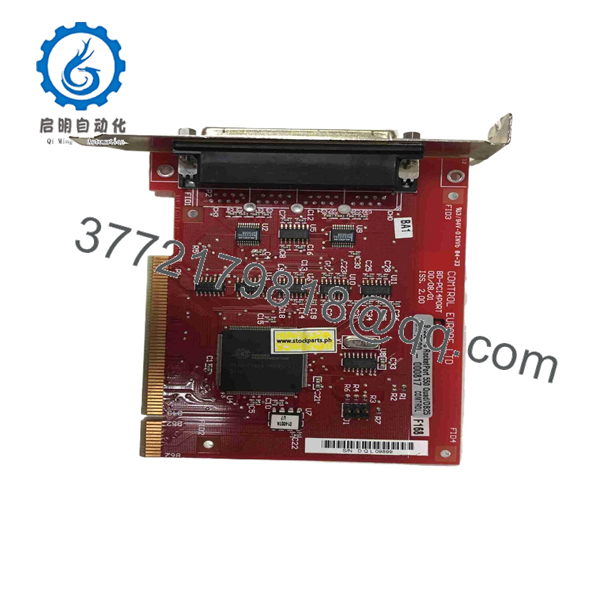
- Parameter: Product Type: PCI multiport serial communication adapter
- Parameter: Host Interface: Conventional 32-bit PCI bus
- Parameter: Serial Port Count: Four independent serial channels
- Parameter: Serial Electrical Standards: RS-232; verify whether the specific card and breakout assembly support RS-422 or RS-485 operation
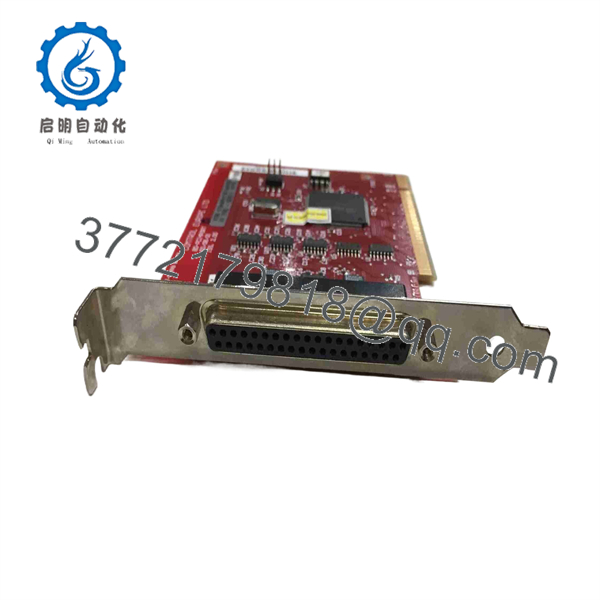
- Parameter: External Connection: Multiport breakout interface; verify whether the supplied assembly uses DB-25, DB-37, DB-9 fan-out, or another connector arrangement
- Parameter: Intended Host: Legacy industrial PC, HMI workstation, SCADA node, server, or embedded computer with an available conventional PCI slot
- Parameter: Typical Connected Devices: PLCs, drives, RTUs, barcode readers, scales, analyzers, printers, and serial instruments
- Parameter: Power Source: PCI backplane power; no separate field power supply should be assumed for the card itself
- Parameter: Operating System Dependency: Requires the correct Comtrol/RocketPort driver compatible with the installed operating system
- Parameter: Hardware Compatibility Warning: Not directly compatible with PCI Express-only motherboards without a true PCI slot or an engineered PCI expansion solution
- Parameter: Service Status: Legacy/obsolete conventional PCI hardware; confirm card label, port-interface hardware, and driver support before ordering
Public listings consistently identify 97590-8 / BD-PCI4PORT as a four-port PCI serial communications card. However, several reseller pages conflict on the original manufacturer, maximum baud rate, connector type, isolation rating, and whether RS-422/485 capability is native or configuration-dependent. Treat the card label, breakout assembly, existing driver package, and system documentation as the controlling evidence before purchase or installation.
Product Introduction
The 97590-8 BD-PCI4PORT is a legacy four-port PCI serial communications card used in industrial PCs, HMI stations, SCADA servers, and control-system workstations. It provides four independent serial channels for equipment that still communicates through serial interfaces, including PLCs, variable-frequency drives, RTUs, barcode readers, weighing systems, and process instruments.
This card is normally purchased as a like-for-like spare when a critical workstation requires a conventional PCI expansion card and existing application software depends on established COM-port assignments. The key compatibility issue is not just the 97590-8 number: confirm the physical PCI slot, breakout cable, port standard, driver version, and Windows or Linux support before scheduling a replacement.
97590-8
97590-8
Troubleshooting Quick Reference
| Symptom | Possible Cause | Relevance to This Part | Quick Check Method | Recommendation |
|---|---|---|---|---|
| Card does not appear in Device Manager | Card not seated, failed PCI slot, incompatible motherboard, missing driver | ✅ High | Shut down the computer. Reseat the card, inspect the PCI edge connector, then boot and check BIOS/Device Manager for unknown hardware. | Test the card in a known-good conventional PCI slot before replacing it. Do not confuse PCI with PCIe; they are not mechanically interchangeable. |
| Windows shows a yellow warning icon | Missing, incorrect, unsigned, or incompatible RocketPort driver | ✅ High | Record the operating-system version, driver version, hardware ID, and Device Manager error code. Compare them with the installed driver media. | Install the matching legacy driver. Do not install an unverified generic serial-card driver on a production HMI. |
| One serial port does not communicate | Wrong COM-port assignment, damaged breakout cable, incorrect baud/parity/stop bits, failed field device | ✅ Medium | Use Device Manager to identify the COM port. Compare baud rate, parity, data bits, stop bits, and flow control with the device manual. Swap only the field cable with a known-good cable. | Confirm configuration and cabling before declaring a card-port failure. |
| All four ports are offline | Breakout interface disconnected, card driver failure, host PCI fault, application service stopped | ✅ High | Verify the breakout connector is fully latched. Check Device Manager, Windows Event Viewer, and the HMI/SCADA service status. | If the host recognizes the card but all ports fail, test with a serial loopback or known-good external device before replacement. |
| Data is garbled or intermittent | Incorrect baud rate, parity mismatch, RS-232 cable length/noise, poor shield termination, ground potential issue | ✅ Medium | Compare both endpoints’ serial settings. Check cable continuity and shield practice. Use an RS-232/RS-485 analyzer if available. | Correct the serial settings and field wiring first. A good card cannot compensate for mismatched serial framing. |
| Communication works until the PC reboots | COM numbering changed, application points to old port number, driver startup problem | ✅ Medium | Record assigned COM numbers before replacement. After reboot, verify the application is using the same port assignments. | Preserve COM-port mapping during replacement. Legacy SCADA applications often hard-code port numbers. |
| Serial connection fails after replacing the workstation | New PC has PCIe only, no conventional PCI slot, driver incompatible with current operating system | ❌ Low | Inspect the motherboard for an actual PCI slot and confirm the operating system. Check whether the old card physically fits the new host. | Use a validated industrial PC with a true PCI slot or an approved PCI expansion chassis. Do not force a PCI card into a PCIe migration plan without driver testing. |
| One device locks up when connected | DTE/DCE mismatch, missing null-modem crossover, incorrect hardware flow control, external equipment fault | ❌ Low | Compare pinout and cable type against the device manual. Test with a known-good null-modem or straight-through cable as required. | Correct the cable and handshake configuration before replacing the interface card. |
❗ PCI and PCIe are not the same. This is the first replacement trap. The 97590-8 BD-PCI4PORT is associated with conventional PCI hardware. A modern workstation may only have PCIe slots, and the card will not physically install. Verify the motherboard before buying anything.
❗ Record every COM-port number before removing the old card. I have seen a working replacement card create a full HMI communications outage because the new driver assigned COM9–COM12 while the application still expected COM3–COM6. The hardware was fine; the port mapping was wrong.
❗ Check the breakout cable before condemning the board. These cards often depend on a proprietary or high-density breakout assembly. A damaged fan-out cable, bent connector pin, or loose latching screw can disable several ports at once.
❗ Do not guess RS-232 versus RS-422/485. The external device, cable type, termination, and signal standard must match. Wire from the pinout and device documentation, not from memory.
If you are stuck, provide technical support with photos of the card label, PCI connector, breakout assembly, computer motherboard slot, Device Manager screen, driver version, COM-port assignments, and communications error logs. Keep these checks in mind and you will save yourself 90% of typical rework time.
Frequently Asked Questions (FAQ)
Is 97590-8 the same as BD-PCI4PORT?
The part is commonly referenced as 97590-8 BD-PCI4PORT. Public reseller sources identify it as a four-port PCI serial communications card and associate it with the Comtrol RocketPort product family, although some catalogs label it under GE industrial spare-part references. For procurement, match the actual board label, full assembly number, port breakout hardware, and driver package—not just one search result.
Is this card compatible with a modern PCIe computer?
Usually no, not directly. The 97590-8 BD- uses a conventional PCI interface, while most current industrial computers use PCI Express. The slots are physically and electrically different. Use a legacy-compatible PC with a true PCI slot, or validate a PCI expansion chassis and driver combination in a non-production environment before commissioning.
Does the card provide four RS-232 ports?
It is widely described as a four-port serial communications adapter. However, do not assume the exact field interface without checking the physical card and breakout cable. Reseller documentation differs on whether the card uses DB-25, DB-37, or fan-out connections and whether RS-422/485 support is native or configuration-dependent. Confirm the required serial standard from the installed equipment and card documentation first.
Can I replace it with any generic four-port PCI serial card?
Not safely if the HMI, SCADA workstation, or control application depends on the existing driver, COM-port numbering, interrupt behavior, connector pinout, or protocol timing. A generic card may work electrically but fail at the software level. In a production control system, use an exact matching spare whenever possible; otherwise, perform a controlled compatibility test with the actual application and field equipment.
Will I lose the PLC or SCADA program when I replace the card?
The card normally does not store the PLC logic or SCADA project. Those files reside on the PLC, engineering workstation, server, or application storage. But replacement can still interrupt communications if port settings, COM-port assignments, driver settings, or application service configuration change. Back up the workstation configuration and record all serial parameters before the swap.
Why does a replacement card install correctly but still not communicate?
The common causes are wrong driver, wrong COM assignment, missing breakout cable, incorrect serial settings, cable type mismatch, disabled application service, or a field-device problem. Start with Device Manager, verify the assigned COM ports, compare baud/parity/data/stop-bit settings at both ends, and test each port with a known-good device or serial loopback. The card should be the last suspect, not the first.
Is this part obsolete, and should I stock a spare?
Yes, treat it as legacy conventional PCI hardware with limited availability. If the installed HMI, SCADA, or industrial PC cannot be migrated immediately, retain at least one verified spare card and its matching breakout cable. Also archive the approved driver, installation files, COM-port mapping, and workstation image. The spare is not useful at 3:00 AM if the driver media and configuration record are missing.
Why is New Surplus inventory cheaper than a current OEM replacement?
New Surplus inventory often comes from canceled projects, unused maintenance stock, warehouse liquidation, or discontinued industrial-PC inventory. That can reduce cost, but it raises verification requirements. Request high-resolution photos of both sides of the card, the full label, the PCI edge connector, breakout interface, included cable assembly, packaging condition, test procedure, warranty, and return terms before issuing a purchase order.



