
 WhatsApp: +86 16626708626
 Email:
  Phone: +86 16626708626
Description
Key Technical Specifications
| Parameter | Specification |
|---|---|
| Manufacturer | Contec |
| Model | BUS-PCI(PCI) |
| Part Number | 7102A |
| Product Type | PCI Bus Interface / Adapter Board |
| Bus Type | PCI |
| Host Interface | PCI expansion slot |
| Application | Industrial PC / data-acquisition systems |
| Board Type | Plug-in PCI card |
| Weight | Approx. 5 lb shipping weight reported by one reseller; not an OEM board weight |
| Condition | New / Used / Refurbished — verify before purchase |
| Availability | Legacy/secondary-market inventory |
| Compatibility | Verify motherboard, PCI slot, OS, and driver requirements |
A Contec-specific listing explicitly gives Bus-PCI(PCI) as the product name and 7102A as the part number.
Another industrial automation supplier lists “CONTEC BUS-PCI(PCI) NO.7102A BOARD”, further confirming the exact model/part-number combination.
Technical caution: Public sources do not provide enough reliable OEM documentation to establish detailed electrical specifications, PCI revision, supported operating systems, driver versions, or exact I/O functionality for the 7102A. Those values should not be inferred from similarly named Contec PCI products.
Product Introduction
The Contec BUS-PCI(PCI) 7102A is a legacy PCI interface/adapter board associated with Contec industrial computer and data-acquisition equipment. The exact identification is consistently listed as BUS-PCI(PCI), Part Number 7102A.
For replacement work, the most important checks are the complete 7102A part number, host computer architecture, available PCI slot, operating-system environment, and installed Contec driver/application. Do not substitute a visually similar PCI board without confirming the original system configuration.
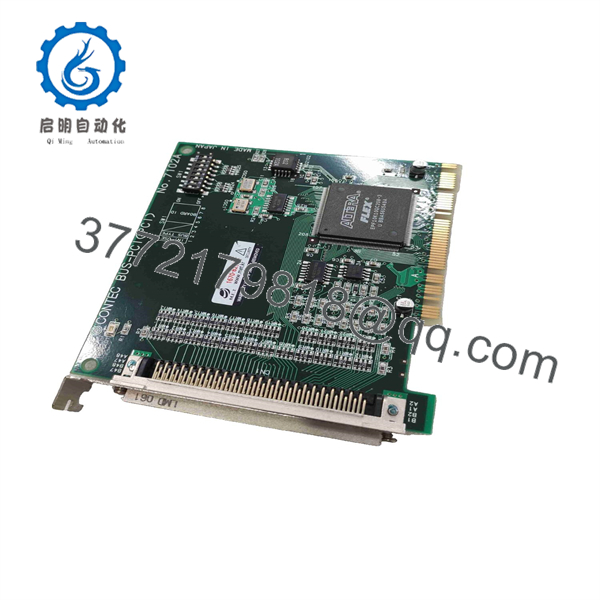
BUS-PCI 7102A
Installation & Configuration Guide
Stage 1 — Pre-Installation
- Record the complete board marking: BUS-PCI(PCI) / 7102A.
- Record the industrial PC model and motherboard.
- Photograph the existing card, connectors, jumpers, and slot position.
- Back up the host PC configuration and application software.
- Record the installed driver version before removing the original board.
- Verify that the host system provides the required PCI, not PCI Express, expansion slot.
⚠️ Do not assume PCI and PCIe are interchangeable. The 7102A is identified as a PCI board.
Stage 2 — Removal
- Shut down the industrial computer through the approved procedure.
- Disconnect AC power and wait for the system power supply to discharge.
- Apply ESD protection.
- Remove the chassis cover.
- Record the original slot position.
- Remove the retaining screw.
- Pull the board straight out without twisting the PCI connector.
Stage 3 — Installation and Driver Configuration
- Inspect the replacement board for damaged edge contacts or components.
- Confirm 7102A against the original hardware identification.
- Insert the board into the same PCI slot where practical.
- Secure the card mechanically.
- Reinstall the chassis cover.
- Restore power and boot the industrial PC.
- Check whether the operating system detects the PCI hardware.
- Install or restore the appropriate Contec driver/application from the approved system backup.
- Confirm the device appears without a hardware-resource conflict.
Stage 4 — Functional Testing
- Verify the PCI device is recognized correctly.
- Launch the installed industrial-control or data-acquisition application.
- Confirm communication with the associated Contec hardware.
- Check application diagnostics and event logs.
- Run a controlled acquisition/interface test.
- Compare readings or system behavior against the pre-replacement baseline.
- Record the replacement board’s serial number and driver configuration.
Estimated replacement time: approximately 30–90 minutes for a straightforward board swap, excluding driver troubleshooting.
⚠️ Critical: If the replacement board is not recognized, check BIOS PCI configuration, IRQ/resource allocation, driver compatibility, operating-system support, and the physical PCI slot before assuming the board is defective.
FAQ
What is Contec BUS-PCI 7102A?
It is a Contec BUS-PCI(PCI) board identified by Part Number 7102A. Available listings classify it as a PCI adapter/interface board, with some secondary-market sources describing it as a data-acquisition card.
Is 7102A a PCI or PCI Express board?
Available records identify it as BUS-PCI(PCI), so it should be treated as a conventional PCI board rather than PCI Express. Confirm the physical connector and host computer before installation.
Is BUS-PCI 7102A a current-production product?
The available evidence is primarily from secondary-market and legacy industrial-equipment sources. It should therefore be treated as legacy hardware unless current Contec documentation confirms otherwise.
Can I replace 7102A with another Contec PCI card?
Not automatically. Contec produced many PCI boards with different electrical interfaces, drivers, and application functions. Match the complete part number and system configuration rather than selecting a replacement solely by connector type.
What should I check before purchasing?
Confirm:
- Complete marking: BUS-PCI(PCI) 7102A
- Host motherboard and PCI slot
- Operating system
- Existing Contec driver
- Application software
- Board revision
- Connector configuration
- Required functionality
Is a used 7102A acceptable for legacy equipment?
It can be considered when an original replacement is required, but the seller should provide clear photographs of the board markings and connector area and confirm that the card has been functionally tested.
What condition should be specified?
Specify New Original, New Surplus, or Refurbished/Tested. For refurbished equipment, request the test procedure and confirm that the exact 7102A board—not a visually similar Contec PCI card—is being supplied.
Verify precise compatibility with the Contec documentation, host PC motherboard, operating system, and installed driver before installation.



