
 WhatsApp: +86 16626708626
 Email:
  Phone: +86 16626708626
Description
Key Technical Specifications
| Parameter | Value |
|---|---|
| ARCNET Controller | COM20022 chip — command chaining, sequential internal RAM access, duplicate node ID detection |
| Voltage Compatibility | Universal — operates in both +3.3V and +5V PCI slots; drop-in replacement for the original +5V-only PCI20 |
| PCI-X Behavior | Functions on PCI-X buses at the fixed 33 MHz conventional PCI clock; restricts other devices on that bus segment to conventional PCI protocol while installed |
| Network Topology | Coaxial bus configuration (-CXB variant) |
| Data Rate (this variant) | 2.5 Mbps — note that -CXB/-CXS/-TB5 models are fixed at 2.5 Mbps; the higher 5/10 Mbps rates apply only to the -485/-485X/-4000 EIA-485 variants in this series |
| Node Addressing | 8-position general-purpose DIP switch; node address is ultimately set via software, with the switch available for user-defined functions |
| Diagnostics | Two onboard LEDs — network operation and PCI bus access |
| I/O Mapping | Requires 16 bytes of I/O space for the COM20022 controller |
| Interrupt | Supports PCI INTA |
| Dimensions | 2.50 in x 4.72 in (64 mm x 120 mm), low-profile PCI card; standard and half-height brackets included |
| Shipping Weight | 1 lb (0.45 kg) |
| Operating Temperature | 0°C to +60°C |
| Storage Temperature | -40°C to +85°C |
| Power Draw | 400 mA @ +5V, 30 mA @ +3.3V, 20 mA on the I/O rail (per Contemporary Controls’ published power table for this series) |
| Regulatory | CE Mark; CFR 47 Part 15 Class A |
| OS/Driver Support | NDIS or null-stack driver, Windows environments |
Product Introduction
The PCI20U-CXB is Contemporary Controls’ universal-voltage ARCNET network interface module, built around the COM20022 controller chip specifically to solve a hardware transition problem: when the PCI standard moved to +3.3V-only slots on newer motherboards, the original +5V-only PCI20 could no longer be counted on to fit every system. The PCI20U line was designed as a direct drop-in replacement that works in both +3.3V and +5V PCI slots without any user-side migration work, and it remains functional even on PCI-X capable buses, running at the conventional 33 MHz clock.
The -CXB configuration specifically supports coaxial bus topology, which is the common configuration in GE Mark V Speedtronic turbine control HMI installations upgrading from ISA-bus ARCNET cards. Note that this variant is fixed at 2.5 Mbps — if your application needs the series’ higher 5 or 10 Mbps rates, that’s only available on the EIA-485 variants (-485, -485X, -4000) in this same family, not on -CXB, -CXS, or -TB5.
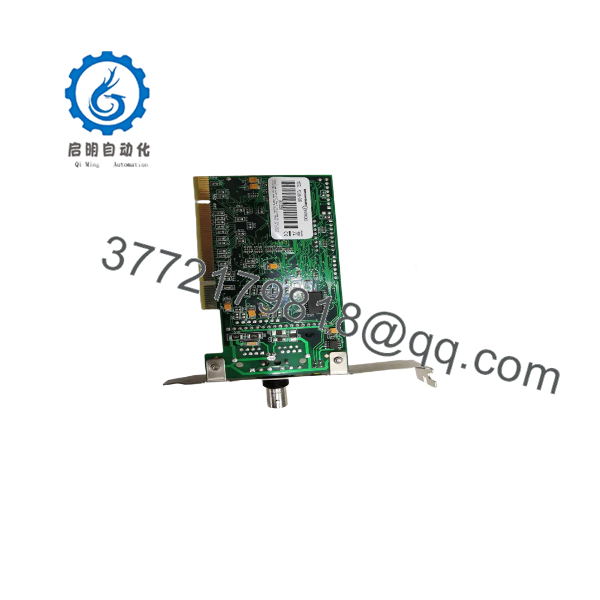
PCI20U-CXB
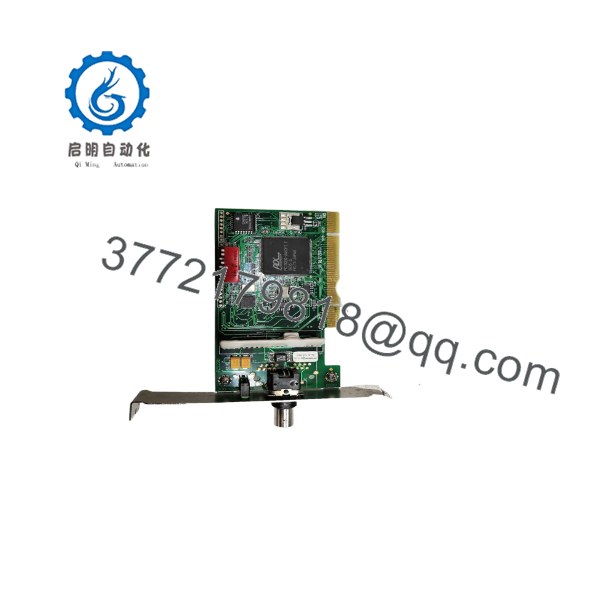
PCI20U-CXB
Installation & Configuration Guide
Stage 1: Pre-Installation Preparation (~15 min)
⚠️ Safety First: Notify operations of the HMI downtime window. This card sits in the operator interface computer, not the turbine control cabinet itself — confirm no critical monitoring function depends solely on this HMI before taking it offline. Power down and unplug the PC before opening the case.
Tools Required: ESD wrist strap, PH1/PH2 screwdriver, digital multimeter, smartphone for reference photos.
Data Backup: If replacing an older PCI20 (+5V) card or an ISA-bus card, verify your driver stack (TCI, or equivalent NDIS/null-stack driver) explicitly supports the PCI20U series before proceeding — driver compatibility, not the card’s own Plug-and-Play behavior, is the most common point of failure on this kind of upgrade.
Stage 2: Removing the Old Card (~5 min)
- Remove the PC case cover.
- Label and disconnect the coaxial ARCNET cable from the old card.
- Release the card’s rear-bracket screw and pull the card straight out of the PCI slot.
- Inspect the now-empty slot for dust or debris, and confirm whether the target slot is +3.3V or +5V — the PCI20U is designed to work in either, so this is a compatibility check, not a blocker.
Stage 3: Installing the New Module (~15 min)
- ESD prep. Seat the PCI20U-CXB in an available PCI slot and secure the rear bracket screw — use the half-height bracket if your chassis requires a low-profile card.
- Reconnect the coaxial ARCNET cable to the new card.
- Close the PC case and reconnect power.
- Boot the PC and allow Plug-and-Play to assign the I/O base address and interrupt automatically.
Self-Checklist: [ ] Card seated and bracket secured [ ] Coax cable reconnected [ ] Driver stack confirmed compatible with PCI20U series [ ] DIP switch/node address setting confirmed
Stage 4: Power-On & Testing (~15 min)
Pre-Power Check: Confirm the coaxial cable is properly terminated per your network topology before applying power.
- Boot the PC and confirm the card is recognized with an assigned I/O base address and IRQ.
- Confirm the two onboard LEDs indicate network operation and bus access as expected.
- Verify node addressing through the application software (node address on this generation is ultimately software-configured, not solely DIP-switch driven).
- Confirm communication with the rest of the ARCNET network before returning the HMI to production.
⚠️ Troubleshooting Note: If the card isn’t recognized correctly, double-check that your driver version explicitly supports the series — the universal-voltage hardware compatibility doesn’t guarantee driver-level compatibility if you’re running software written against the original PCI20/COM20020 combination.
Frequently Asked Questions (FAQ)
Can the -CXB be hot-swapped under power?
No. It’s a PCI-bus card — power down and unplug the host PC before installing or removing it.
Is the -CXB obsolete, and is “new” stock genuinely new?
It’s a mature product in a legacy technology category — Contemporary Controls has since introduced the PCI Express-based PCI20EX as the modern-motherboard successor for new installations, though ARCNET itself remains actively supported by the company because of installed-base demand in systems like GE Mark V. Expect current supply to be a mix of remaining factory stock and secondary-market inventory; state which applies to your specific unit.
Is this a direct replacement for the original +5V PCI20 card?
Yes — that’s the entire design intent of the “U” designation. The is a drop-in replacement for the +5V-only PCI20, engineered specifically so it works in both +3.3V and +5V PCI slots without additional migration work.
What’s the difference between the -CXB, -CXS, and -485 variants in this series?
-CXB supports coaxial bus topology (typically no hub needed); -CXS supports coaxial star topology (typically requires an external hub); -TB5 supports twisted-pair. The -485/-485X/-485D/-4000 variants use EIA-485 transceivers and support significantly higher data rates (up to 10 Mbps) than the -CXB/-CXS/-TB5 models, which are fixed at 2.5 Mbps. These aren’t interchangeable without matching your existing network’s physical topology.
Will I lose my ARCNET node configuration when I swap the card?
Node addressing on the generation is ultimately set via application software rather than purely hardware DIP switches, so confirm your node address configuration in the driver/application software after installation rather than assuming the physical DIP switch setting alone carries it over.
Why is your price lower than other “new” listings for this model?
On a mature product like this, price differences generally track inventory age and testing depth rather than product quality — state plainly whether the unit is unused older factory stock or tested/rebuilt secondary-market inventory before quoting a customer.



