
 WhatsApp: +86 16626708626
 Email:
  Phone: +86 16626708626
Description
Key Technical Specifications
| Parameter | Specification |
|---|---|
| Manufacturer | Control Technology Inc. (CTI) |
| Catalog Number | 2500-C200 |
| Product Family | CTI 2500 Series Classic |
| Product Type | PLC CPU / Programmable Controller |
| User Program RAM | 256K |
| Discrete I/O Points | 2,048 |
| Word I/O Points | 1,024 |
| Control Relays | 32,768 |
| Retentive Control Relays | 4,096 |
| Timers/Counters | 20,480 |
| Cyclic PID Loops | 64 |
| Analog Alarms | 128 |
| Special Function Programs | 1,023 |
| Special Function Subroutines | 1,023 |
| Remote I/O | Up to 15 bases |
| PROFIBUS-DP | Up to 112 devices |
| Ethernet | 100 Mbit, RJ45 |
| USB | Built-in |
| RS232C | DB9 male |
| RS485 Remote I/O | Built-in |
| SD Flash | Up to 32 GB with supported firmware |
| Maximum Serial Data Rate | 115.2 Kbaud |
| Operating System | Integrity RTOS |
| Backplane Power | 7 W maximum |
CTI’s current product documentation confirms the 256K user memory, 2,048 discrete I/O points, 1,024 word I/O points, 64 cyclic PID loops, up to 15 remote-I/O bases, PROFIBUS-DP support, Ethernet, USB, and 115.2 Kbaud maximum serial rate.
The CTI 2500 Series datasheet specifies a 100 Mbit Ethernet RJ45, DB9 RS232C, PROFIBUS interface, RS485 Remote I/O interface, and SD flash support.
Product Introduction
The CTI 2500-C200 is a programmable controller CPU for the CTI 2500 Series Classic platform and legacy Siemens SIMATIC 505 installations. It provides 256K user memory, 2,048 discrete I/O points, 1,024 word I/O points, 64 cyclic PID loops, and built-in Ethernet and USB connectivity.
For migration projects, the 2500-C200 is particularly relevant because CTI specifies it as a replacement for Siemens 545-1101, 545-1102, 545-1104, and 545-1106 without rewiring. It also adds built-in PROFIBUS-DP and RS485 Remote I/O capabilities compared with the lower C100 model.
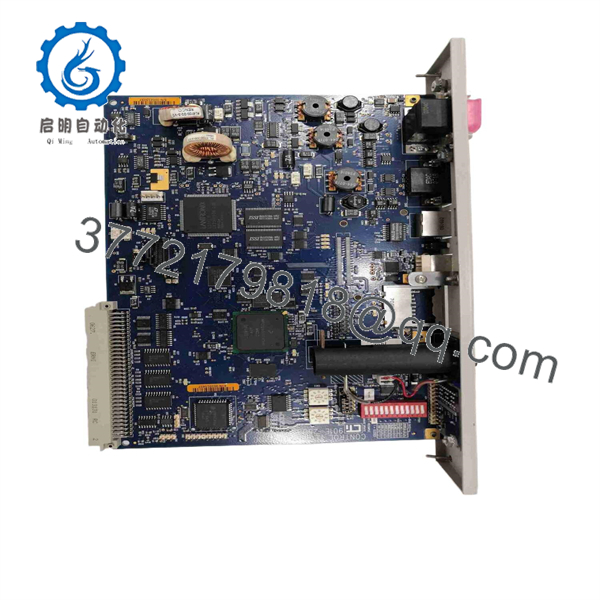
2500-C200
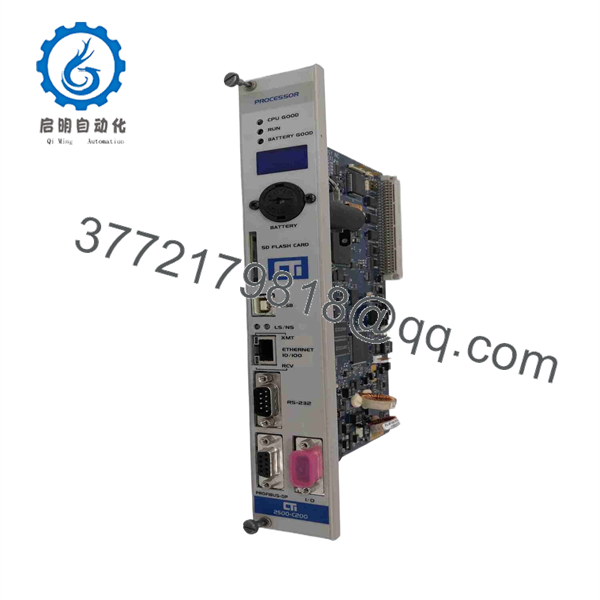
2500-C200
Installation & Configuration Guide
Stage 1: Pre-Installation Preparation — 15–20 Minutes
⚠️ Safety First: Place the controlled process in its approved maintenance state. Follow plant LOTO procedures before removing the CPU from a live control system.
Tools Required:
- ESD wrist strap
- Digital multimeter
- Screwdriver
- Wire labels
- Laptop with CTI programming software
- USB/Ethernet programming connection as applicable
- Current PLC application backup
Data Backup:
- Record the complete 2500-C200 catalog number.
- Record CPU firmware revision.
- Back up the PLC application.
- Record Ethernet configuration and IP address.
- Record PROFIBUS-DP configuration if used.
- Record RS485 Remote I/O configuration.
- Document the existing Siemens/CTI CPU model.
- Photograph all communication connections.
- Record the installed I/O rack and module arrangement.
- Confirm whether the application uses retentive data.
⚠️ Critical: CTI lists the C200 as a replacement for specific Siemens 505 CPUs, but the actual application still needs to be reviewed for memory usage, communications, special functions, and installed firmware.
Stage 2: Removing the Existing CPU — 10–15 Minutes
- Stop the controlled process according to the approved shutdown sequence.
- Isolate PLC power.
- Verify the backplane is de-energized.
- Record the CPU status indicators.
- Photograph the CPU and adjacent modules.
- Disconnect Ethernet, USB, RS232, PROFIBUS, or RS485 connections as applicable.
- Label each communication cable.
- Release the CPU from the chassis.
- Remove the CPU carefully.
- Inspect the backplane connector for contamination or mechanical damage.
- Retain the original CPU until commissioning is complete.
Stage 3: Installing the 2500-C200 — 10–15 Minutes
- Verify the replacement CPU is CTI 2500-.
- Confirm the hardware revision.
- Inspect the backplane connector.
- Install the CPU in the correct chassis position.
- Secure the module.
- Reconnect Ethernet.
- Reconnect USB or RS232 as required.
- Reconnect PROFIBUS-DP if used.
- Reconnect RS485 Remote I/O if used.
- Verify all communication connections against the original documentation.
- Confirm the power supply and backplane loading are within specification.
Self-Checklist:
- 2500- verified
- Firmware revision documented
- Application backup available
- Ethernet configuration documented
- PROFIBUS configuration documented
- Remote I/O configuration documented
- Backplane connector inspected
- Communication cables correctly restored
Stage 4: Power-On & Testing — 20–45 Minutes
- Perform a complete visual inspection.
- Verify the PLC power supply.
- Energize the controller.
- Check the CPU status display.
- Verify the controller reaches the expected operating state.
- Connect through the approved programming interface.
- Confirm the application loads correctly.
- Verify I/O configuration.
- Check Ethernet communication.
- Check PROFIBUS-DP communication if used.
- Check Remote I/O if used.
- Verify retentive data and timers/counters.
- Test representative digital and analog I/O.
- Verify PID loops where applicable.
- Run the machine through a controlled test cycle.
- Return the system to production only after all critical functions pass.
Common Replacement Pitfalls
❗ 1. Treating the as a Generic Siemens 505 CPU
The CTI 2500- is designed for the Siemens 505 ecosystem, but migration still requires checking application compatibility. CTI specifically identifies supported Siemens CPU replacements; do not assume every 505 application is identical.
❗ 2. Forgetting the 256K Memory Limit
The provides 256K user program RAM. Applications exceeding this capacity require a higher 2500-series CPU such as the C300 or C400.
❗ 3. Assuming PROFIBUS Is Available on Every 2500 CPU
The supports PROFIBUS-DP, whereas the C100 does not. Verify the exact CPU model before planning a communication migration.
❗ 4. Ignoring Firmware
CTI documents SD flash firmware updates and notes that SDHC cards up to 32 GB are supported with firmware V6.18 and higher. Firmware compatibility should therefore be checked before commissioning a replacement CPU.
❗ 5. Losing Network Configuration
The has built-in Ethernet, so a replacement CPU may require restoration of the correct IP/network configuration. Record the existing settings before removing the old controller.
Frequently Asked Questions (FAQ)
1. What is the CTI 2500-?
The is a CTI 2500 Series programmable controller CPU with 256K user memory. It is designed for CTI 2500 and compatible Siemens SIMATIC 505 control-system applications.
2. How much memory does the 2500- have?
The provides 256K of user program RAM. CTI’s model comparison lists 128K for the C100, 256K for the , 512K for the C300, and 3,072K for the C400.
3. Which Siemens CPUs does the 2500- replace?
CTI and its distributors identify the as a replacement for Siemens 545-1101, 545-1102, 545-1104, and 545-1106, with no rewiring required. Application-level compatibility should still be verified before migration.
4. Does the 2500- have Ethernet?
Yes. The includes a built-in 100 Mbit Ethernet RJ45 interface. CTI documentation also identifies Ethernet port 4452 for programming and ports 1505 or 4450 for data-access connections.
5. Does the 2500- support PROFIBUS?
Yes. The includes PROFIBUS-DP capability and supports up to 112 devices according to CTI’s model comparison. It also supports up to 15 remote-I/O bases.
6. Is the 2500- obsolete?
CTI continues to publish technical information and product documentation for the 2500 Series. However, the platform primarily serves legacy Siemens 505 applications, so procurement should distinguish between current factory-supplied hardware and surplus/refurbished inventory. Current distributor listings continue to identify the 2500- as a CTI CPU.
7. What should I verify when buying a surplus 2500-?
Verify the exact 2500- model, hardware and firmware revision, 256K memory capacity, Ethernet/PROFIBUS functionality, physical connector condition, and application compatibility. For a critical spare, request an actual-unit photograph and a functional test covering CPU startup and communication—not merely a power-on test.



