
 WhatsApp: +86 16626708626
 Email:
  Phone: +86 16626708626
Description
Key Technical Specifications
| Parameter | Value |
|---|---|
| Manufacturer | Eaton / Moeller |
| Model | MC2-442-57CQB-1-2A |
| Equivalent XV400 model | XV-442-57CQB-1-2A |
| Display type | 5.7 in CSTN color LCD |
| Display resolution | 320 x 240 pixels, QVGA |
| Visible display area | 115 x 86 mm |
| Touch technology | Infrared touch matrix |
| Front style | 4-hole mounting front |
| Supply voltage | 24 VDC from a SELV AC/DC power supply |
| Power protection | Internal fuse and reverse-polarity protection |
| Ethernet | 10Base-T port |
| Serial interface | RS-232 system port, 9-pin D-Sub male |
| CAN interface | CAN port with CAN ACT status LED |
| USB ports | USB Host and USB Device |
| Storage | CompactFlash slot 0 for operating system and normally PLC/visualization projects |
| Dimensions | 220 mm wide x 170 mm high x 81 mm deep |
| Mounting cutout material thickness | 2-20 mm for 4-hole-front devices |
| Operating position | Horizontal or vertical panel mounting |
| Ventilation clearance | At least 3 cm from ventilation slots; at least 15 cm from major heat sources |
| Intended use | Visualization, operation, and control of machines and systems |
| Safety-function limitation | Not approved for implementing personnel or machinery safety functions |
Product Introduction
The Eaton MC2-442-57CQB-1-2A is a 5.7 in MICRO PANEL operator interface for machine visualization, operation, and control. It is the MC2 designation for the equivalent Eaton XV-442-57CQB-1-2A and uses an infrared touch sensor with a 320 x 240 CSTN color display.
This 4-hole-front version is intended for control cabinets, panels, and operator desks. It includes Ethernet, RS-232, CAN, USB Host, and USB Device interfaces, and can operate as an HMI or, with the appropriate software/license, as an integrated HMI/PLC device.
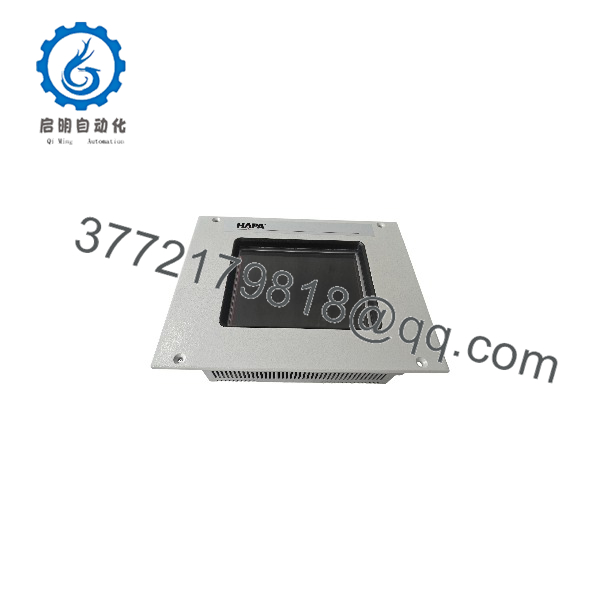
MC2-442-57CQB-1-2A
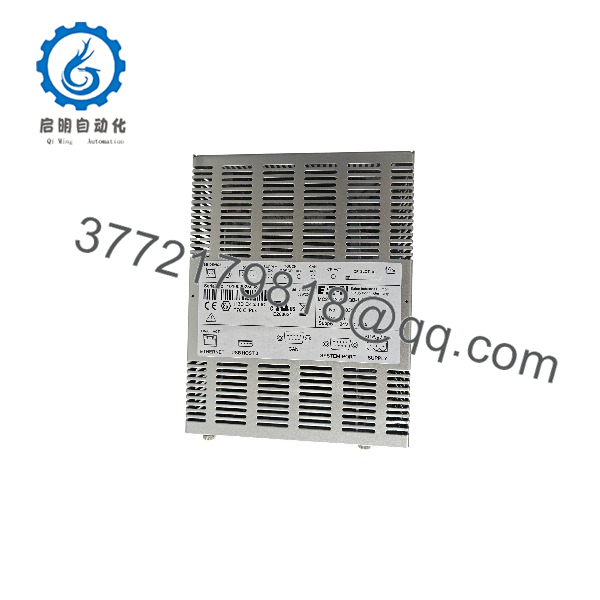
MC2-442-57CQB-1-2A
Troubleshooting Quick Reference
| Symptom | Possible Cause | Relevance to this Part | Quick Check Method | Recommendation |
|---|---|---|---|---|
| Panel completely dead | Missing 24 VDC, failed SELV power supply, blown internal fuse, or wiring fault | ✅ High | Measure 24 VDC at the power connector; verify 0 V and functional-earth connections | Check the external 24 VDC supply and wiring before replacing the panel |
| SUPPLY OK LED off | Internal voltage fault or inadequate input supply | ✅ High | Confirm input voltage and inspect the rear/service-side LEDs | If input power is correct but SUPPLY OK remains off, arrange panel repair or replacement |
| Panel boots but touch does not work | Contaminated IR frame, touch calibration issue, or touch electronics fault | ✅ High | Check TOUCH ACT and TOUCH ERROR LEDs; clean the IR frame with a soft, dry cloth | Clean the IR frame first; recalibrate if required, then replace the panel if the fault remains |
| TOUCH ERROR LED flashes | Dirty infrared frame or incorrect touch calibration | ✅ High | Inspect the bezel and IR frame for dust, film, moisture, or obstruction | Clean the IR frame; recalibrate the touch sensor if cleaning does not clear the fault |
| No Ethernet communication | Wrong IP address, cable fault, subnet mismatch, or switch/port issue | ❌ Medium | Check link LEDs and ping the panel from a PC on the same subnet | Verify IP configuration and Ethernet cable before replacing the HMI |
| CAN communication failure | Wiring, termination, baud-rate mismatch, or GND potential difference | ✅ Medium | Inspect CAN wiring, termination, baud rate, and CAN ACT LED activity | Correct bus wiring and configuration; connect GND terminals of all bus stations |
| CF card errors or project will not load | Damaged/incorrect CompactFlash, corrupted project, or card removed during write | ✅ High | Check CF ACT LED and verify the CF card/project on a known-good system | Never remove the CF card while CF ACT is lit; restore the project from a verified backup |
| Display dark or distorted | Backlight/LCD aging, power issue, or internal display fault | ✅ High | Confirm stable 24 VDC input and observe boot behavior | If power is stable but display remains faulty, panel replacement or component-level repair is required |
| Condensation present | Temperature/humidity change caused moisture inside or on the panel | ✅ High | Inspect for visible moisture before applying power | Do not power a condensation-affected unit; allow it to reach room temperature first |
❗ Do not use this panel for safety functions. Eaton specifically prohibits using the MICRO PANEL to implement personnel- or machinery-protection safety functions.
If the panel still will not start or communicate, send photos of the nameplate, rear connectors, LED status, and CompactFlash/project details before ordering a replacement.
Frequently Asked Questions
Is the MC2-442-57CQB-1-2A the same as an XV-442-57CQB-1-2A?
Functionally, yes. Eaton states that XV400 5.7 in and MC2 5.7 in are two names for equivalent products; this MC2 version corresponds to the XV-442-57CQB-1-2x 4-hole-front infrared-touch configuration.
What type of touchscreen does it use?
It uses an infrared touch matrix, not a resistive touchscreen. It detects a finger or suitable object of at least 7 mm diameter interrupting the infrared light matrix.
What display resolution does it have?
The 5.7 in CSTN color LCD provides 320 x 240 pixel QVGA resolution, with a visible area of 115 x 86 mm.
What power supply does it require?
It requires 24 VDC from an AC/DC converter with safe isolation (SELV). The panel includes an internal fuse and reverse-polarity protection.
Can it run PLC logic locally?
Yes. Eaton describes the MICRO PANEL as usable either as an HMI or as an integrated HMI/PLC device, subject to the installed operating system, software, and licensing.
Can I remove the CompactFlash card while it is running?
No. Remove the CF card only after the panel is de-energized and the CF ACT LED is off. A power failure or card removal during a write operation can cause data loss or damage the card.
Why is this panel cheaper than a new Eaton HMI?
It is an obsolete legacy MICRO PANEL, so available units are typically refurbished or surplus stock rather than newly manufactured panels. The lower price reflects limited availability and legacy-market sourcing; verify the test scope, warranty, CF-card contents, and project compatibility before purchase.



