
 WhatsApp: +86 16626708626
 Email:
  Phone: +86 16626708626
Description
3. Key Technical Specifications
| Parameter | Value |
|---|---|
| Manufacturer | Eaton |
| Model | XV-152-D6-84TVRC-10 |
| Article Number | 150605 |
| Product Series | XV150 |
| Product Type | HMI with Integrated PLC Runtime |
| Display Size | 8.4-inch TFT LCD |
| Resolution | 640 × 480 (VGA) |
| Color Depth | 64K Colors |
| Touch Technology | 4-wire Resistive Touch |
| Processor | 32-bit RISC CPU, 400 MHz |
| Operating System | Windows CE 5.0 |
| Internal DRAM | 64 MB |
| Retain Memory | 125 KB NVRAM |
| Data Storage | 64 MB NAND Flash + SD Card Slot |
| Ethernet | 1 × 10/100 Mbps RJ45 |
| Serial Interfaces | 1 × RS-232, 1 × RS-485 |
| CAN Interface | 1 × CANopen® / easyNet |
| USB | 1 × USB Host 2.0, 1 × USB Device |
| Supply Voltage | 24 VDC |
| Typical Power Consumption | Approximately 14.5 W |
| Mounting | Flush Panel Mount |
| Protection Rating | IP65 (Front), IP20 (Rear) |
| Certifications | CE, UL508, cUL, IEC 61131-2, ATEX Zone 22 (selected versions) |
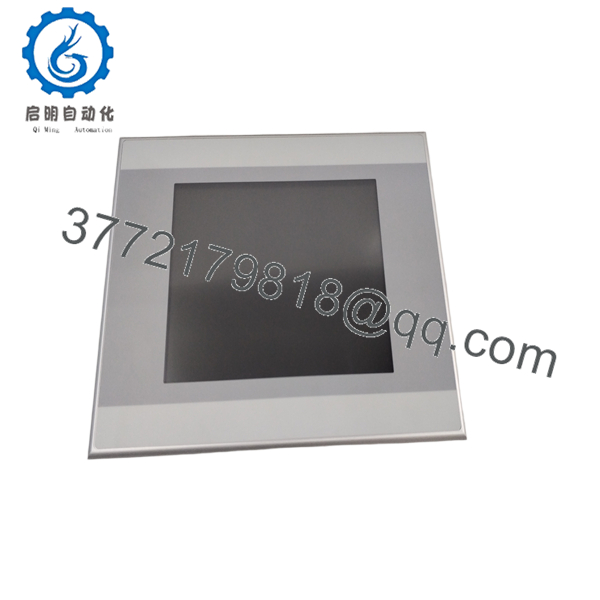
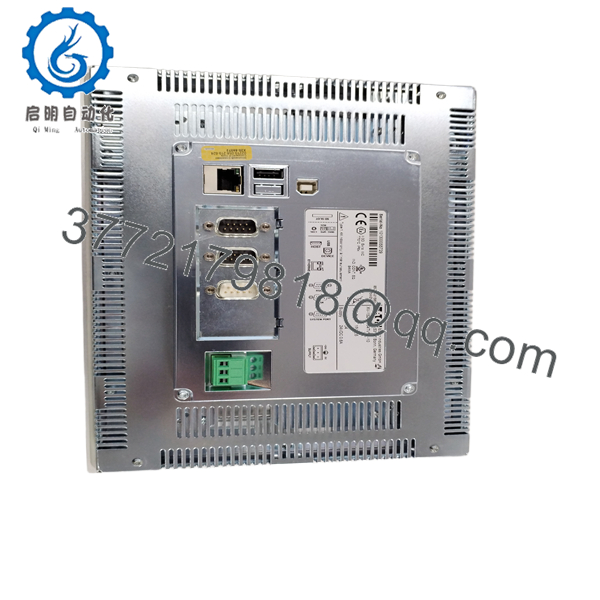
The XV-152-D6-84TVRC-10 combines an industrial HMI with an integrated PLC runtime. It features Ethernet, RS-232, RS-485, CANopen/easyNet communication, an SD card slot, and Windows CE 5.0, making it suitable for machine automation and OEM control panels.
4. Product Introduction
The EATON XV-152-D6-84TVRC-10 is an advanced Human Machine Interface (HMI) from the XV150 family designed for machine builders and industrial automation applications. Unlike standard operator panels, this model includes an integrated PLC runtime, allowing a single device to perform both visualization and machine control tasks.
The terminal features an 8.4-inch VGA TFT touchscreen, a 400 MHz 32-bit processor, and multiple industrial communication interfaces, including Ethernet, RS-232, RS-485, and CANopen. The integrated PLC capability helps reduce cabinet space, wiring complexity, and hardware costs while maintaining compatibility with Eaton automation platforms. It is commonly used in packaging machines, material handling systems, food processing equipment, water treatment facilities, and general OEM machinery.
5. Installation & Configuration Guide
Stage 1 – Preparation
Safety
- Disconnect cabinet power.
- Apply Lock-Out/Tag-Out procedures.
- Verify the 24 VDC supply.
- Wear an ESD wrist strap.
- Back up the existing HMI/PLC project.
Required Tools
- Engineering laptop
- Ethernet cable
- USB flash drive
- Phillips screwdriver
- Digital multimeter
- SD memory card (optional)
Stage 2 – Removing the Existing Unit
- Disconnect the 24 VDC supply.
- Label all communication cables.
- Remove Ethernet, RS-232, RS-485, and CAN connections.
- Release the mounting clamps.
- Remove the terminal carefully.
Do not interrupt power during firmware updates or project downloads.
Stage 3 – Installing the Replacement
- Verify the model is XV-152-D6-84TVRC-10 (150605).
- Install the panel into the cabinet cutout.
- Tighten the mounting brackets evenly.
- Connect power and communication cables.
- Restore the HMI application and PLC project.
- Verify communication with the connected PLCs or field devices.
Installation Checklist
- ✔ Correct article number
- ✔ 24 VDC verified
- ✔ Ethernet operational
- ✔ RS-232 / RS-485 configured
- ✔ CANopen communication verified
- ✔ PLC runtime restored
Stage 4 – Commissioning
- Apply power.
- Verify normal boot sequence.
- Test touchscreen calibration.
- Confirm Ethernet communication.
- Verify PLC execution.
- Test alarms, recipes, and operator functions.
Troubleshooting
Blank display
- Verify 24 VDC power.
- Check fuse and polarity.
- Inspect the power connector.
PLC program not running
- Confirm the PLC runtime license is active.
- Verify the project download completed successfully.
- Check application startup settings.
Communication failure
- Verify Ethernet IP settings.
- Confirm RS-485 baud rate and node address.
- Inspect CANopen termination and cabling.
Field Experience: One of the most common replacement issues occurs when technicians restore only the visualization project but overlook the embedded PLC application. The HMI appears to operate normally, but machine control remains inactive until the PLC project is downloaded and started.

- XV-152-D6-84TVRC-10
- XV-152-D6-84TVRC-10
6. Frequently Asked Questions (FAQ)
Q1. What is the primary function of the XV-152-D6-84TVRC-10?
It combines a graphical HMI with an integrated PLC runtime, enabling one device to perform both machine visualization and automation control.
Q2. Which communication interfaces are available?
The unit includes:
- 1 × Ethernet (10/100 Mbps)
- 1 × RS-232
- 1 × RS-485
- 1 × CANopen® / easyNet
- 1 × USB Host
- 1 × USB Device
- SD Card Slot
This interface combination supports communication with a wide range of PLCs, drives, and field devices.
Q3. What does the “D6” designation indicate?
Within the XV150 family, the D6 version includes RS-232, RS-485, and CANopen/easyNet interfaces. Other XV150 variants provide different communication combinations, so the suffix should always be verified before ordering.
Q4. Which industries commonly use this HMI?
Typical applications include:
- Packaging machinery
- Material handling systems
- Food and beverage processing
- Printing equipment
- Water and wastewater plants
- Plastics and rubber machinery
- General OEM automation
Q5. Does the unit include a PLC?
Yes. Unlike entry-level HMI models, the XV-152-D6-84TVRC-10 includes an integrated PLC runtime, allowing it to execute automation logic while simultaneously providing operator visualization.
Q6. Is the XV-152-D6-84TVRC-10 still available?
The XV150 platform remains widely installed in industrial automation systems, but this model is considered a mature product. Most replacement units are sourced from new surplus inventory or professionally tested refurbished stock. Before purchasing, verify the article number (150605), firmware version, communication requirements, and application compatibility with the existing machine.



