
 WhatsApp: +86 16626708626
 Email:
  Phone: +86 16626708626
Description
Key Technical Specifications
- Model code: XV-430-10TVB-1-10
- Brand: Eaton
- Series: XV-400
- Display size: 10.4 in
- Display type: TFT color display
- Resolution: 640 x 480
- Touch type: Infrared touch
- Supply voltage: 24 V DC
- Communication interfaces: Ethernet, RS-232, CAN, USB host, USB device
- Operating system: Windows CE
- Front protection: IP65
- Rear protection: IP20
- Operating temperature: 0 to 50 C
- Built-in depth: 88 mm
- Front dimensions: 345 mm x 260 mm
Product Introduction
Eaton XV-430-10TVB-1-10 is a 10.4 in XV-400 HMI-PLC used for machine visualization, operator input, and local control tasks. It runs on 24 V DC and fits retrofit panels that need Ethernet, RS-232, CAN, and USB connectivity.
This model is a practical replacement when you want integrated HMI and PLC functions in one cabinet opening. The 640 x 480 TFT screen is legacy-friendly, and the XV400 platform is known for broad communication options and field retrofit use.
Troubleshooting Quick Reference
| Symptom | Possible Cause | Relevance to this Part | Quick Check Method | Recommendation |
|---|---|---|---|---|
| No power-up at all | Missing 24 V DC, blown fuse, bad terminal connection | ❌ Low | Measure supply at the panel input with a multimeter | Check power and wiring before condemning the HMI |
| Backlight on, no boot screen | Corrupt runtime, bad CF card, startup image missing | ✅ High | Inspect boot messages and test the card contents | Reload the project or replace the storage media first |
| HMI does not talk to PLC | Wrong IP, wrong baud rate, CAN address mismatch | ✅ High | Ping the device, check link LEDs, verify protocol settings | Match the configured port and node settings before replacement |
| Touch input is unreliable | Calibration drift, damaged touch layer, dirty overlay | ✅ High | Run calibration and test all screen zones | Recalibrate first; replace if touch loss persists |
| Random resets or freezes | Supply dip, overheating, unstable cabinet power | ❌ Low | Log 24 V under load and check enclosure temperature | Fix power quality and cooling before swapping the unit |
| Fieldbus devices not seen | Termination issue, node conflict, wiring fault | ✅ High | Check bus termination and node addresses | Verify network topology before ordering a new panel |
If you are stuck, send technical support photos of the nameplate, wiring, connectors, startup screen, and PLC diagnostic logs.
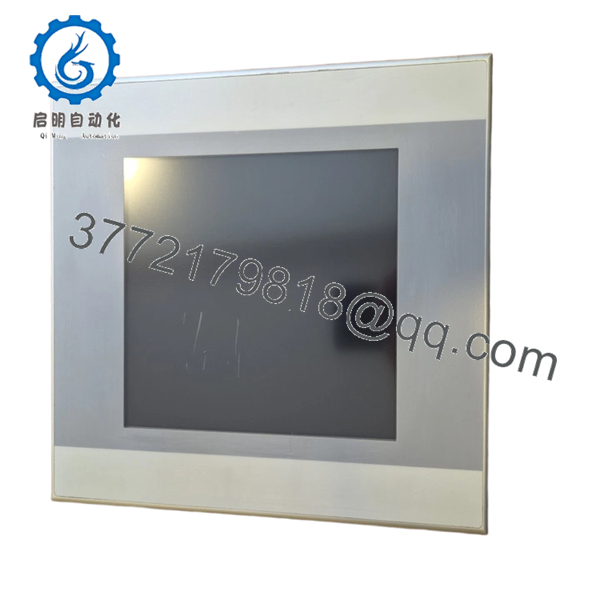
- XV-430-10TVB-1-10
Frequently Asked Questions (FAQ)
Q: Is the XV-430-10TVB-1-10 obsolete?
A: It is a legacy XV400 platform part, so availability usually comes from surplus or remaining stock. That does not make it unreliable, but it does mean you should confirm supply before promising production a quick replacement.
Q: Is this a direct swap for another Eaton XV panel?
A: Only if the cutout, depth, power, and communication package match. The XV-400 family shares a lot of visual similarity, so people often assume compatibility and get burned by a port or firmware mismatch. Check the suffix exactly before ordering.
Q: Can I hot-swap this HMI-PLC?
A: No. Kill power first and verify the cabinet is de-energized. Pulling a live panel can damage the communication ports, the storage media, or the backplane interfaces.
Q: Does it include PLC functionality?
A: Yes, this is an HMI-PLC platform, so the panel can handle both visualization and control logic. That saves cabinet space, but it also means you need the correct application image and runtime setup after replacement.
Q: What condition is this usually sold in?
A: Most listings are New Original or New Surplus. Surplus pricing is lower because the unit is already manufactured and in inventory, not because the part is inferior. Ask for traceability, test status, and photos of the label.
Q: What usually causes replacement problems on this model?
A: Firmware mismatch, wrong startup files, incorrect CAN or Ethernet settings, and bad cabling are the usual culprits. I have seen a “dead” panel turn out to be a node-address error that took ten minutes to fix. Take photos of the old setup before removal and mirror it exactly.
Q: What should I verify before installation?
A: Verify supply voltage, built-in depth, front cutout, connector layout, and the exact communications ports in use. Do not wire from memory. Even similar-looking revisions can change the details enough to cause a long rework cycle.



