
 WhatsApp: +86 16626708626
 Email:
  Phone: +86 16626708626
Description
Key Technical Specifications
| Parameter | Specification |
|---|---|
| Manufacturer | Eaton |
| Product family | XV400 |
| Model | XV-440-10TVB-1-20 |
| Catalog number | 139906 |
| HMI size | 10.4 in |
| Display | Color TFT |
| Resolution | 640 × 480 VGA |
| Visible display area | 211 × 158 mm |
| Color depth | 65,536 or 256 colors, selectable |
| Touch technology | Infrared |
| Backlight | LED, software dimmable |
| Typical brightness | 350 cd/m² |
| Typical contrast | 350:1 |
| Backlight life | Approximately 50,000 h |
| Supply | 24 VDC SELV |
| Permitted supply range | 20.4–28.8 VDC |
| Ethernet | 10/100Base-TX |
| Serial interface | 1 × RS232 |
| CAN | 1 × CAN / easyNet |
| USB | 1 × Host, 1 × Device |
| CompactFlash | 2 slots |
| Communication modules | 2 slots |
| PLC capability | Optional via license |
| Heat dissipation | 32 W maximum |
| Enclosure | Metal |
| Mounting | Panel installation, 4-hole front |
| Operating system | Windows CE |
| Product lifecycle | Not for new applications |
Eaton’s official datasheet lists 24 VDC SELV, a permitted operating range of 20.4–28.8 VDC, maximum power dissipation of 32 W, and the integrated Ethernet, RS232, CAN, USB Host, and USB Device interfaces.
The display is a 10.4-inch TFT with 640 × 480 VGA resolution, infrared touch technology, 350 cd/m² typical brightness, 350:1 typical contrast, and an LED backlight rated at approximately 50,000 hours.
Product Introduction
The Eaton XV-440-10TVB-1-20 is a 10.4-inch operator panel in the Eaton XV400 family. It combines a VGA TFT display with infrared touch input and several industrial communication interfaces, making it suitable for machine control, process visualization, diagnostics, and operator-access functions. Its catalog number is 139906.
This model is also an HMI-PLC platform rather than a display-only terminal. Eaton specifies that PLC functionality can be added through a license, while communication functionality can also be expanded through optional licenses and plug-in communication modules. The unit requires CompactFlash storage for its Windows CE environment and automation application.
Lifecycle Consideration
Eaton’s own datasheet states “Not for new applications.” That is an important procurement distinction. The XV-440-10TVB-1-20 remains relevant when maintaining an installed XV400 system, but it should not normally be selected for a new machine design without an explicit lifecycle assessment.
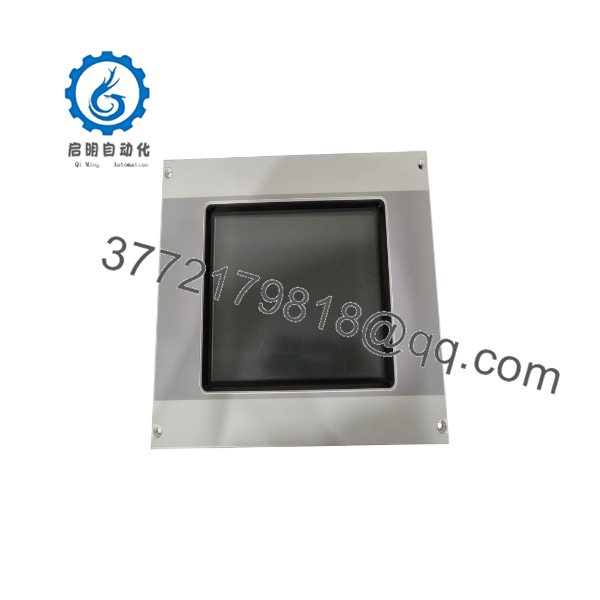
XV-440-10TVB-1-20
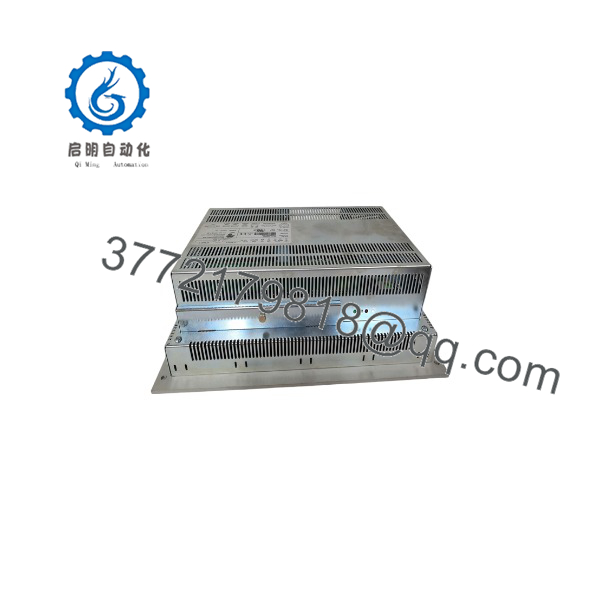
XV-440-10TVB-1-20
Installation & Configuration Guide
Stage 1 — Pre-Installation Preparation (~5 minutes)
- Apply the machine’s lockout/tagout procedure.
- Record the existing HMI model, hardware revision, and serial number.
- Back up the current HMI project and PLC application if the PLC function is enabled.
- Photograph all rear connections.
- Record Ethernet IP settings and CAN/easyNet network parameters.
- Identify both CompactFlash cards if installed.
- Prepare an ESD strap, PH1 screwdriver, multimeter, labels, and the existing configuration files.
⚠️ Do not assume that replacing the physical panel restores the application automatically. The project, operating-system media, CompactFlash contents, licenses, and communication settings are separate considerations.
Stage 2 — Removing the Existing HMI (~5 minutes)
- Shut down the machine in accordance with the equipment manufacturer’s procedure.
- Isolate the 24 VDC supply.
- Verify the supply is de-energized.
- Label Ethernet, RS232, CAN, USB, and power connections.
- Disconnect the rear cables.
- Release the four-hole panel mounting hardware.
- Remove the HMI from the enclosure.
- Inspect the cutout and mounting surface for mechanical damage.
Keep the original panel available until the replacement has completed commissioning.
Stage 3 — Installing the XV-440-10TVB-1-20 (~5 minutes)
- Verify the complete part number XV-440-10TVB-1-20 / 139906.
- Confirm the replacement has the same front-panel dimensions and mounting arrangement.
- Install the panel into the existing enclosure cutout.
- Secure the four-hole mounting arrangement.
- Reconnect the 24 VDC supply.
- Reconnect Ethernet, RS232, CAN, and USB connections as required.
- Install the required CompactFlash media.
- Verify that any communication-module hardware matches the original configuration.
⚠️ The CompactFlash card is not an incidental accessory. Eaton specifies CompactFlash as required for the Windows CE operating environment and application storage.
Stage 4 — Power-On & Testing (~10–15 minutes)
- Verify polarity and supply voltage before energizing.
- Apply 24 VDC.
- Confirm the HMI boots correctly.
- Verify the touchscreen responds across the complete display area.
- Check Ethernet communication.
- Verify RS232 and CAN/easyNet communication where used.
- Confirm the HMI project loads correctly.
- Check PLC functionality if the optional PLC license is installed.
- Test operator controls and alarm displays.
- Perform a controlled machine dry run before returning the equipment to production.
Technical Pitfall & Survival Guide
The common mistake with legacy XV400 panels is treating the HMI hardware and application as one item.
They are not.
The XV-440-10TVB-1-20 uses Windows CE and CompactFlash-based application storage. The PLC function is separately license-enabled, and communications can be expanded through optional licenses/modules. A replacement with identical hardware can therefore still fail commissioning if the original application media or licensing configuration is missing.
Another procurement trap is confusing the XV-440-10TVB-1-20 with visually similar XV400 variants such as the XV-440-10TVB-1-10 or other screen-size/configuration variants. Match the complete ordering code.
Frequently Asked Questions (FAQ)
What is the Eaton XV-440-10TVB-1-20?
It is a 10.4-inch XV400-series industrial HMI/operator panel with infrared touch input, VGA 640 × 480 display resolution, Ethernet, RS232, CAN, USB Host, and USB Device interfaces. Eaton assigns catalog number 139906.
Does the XV-440-10TVB-1-20 include a PLC?
The hardware supports HMI-PLC functionality, but Eaton specifies that the PLC function is retrofittable through the appropriate license. Therefore, do not assume every XV-440-10TVB-1-20 in the field has the PLC function activated.
What power supply does it require?
The unit uses 24 VDC SELV, with Eaton documenting an operating range of 20.4–28.8 VDC. Confirm the actual supply at the panel terminals before commissioning.
What communication ports are built in?
The standard unit has 10/100Base-TX Ethernet, , CAN, USB Host, and USB Device. Eaton also provides two slots for optional communication modules.
What is the display resolution?
The XV-440-10TVB-1-20 uses a 640 × 480 VGA color TFT display with a 10.4-inch diagonal. The infrared touch interface is integrated with the front panel.
Is the XV-440-10TVB-1-20 obsolete?
Eaton’s datasheet does not use the word “obsolete”; it explicitly states “Not for new applications.” For installed equipment, the unit remains a relevant maintenance/replacement part, but it should be considered a legacy platform when planning new systems.
Can I replace an XV-440-10TVB-1-20 with another HMI?
Not without checking the complete model number and application. Screen size, resolution, touch technology, interfaces, mounting arrangement, CompactFlash configuration, communication modules, PLC licensing, and application software all need to match the installed system.
What should procurement verify?
For a replacement order, verify XV-440-10TVB-1-20, catalog number 139906, physical condition, display/touch condition, rear connectors, CompactFlash availability, installed communication modules, PLC license requirements, and compatibility with the existing application. For surplus equipment, request photographs of the identification label and a powered functional test rather than relying only on a seller’s condition description.



