
 WhatsApp: +86 16626708626
 Email:
  Phone: +86 16626708626
Description
Key Technical Specifications
| Parameter | Value |
|---|---|
| Manufacturer | EKF Elektronik GmbH |
| Model Number | CN4-BELL |
| Variant Reference | CN4-96-BELL |
| Reported Assembly Reference | MK04584-04; verify against actual board label |
| Product Status | End of life / phased out |
| Product Type | Quad-port Fast Ethernet controller for CompactPCI systems |
| Form Factor | 3U CompactPCI, single-size Eurocard |
| Ethernet Port Count | 4 independent LAN ports |
| Ethernet Interface | 10BASE-T and 100BASE-TX |
| Physical Network Connection | Four individual RJ45 jacks |
| Cable Type | Category 5 or Category 6 twisted-pair Ethernet cable |
| Maximum Copper Cable Distance | Up to 105 m per port |
| Port Negotiation | Auto-negotiation |
| Duplex Modes | Half duplex and full duplex |
| Maximum Port Data Rate | Up to 200 Mbps in full-duplex mode per port |
| MAC/IP Addressing | Four individual MAC addresses; four independent IP network interfaces |
| Typical Use Cases | Firewall, gateway, router, fieldbus-data concentrator, redundant network path, embedded industrial PC |
| Operating-System Driver Support | Windows and Linux listed by the product source; verify exact operating-system and driver version before purchase |
| Mechanical Integration | CompactPCI chassis and backplane required |
| Replacement Requirement | Match front-panel part number, board revision, CompactPCI bus compatibility, OS driver, application image, port mapping, and physical chassis requirements |
EKF identifies CN4-BELL as a 3U CompactPCI Quad Port Fast Ethernet Controller. Each of the four RJ45 connections supports 10BASE-T or 100BASE-TX, auto-negotiation, and full-duplex operation; EKF also identifies the product as phased out.
Product Introduction
EKF CN4-BELL is a 3U CompactPCI quad-port Fast Ethernet controller used in embedded industrial computers and legacy control platforms, including some Alstom ALSPA and Hermes-related systems. It provides four independent 10/100BASE-TX RJ45 interfaces for segmented networks, fieldbus-data concentration, firewall functions, routing, redundant communications paths, and multi-network machine control.
CN4-BELL is a network-interface card, not a PLC I/O module or a marine alarm device. It needs a compatible CompactPCI chassis, operating system, driver, and application configuration. EKF has phased out the product, so verify the exact CN4-BELL or CN4-96-BELL label and board revision before ordering.
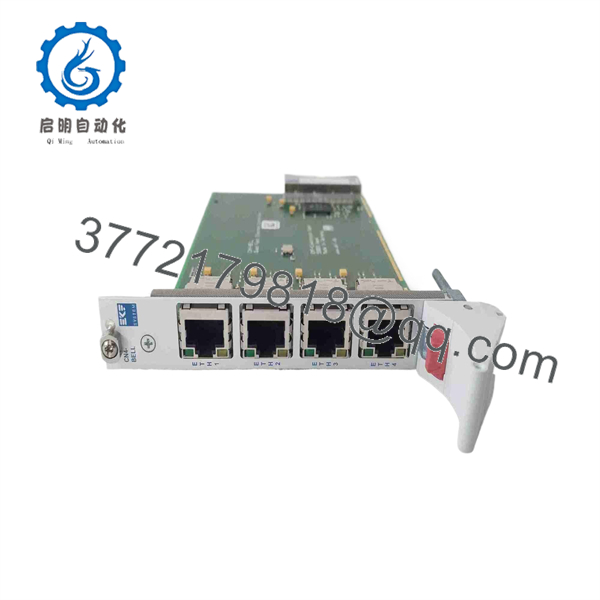
CN4-BELL
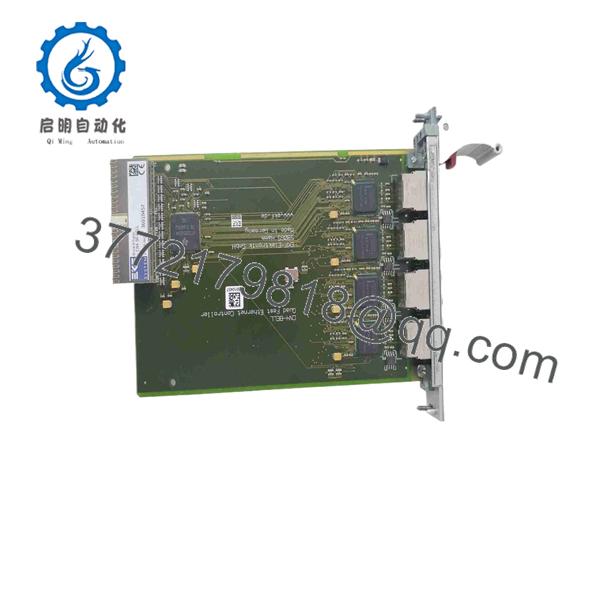
CN4-BELL
Troubleshooting Quick Reference
| Symptom | Possible Cause | Relevance to This Part | Quick Check Method | Recommendation |
|---|---|---|---|---|
| All four Ethernet ports show no link | CompactPCI chassis power issue, card not seated, failed system CPU, incorrect slot, board failure | ✅ High | Check chassis supply rails and CPU status; power down under approved procedure; reseat the CN4-BELL and inspect CompactPCI connector engagement | Verify chassis power and card seating before replacing the board. |
| One RJ45 port has no link LED | Bad patch cable, disabled switch port, damaged RJ45 contact, failed PHY channel, port mapped incorrectly | ✅ Medium | Test with a known-good Cat5e/Cat6 cable and known-good switch port; inspect RJ45 contacts with power removed; test another port | Replace cable or switch-port configuration first. Suspect the board only when a known-good cable and switch port fail on one specific port. |
| Ethernet link is present but no network traffic passes | IP/subnet mismatch, VLAN mismatch, incorrect routing, firewall rules, driver issue, application service stopped | ❌ Low | Check interface IP address, subnet mask, gateway, VLAN assignment, ARP table, packet counters, and host routing table | Diagnose system configuration and application services before replacing . |
| Only one or two ports work after board replacement | Port mapping changed, MAC-address binding, OS network-interface order changed, old configuration not restored | ✅ High | Record old MAC addresses and Linux/Windows interface assignments; compare switch MAC table and host network configuration after installation | Restore port mapping, firewall rules, routing, and application bindings before declaring the replacement defective. |
| Network drops intermittently under traffic | Cable damage, poor connector retention, switch errors, duplex mismatch, EMI, chassis ground problem, failing PHY | ✅ Medium | Check switch-port error counters, CRC errors, speed/duplex settings, cable routing, chassis bonding, and packet-loss trend | Correct cabling, switching, and grounding issues first. Replace if faults follow the same board port on a known-good network. |
| System does not boot after installing | Incompatible CompactPCI slot/backplane, bent connector pin, resource conflict, unsupported BIOS/OS driver, damaged board | ✅ High | Remove power; inspect backplane connector and guide rails; confirm the board is installed in the same type of slot as the original; boot with the board removed if site procedure permits | Verify chassis compatibility and driver requirements. Do not force the board into an incompatible slot. |
| Driver loads but ports are missing | Unsupported OS version, wrong driver package, incorrect device ID, firmware/board-revision difference, damaged card | ✅ High | Review OS device manager, lspci, kernel logs, or Windows event logs; compare PCI device ID and driver version with the original system image |
Install the validated driver package for the exact OS and board revision before replacing hardware. |
| Communication fails after a network change | Incorrect port connected to field network, swapped cables, duplicate IP address, changed VLAN or switch configuration | ❌ Low | Trace each cable by port number; compare switch-port configuration and MAC tables; ping each assigned interface from the correct subnet | Correct network configuration and cable mapping. Do not change application logic until physical port identity is confirmed. |
| Card becomes hot or has visible damage | Incorrect chassis voltage, contaminated backplane, poor airflow, internal component fault, ESD event | ✅ High | Shut down the chassis; inspect for discoloration, odor, damaged components, or connector contamination; verify chassis rails and airflow | Replace the card if physical damage is present, but resolve power, cooling, or contamination problems before fitting a replacement. |
❗ Port-mapping warning: presents four independent Ethernet interfaces and four individual MAC addresses. The operating system may enumerate the replacement ports differently from the old board. Photograph cable positions, record MAC addresses, interface names, IP settings, VLAN IDs, routes, and firewall bindings before removal.
❗ Driver warning: A physically correct CompactPCI card can look dead if the operating system driver does not support the installed board revision or legacy OS image. Verify the original Windows or Linux version, driver package, PCI device identifiers, and boot logs before treating the card as failed.
❗ Duplex warning: Each port supports auto-negotiation, half duplex, and full duplex. Avoid manually forcing a port unless the connected switch port uses the same setting. A forced/full versus auto/half mismatch often creates poor throughput, CRC errors, and intermittent communication that gets blamed on the network card.
❗ Cable warning: Use verified Category 5 or Category 6 twisted-pair cabling and keep each copper run within the documented 105 m maximum. Do not assume a link LED proves cable quality; damaged pairs can link at 100 Mbps and fail under real traffic.
❗ CompactPCI warning: Do not force the board into the chassis. Inspect guide rails, keying, retaining screws, and connector alignment. A bent backplane contact can damage both the replacement and the CompactPCI backplane.
❗ ESD warning: Wear a grounded wrist strap before handling the card. I have seen an engineer replace a working network card on a dry day, touch the shield and board edge without ESD control, then spend hours chasing an intermittent port fault. Use an ESD mat and strap from removal through installation.
Keep these checks in mind and you will save yourself 90% of typical rework time. If the issue remains unresolved, send technical support full front and rear board photos, the /CN4-96-BELL label, chassis model, operating-system version, driver version, MAC addresses, interface mapping, switch-port statistics, and Ethernet diagnostics.
Frequently Asked Questions
What is the EKF ?
EKF is a 3U CompactPCI quad-port Fast Ethernet controller. It adds four independent Ethernet interfaces to a CompactPCI system for 10BASE-T and 100BASE-TX network connections. EKF describes it as suitable for applications such as firewalls, gateways, routers, fieldbus-data concentrators, and high-availability network arrangements.
Is a PLC I/O module?
No. is a CompactPCI Ethernet network-interface controller. It does not provide standard 24 V DC digital I/O, analog I/O, relay outputs, or PLC logic. It belongs in a compatible CompactPCI computer or embedded control chassis and depends on the host CPU, operating system, driver, and application software.
Some generic reseller pages incorrectly label it as remote I/O, an alarm device, Gigabit Ethernet equipment, or a marine radar accessory. EKF’s product description identifies it as a quad 10/100 Mbps CompactPCI Ethernet controller.
How many Ethernet ports does provide?
provides four individual Fast Ethernet ports. Each port uses an connection and supports 10BASE-T or 100BASE-TX over Category 5 or Category 6 twisted-pair cabling. Each interface has its own MAC address and can be configured as a separate network interface by the host system.
Does support Gigabit Ethernet?
No. is a Fast Ethernet controller. Its ports support 10 Mbps and 100 Mbps Ethernet, not 1 Gbps Ethernet. In full-duplex operation, a port can support up to 200 Mbps aggregate bidirectional traffic: 100 Mbps transmit plus 100 Mbps receive.
Do not substitute it with a generic Gigabit CompactPCI card without confirming driver, BIOS, slot, operating-system, and application compatibility.
What cable distance can support?
EKF specifies Category 5 or Category 6 twisted-pair cabling for each port and a distance up to 105 m per 10BASE-T or 100BASE-TX connection.
Keep real cable routing in mind. Nearby VFD output cables, poor shielding, damaged connectors, panel-door flexing, and unbonded cabinet sections can cause errors well below the maximum length.
Is obsolete?
Yes. EKF’s product source identifies as an end-of-life, phased-out CompactPCI product. That means replacement availability is usually limited to New Surplus, refurbished, or used-tested inventory.
For a critical legacy system, keep one verified spare with an image of the validated driver package, documented MAC addresses, and preserved network configuration. For a planned upgrade, treat any replacement as a system-integration project, especially if the existing application expects a specific interface order or driver behavior.
Can I replace with any four-port Ethernet card?
No. A generic four-port card may fit neither mechanically nor electrically, and even a compatible CompactPCI card may use a different chipset, driver, firmware, MAC-address allocation, interface order, or operating-system support. That can break firewall rules, routing, VLAN assignments, application bindings, or industrial protocol communications.
A like-for-like is the lower-risk choice for an urgent repair. For modernization, validate the replacement card in a non-production chassis and test the exact operating-system image, drivers, applications, port mappings, and network traffic before field installation.
Why is a New Surplus cheaper than factory supply?
New Surplus stock usually comes from cancelled embedded-system projects, system-integrator stock, industrial PC spares, distributor overstock, warehouse releases, or decommissioned equipment inventories. Lower cost reflects end-of-life status and secondary-market sourcing, not automatically a defect.
Before ordering, request:
- Actual front, rear, and full-label photos showing
orCN4-96-BELL - Board revision, serial number, and assembly reference where visible
- Photos of all four ports and the CompactPCI connector
- Confirmation of Factory Sealed, New Original / New Surplus, or Refurbished (tested) condition
- OS driver package and compatibility evidence, if available
- Warranty period, return terms, verified quantity, and dispatch lead time
What test process should a supplier complete before shipment?
A supplier should complete a traceable CompactPCI-specific test process:
- Inbound inspection and traceability: Verify the EKF label, model number, board revision, serial number, source documentation, and original markings. Inspect for corrosion, altered labels, cracked housings, bent CompactPCI contacts, damaged ejector handles, rework marks, heat discoloration, or missing components.
- Chassis fit and power test: Install the into a compatible 3U CompactPCI test chassis. Confirm correct mechanical seating, stable chassis operation, device recognition in the host operating system, and no abnormal board temperature.
- Driver recognition test: Install the appropriate Windows or Linux driver for the tested operating system. Confirm that the host detects four separate Ethernet interfaces and records the four MAC addresses.
- Four-port link test: Connect each port individually to a known-good managed Fast Ethernet switch using verified Category 5e or Category 6 patch cables. Confirm 10 Mbps and 100 Mbps auto-negotiation, link status, full-duplex operation, and stable port enumeration.
- Traffic and error test: Run bidirectional network traffic through each port, verify packet transmission and reception, monitor CRC errors, dropped packets, link renegotiation, and sustained performance. Test VLAN or routing behavior where the card is intended for segmented networks.
- Load and thermal test: Operate all four ports with representative traffic for more than 24 hours where the test fixture permits. Monitor interface stability, driver logs, temperature, packet loss, and host-system errors.
- Final QC and packaging: Obtain QC inspector sign-off, protect the CompactPCI connector and ports, package the board in an anti-static bag with foam protection, use heavy-duty corrugated boxing, and apply a dated QC-passed label. Test screenshots, port/MAC records, and a test report should be available upon request.



