
 WhatsApp: +86 16626708626
 Email:
  Phone: +86 16626708626
Description
Key Technical Specifications
| Parameter | Value |
|---|---|
| Manufacturer | Emerson / Westinghouse Ovation |
| Part Number | 1C31166G02 |
| Product Type | Electronic Module Assembly (EMOD) |
| Module Function | Serial Link Controller |
| CPU Architecture | R1120 CPU |
| Ovation System | Emerson Ovation DCS |
| Communication Architecture | Serial Link Controller |
| PMOD for RS-232 | 1C31169G01 |
| PMOD for RS-485/RS-422 | 1C31169G02 |
| Front Interfaces | J1 programming port; J2 application port |
| J1 Interface | RS-232 |
| J2 Interface | RS-232 or RS-485/RS-422, depending on PMOD |
| RS-485 Configuration | 4-wire full-duplex |
| Maximum Reported Data Rate | Up to 3.125 Mbps |
| RS-232 Data Rate | Up to 115.2 kbps |
| Mounting Architecture | Ovation I/O base with EMOD + PMOD |
| Reported Operating Temperature | −40 to +70 °C |
| Reported Storage Temperature | −55 to +85 °C |
| Reported Humidity | 5–95% non-condensing |
The Ovation planning documentation shows 1C31166G02 paired with 1C31169G01 for RS-232 applications and 1C31169G02 for RS-485/RS-422 four-wire applications. It also notes that this configuration is intended for spares and replacements rather than new projects.
Important: Do not confuse the 1C31166G02 EMOD with the 1C31169G01/G02 PMOD. The EMOD provides the controller electronics; the PMOD establishes the applicable serial-link interface.
Product Introduction
The Emerson 1C31166G02 is an Ovation DCS Serial Link Controller EMOD built around the R1120 CPU architecture. It provides the processing hardware for serial communications between an Ovation controller and external equipment such as PLCs, RTUs, drives, protection systems, or other serial devices. Emerson lists it directly as an EMOD ASSY, LINK CONTROLLER (R1120 CPU).
The actual serial interface depends on the installed personality module. 1C31169G01 provides an RS-232 link, while 1C31169G02 provides four-wire RS-485/RS-422 operation. This EMOD/PMOD distinction is critical when ordering a replacement because the EMOD part number alone does not identify the complete field interface.
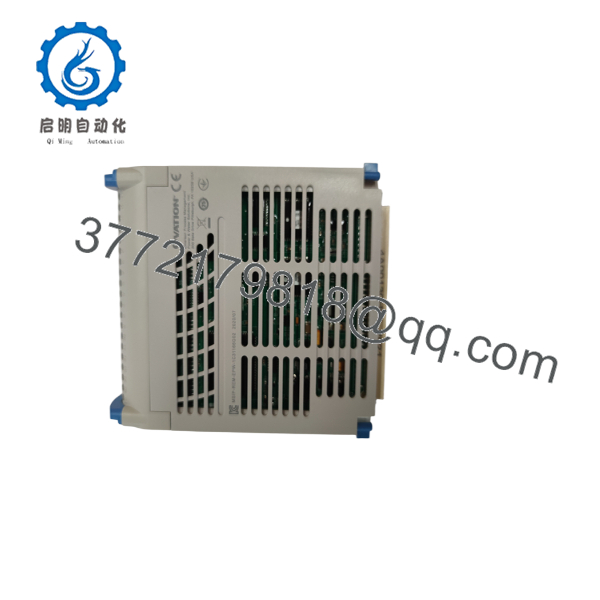
1C31166G02
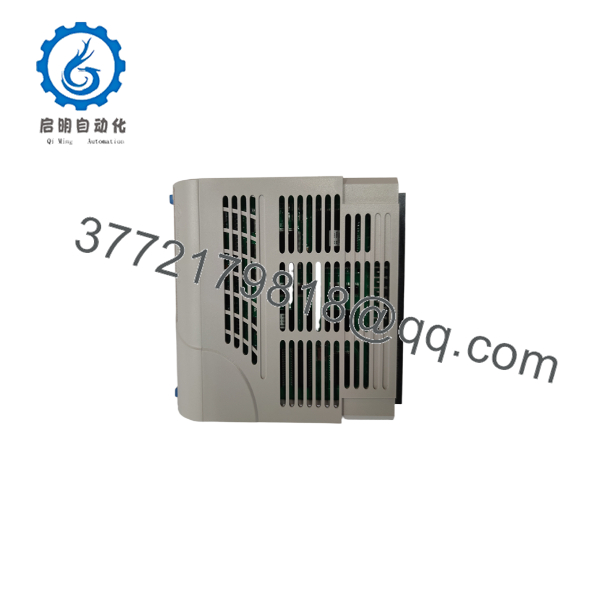
1C31166G02
Installation & Configuration Guide
Stage 1: Pre-Installation Preparation — Approximately 5–10 Minutes
⚠️ Safety First: Notify operations, place affected control functions in the approved safe state, and follow site LOTO procedures. Do not assume the Serial Link Controller can be removed under power without confirmation from the applicable Ovation maintenance documentation.
Tools Required
- ESD wrist strap
- PH1 screwdriver, where applicable
- Digital multimeter
- Wire labels
- Smartphone/camera
- Approved Ovation hardware and communication documentation
Data Backup
- Record the complete module number: 1C31166G02.
- Record the installed PMOD number: 1C31169G01 or 1C31169G02.
- Photograph the EMOD/PMOD assembly.
- Photograph the J1/J2 cable connections.
- Record the Ovation I/O slot and node location.
- Record serial communication parameters: baud rate, parity, data bits, stop bits, and addressing.
- Capture the existing Link Controller configuration before shutdown.
Stage 2: Removing the Old Module — Approximately 5 Minutes
- Place the affected communication link in its approved maintenance state.
- Remove the applicable cover or retaining hardware.
- Label J1 and J2 cables before disconnecting them.
- Disconnect the cables without pulling on the conductors.
- Release the module retaining mechanism.
- Withdraw the EMOD straight from the Ovation base.
- Keep the PMOD with the original EMOD unless the PMOD itself is also being replaced.
- Inspect the connectors and backplane for bent pins, contamination, or mechanical damage.
⚠️ Keep the old module until commissioning is complete. Serial communication faults are much easier to diagnose when you can compare the old EMOD/PMOD arrangement directly.
Stage 3: Installing the New Module — Approximately 5–10 Minutes
- Verify the replacement marking is exactly 1C31166G02.
- Confirm the PMOD matches the original installation.
- For an RS-232 application, verify the expected 1C31169G01 PMOD arrangement.
- For four-wire RS-485/RS-422, verify the expected 1C31169G02 PMOD arrangement.
- Connect the grounded ESD wrist strap.
- Inspect all mating connectors.
- Insert the EMOD into the correct Ovation base.
- Seat the module completely and secure the retaining mechanism.
- Reconnect J1/J2 cables exactly as documented.
- Verify shield and signal wiring against the approved wiring diagram.
Self-Checklist
- EMOD = 1C31166G02
- Correct PMOD installed
- Correct I/O slot
- J1 cable correctly identified
- J2 cable correctly identified
- RS-232 or RS-485/RS-422 configuration confirmed
- Communication parameters documented
- Connectors fully seated
- Retaining mechanism locked
Stage 4: Power-On & Testing — Approximately 10–15 Minutes
- Inspect the complete installation before energizing.
- Verify that no cable has been pinched or incorrectly inserted.
- Energize the affected Ovation hardware according to the approved procedure.
- Observe module diagnostic/status indicators.
- Verify the Ovation controller recognizes the Link Controller.
- Confirm the configured PMOD/interface.
- Verify baud rate, parity, stop bits, and communication addressing.
- Establish communication with the connected third-party device.
- Check transmit and receive activity.
- Confirm data integrity at the Ovation application level.
- Run a controlled read/write or command test where the connected system permits it.
- Return the communication link to normal operation after operations approval.
⚠️ Troubleshooting Note: If the controller is recognized but the external device does not communicate, check the PMOD first. Then verify J2 wiring, RS-232 versus RS-485/RS-422 selection, baud rate, parity, addressing, termination, and the third-party device configuration.
Technical Pitfall & Survival Guide
1. EMOD/PMOD Mismatch
❗ This is the most important replacement issue.
The 1C31166G02 is the EMOD. The serial interface is established through the appropriate PMOD. Emerson’s planning information identifies 1C31169G01 for RS-232 and 1C31169G02 for RS-485/RS-422 four-wire operation.
I’ve seen replacement orders specify only “1C31166G02 Serial Link Controller.” That is incomplete information when the PMOD is being replaced as well.
2. Serial Parameter Mismatch
The new controller can be physically correct and still appear dead to the external device.
Check:
- Baud rate
- Data bits
- Stop bits
- Parity
- Device address
- Master/slave configuration
- Protocol/application algorithm
Do not change several parameters at once. Capture the original settings first.
3. RS-485 Wiring
❗ RS-485/RS-422 four-wire systems require careful TX/RX polarity and pair assignment.
Verify TX+, TX−, RX+, and RX− against the actual wiring documentation. Do not assume the terminal sequence is identical to another serial card.
4. Termination and Shielding
For RS-485 installations, incorrect termination can create intermittent communication errors that look like software faults.
Check termination only where the network topology requires it. Confirm shield grounding according to the plant’s approved instrumentation practice.
5. Legacy Software Compatibility
The planning documentation states that the applicable SLC algorithm must reside in the Ovation Controller for the Link Controller to operate.
Replacing the hardware does not automatically install or correct the required controller-side configuration.
Frequently Asked Questions (FAQ)
1. What is Emerson 1C31166G02?
The 1C31166G02 is an Emerson Ovation Serial Link Controller EMOD using the R1120 CPU architecture. Emerson’s spare-parts list explicitly identifies it as “EMOD ASSY, LINK CONTROLLER (R1120 CPU).”
2. What does the 1C31166G02 communicate with?
It provides the processing hardware for serial communication between an Ovation control system and external equipment. Typical applications include third-party PLCs, RTUs, protection equipment, and other serial subsystems.
The exact physical interface depends on the PMOD installed with the EMOD.
3. What PMOD is used with 1C31166G02?
Two relevant configurations are documented:
- 1C31169G01: RS-232 serial link
- 1C31169G02: RS-485/RS-422 four-wire serial link
The Ovation planning documentation specifically associates these PMODs with the 1C31166G02/1C31166G01 Link Controller EMOD family.
4. Is 1C31166G02 obsolete?
It is a legacy Ovation component intended for spare/replacement applications. Emerson’s Ovation planning documentation marks the relevant Link Controller configuration as “Not for new projects. Used for spares and replacements only.”
That makes physical stock and revision verification important for shutdown planning.
5. Can I hot-swap the 1C31166G02?
Do not assume it can be hot-swapped.
Some Ovation architectures support online maintenance procedures, but the permissible replacement method depends on the installed base, node configuration, system revision, and plant procedures. If your approved documentation does not explicitly authorize live replacement, de-energize the affected hardware under LOTO.
6. Will replacing 1C31166G02 erase the Ovation control logic?
The 1C31166G02 is a Link Controller EMOD rather than the primary Ovation controller executing the plant application logic. Replacing it should therefore not be treated as replacing the main control processor.
However, the SLC algorithm and communication configuration reside within the overall Ovation control-system configuration. The planning documentation specifically states that the appropriate SLC algorithm must reside in the Ovation Controller.
Back up and document the configuration before removing the hardware.
7. Is 1C31166G02 available as new original stock?
Availability varies because this is a legacy Ovation spare. Current suppliers list both in-stock and quote-only inventory, and supplier descriptions can contain conflicting specifications.
For a critical replacement, request photographs of the actual 1C31166G02, nameplate/traceability information, exact PMOD configuration, condition statement, test report, warranty terms, and confirmed physical stock before purchase.



