
 WhatsApp: +86 16626708626
 Email:
  Phone: +86 16626708626
Description
Key Technical Specifications
| Parameter | Value |
| Manufacturer | Enterasys Networks / Extreme Networks |
| Part Number | 7G4270-12 |
| Port Count | 12 Ports |
| Interface Type | Small Form-factor Pluggable (SFP) Mini-GBIC slots |
| Data Transfer Rate | 1 Gbps per port (Line-rate switching performance) |
| Form Factor | Plug-in module for Matrix E7 chassis systems |
| Backplane Connectivity | High-speed parallel chassis backplane interface |
| Media Type Supported | SX, LX, LH, and FX fiber or copper SFPs (depending on optic selection) |
| Power Consumption | Approximately 45 W maximum draw from chassis backplane |
| Operating Temperature | 0 to +50 °C (32 to 122 °F) |
| Storage Temperature | −40 to +70 °C (−40 to 158 °F) |
| Relative Humidity | 5% to 95% non-condensing |
Product Introduction & Supply Chain Strategy
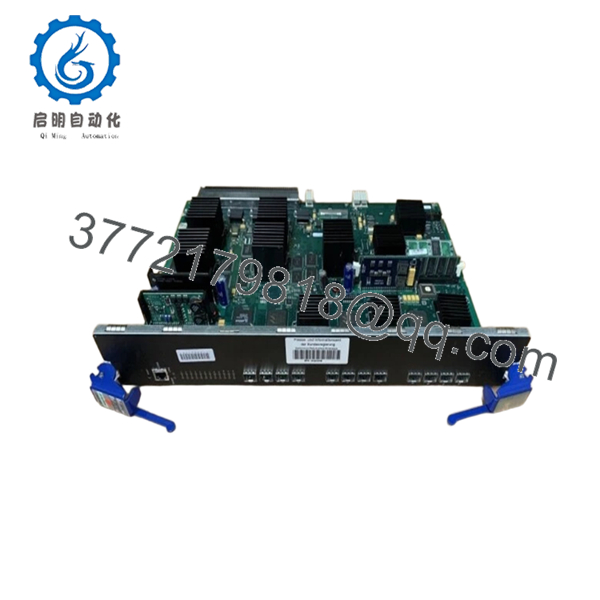
The Enterasys 7G4270-12 is a 12-port Gigabit Ethernet SFP expansion module designed exclusively for the Matrix E7 chassis switching platform. It delivers wire-speed switching capabilities across all ports, distributing localized processing power directly on the module to maximize overall network throughput and uptime. Engineered for enterprise and industrial infrastructure backbone aggregation, this module connects high-speed fiber or copper links to the central switching fabric, ensuring zero packet loss during peak communication spikes.
Procuring this module as a Brand New Surplus unit is a critical strategic decision for minimizing Total Cost of Ownership (TCO) in legacy facilities. Because Enterasys has designated this series as End-of-Life (EOL), plant managers face severe stock-out incidents if an active module fails. Relying on cheap, second-hand components introduces extreme risk; degraded capacitors or micro-fractured solder joints in used network cards often trigger intermittent packet drop faults that halt data collection. Securing factory-sealed, unused inventory guarantees true OEM reliability, allowing procurement teams to extend the operational life of their existing network architecture without facing the multimillion-dollar capital expenditure of an unplanned, wholesale platform migration.

- 7G4270-12
Installation & Configuration Guide
Stage 1: Pre-Installation (Prep & Safety)
- Verify that the current chassis configuration has a verified power budget. Ensure your existing power supply modules can accommodate the 45 W load of the new card.
- Put on a grounded, static-dissipative ESD wrist strap and connect it to the chassis grounding terminal.
- Before pulling any existing hardware, connect via console to log the active system configuration, firmware baseline, and current port assignments.
- Check the faceplate of the 7G4270-12 module for any physical shipping anomalies or configuration jumpers.
Stage 2: Removal
- Unclip and carefully extract all optical or copper SFP transceivers from the faceplate ports of the failed card. Label every fiber optic pair to ensure exact port mapping layout retention.
- Loosen the captive retaining screws located at the top and bottom of the module ejector handles.
- Pivot the top and bottom ejector handles outward simultaneously to unseat the module from the high-density chassis backplane connector.
- Slide the module smoothly straight out along the chassis card guides, ensuring you do not twist or torque the PCB, which can score adjacent cards. Immediately place the old card into an anti-static shielding bag.
Stage 3: Installation (Clone & Seat)
- Unpack the New Surplus 7G4270-12 card inside an ESD-protected zone. Avoid touching the gold contacts on the rear backplane connector.
- Align the module housing with the open vertical or horizontal card guides within the Matrix E7 chassis slot.
- Slide the card inward until the ejector handles meet the lip of the chassis frame.
- Press both ejector handles inward symmetrically until they snap flat against the front faceplate. This cam action forces the module completely into the backplane plug. Tighten the captive mounting screws to torque specs.
Stage 4: Power-On & Testing
- Observe the faceplate LED indicators as the chassis establishes communication. The CPU/Status LED must transition from amber to a solid or blinking green pattern, indicating a successful power-on self-test (POST).
- Insert your clean SFP transceivers back into their designated ports.
- Connect your terminal emulator to confirm the system automatically discovers the new hardware. Execute local loopback tests on the newly installed ports to ensure physical path continuity.
- Verify port status configurations using standard system command lines to ensure the running configuration matches the historical baseline.
Firmware/Software Versions & Upgrade Notes
Recommended Firmware Baseline
This module requires an operational baseline of Enterasys Matrix E7 Firmware Version 5.x or higher for comprehensive feature recognition. Inserting this module into a chassis running older, unpatched legacy code may cause the master management module to flag the card as an “unsupported device” or result in failure to initialize full 1 Gbps throughput across all 12 SFP interfaces.
Compatibility & Architecture Risk Warnings
- Version Parity Lock: Ensure all interface modules within the shared fabric run compatible microcode. Upgrading or downgrading a single card’s firmware while a mismatched cluster remains online can cause internal distributed switching protocol timeouts, dropping whole network segments.
- Firmware Mismatch Protocol: If the newly installed 7G4270-12 holds an outdated firmware revision compared to your active Matrix operational code, do not attempt to force the boot image without backing up the startup-config file. Always verify firmware compatibility via a isolated test chassis environment whenever possible before deployment on a live processing network.
Frequently Asked Questions (FAQ)
Q: Why should I buy this New Surplus unit rather than a much cheaper refurbished or used 7G4270-12 card?
A: Refurbished network modules carry severe hidden performance risks. Network infrastructure switches operate continuously under thermal stress. Used cards often suffer from dried-out electrolytic capacitors or micro-cracks in the internal circuit layers from past overheating incidents. This causes intermittent packet loss, port flapping, and random reboots that cost thousands of dollars in troubleshooting time. This New Surplus card is 100% unused OEM inventory with zero running hours, guaranteeing pristine factory physical integrity and reliable long-term service lifespans.
Q: Is this Enterasys 7G4270-12 module brand new, or has it been pulled from a decommissioned system?
A: This card is unconditionally Brand New Surplus. It has never been installed in a live rack, never handled by third-party repair operations, and never pulled from a decommissioned setup. It originates from clean, overstock inventory and remains in its original static-shielded packaging, opened solely for our inbound optical and electrical quality verification checks.
Q: What is the current manufacturing lifecycle status of this module? How does that impact stocking requirements?
A: The Enterasys 7G4270-12 has reached official End-of-Life (EOL) status and is no longer supported or produced by the OEM. Because replacement modules cannot be sourced via standard distribution channels, it is highly recommended to maintain 1–2 units on-site as insurance policy buffer stock. This prevents a catastrophic backbone network failure from halting facility operations for weeks while you source a rare, verified replacement part.
Q: Does this module support hot-swapping while the main chassis is fully powered and operational?
A: Yes. The Matrix E7 chassis architecture supports hot-swapping for this module class. However, before hot-unplugging any active card, you must manually disable or shut down the active ports via the command line software interface to eliminate sudden arc flash spikes or software disruption across the backplane during removal.
Q: Do I need to reconfigure or program the new 7G4270-12 card after slotting it into the system?
A: The module itself does not store the overall running system configuration on its local board; the central matrix management software handles policy distribution. Once the card successfully finishes its power-on handshake, the chassis automatically pushes the pre-existing slot configurations to the new hardware. However, if you are moving ports or changing media types via the SFP slots, those individual interfaces will require manual verification.
Q: What kind of warranty coverage comes with this New Surplus product?
A: Unlike typical used components that offer a risky 30-day warranty, we stand behind our verified New Surplus inventory with a comprehensive 1 year replacement warranty. If any component level issue arises during the warranty window, we will provide a direct swap unit immediately from our available stock to keep your plant online.



