
 WhatsApp: +86 16626708626
 Email:
  Phone: +86 16626708626
Description
Key Technical Specifications
- Model: G408-0001
- Manufacturer: Eurotherm (Action Instruments Ultra SlimPak Series)
- Module Type: DC Powered DC Input Field Configurable Isolator
- Mounting: DIN rail mount
- Power Supply: 9 to 30 VDC
- Typical Power Consumption: 1.5 W
- Input Configuration: Field selectable DC voltage or DC current
- Voltage Input Range: 10 mV to 100 V
- Current Input Range: 1 mA to 100 mA
- Standard Factory Input Setting: 4–20 mA
- Standard Factory Output Setting: 4–20 mA
- Output Voltage Ranges: 0–5 V, 0–10 V
- Output Current Ranges: 0–1 mA, 0–20 mA, 4–20 mA
- Isolation Voltage: 1800 VDC between input, output, and power supply
- Accuracy: ±0.1% typical
- Input Adjustment: Zero and span adjustment, approximately 50% range adjustment capability
- Operation Mode: Normal or reverse signal operation selectable
- Signal Indication: Front green LED power/input status monitor
- Operating Temperature: 0 to 55 °C
- Installation Environment: Industrial control cabinet applications
- Compliance: RoHS compliant
The Eurotherm G408-0001 Ultra SlimPak is a DIN rail-mounted DC signal conditioner providing isolated proportional DC output from DC voltage or current inputs. The module supports configurable input ranges from 10 mV to 100 V and 1 mA to 100 mA, with 1800 VDC isolation between input, output, and power circuits.
Product Introduction
The Eurotherm G408-0001 is a field-configurable DC signal isolator designed for industrial automation and process control systems. It converts and electrically isolates analog voltage or current signals between field devices, PLCs, DCS systems, and instrumentation equipment.
The Ultra SlimPak design allows high-density DIN rail installation while maintaining signal isolation for applications requiring ground loop elimination, analog scaling, and signal transmission between different control system sections.
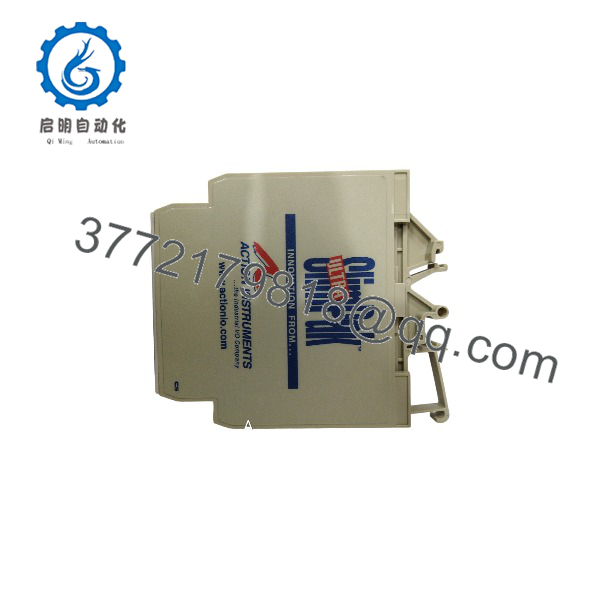
G408-0001
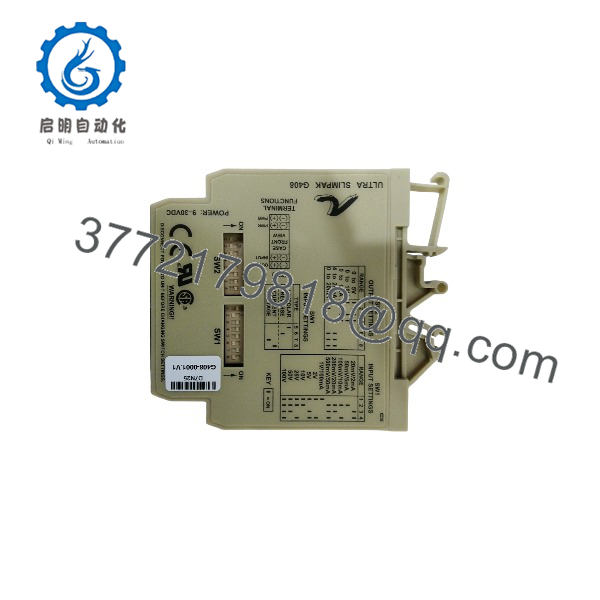
G408-0001
Installation & Configuration Guide
Stage 1: Pre-Installation Preparation (Approx. 10 minutes)
⚠️ Safety First:
Before replacing the Eurotherm G408-0001:
- Notify operations personnel before cabinet maintenance.
- Place affected control loops into maintenance mode.
- Disconnect the 9–30 VDC power supply.
- Verify voltage absence before removing wiring.
Tools Required:
- ESD wrist strap
- Digital multimeter
- Small screwdriver
- Wire labels
- Smartphone for terminal photos
Data Backup:
Before removing the existing module:
- Record input signal type.
- Record output signal range.
- Photograph switch settings.
- Document zero/span adjustment positions.
- Record PLC/DCS analog scaling parameters.
Stage 2: Removing the Old Module (Approx. 10 minutes)
Steps:
- Disconnect DC power supply.
- Verify supply voltage with a multimeter.
- Label input, output, and power terminals.
- Remove field wiring carefully.
- Release DIN rail mounting clip.
- Remove the G408-0001 module from the rail.
⚠️ Note:
Do not change internal switch settings while power is applied. Incorrect adjustment under power can damage the module.
Stage 3: Installing the New Module (Approx. 15 minutes)
Steps:
- Verify the replacement part number: Eurotherm G408-0001.
- Install the module onto the DIN rail.
- Confirm the module is mechanically locked.
- Connect the DC supply terminals.
- Reconnect analog input and output wiring.
Configuration Clone (Critical):
Match the original configuration:
- Input type: voltage or current.
- Input range selection.
- Output range selection.
- Normal/reverse operation.
- Zero adjustment.
- Span adjustment.
uses selector switches for input and output configuration. SW1 selects input type/range, while SW2 selects output type.
Self-Checklist:
- Correct model confirmed
- Power polarity verified
- Input range matched
- Output range matched
- Wiring secured
Stage 4: Power-On & Testing (Approx. 15 minutes)
Pre-Power Check:
- Verify DC supply polarity.
- Confirm analog wiring.
- Check for short circuits.
- Verify shield grounding arrangement.
Power-On Steps:
- Apply 9–30 VDC power.
- Confirm green LED operation.
- Apply a known input signal.
- Measure output current/voltage.
- Compare output value with expected scaling.
- Verify PLC/DCS engineering value.
⚠️ Troubleshooting Note:
- LED flashing rapidly may indicate input above approximately 110% of configured range.
- Incorrect output values usually indicate wrong switch configuration.
- Unstable signals may require checking cable shielding and grounding.
Frequently Asked Questions (FAQ)
Q1: What does the Euroth do?
isolates and converts DC analog signals. It receives voltage or current signals and produces a proportional isolated output for PLC, DCS, or instrumentation systems.
Q2: Is a PLC input module?
No. It is an analog signal conditioning device. It is installed before PLC/DCS analog channels to provide isolation, conversion, and signal protection.
Q3: What is the factory default configuration?
The standard factory configuration is:
- Input: 4–20 mA
- Output: 4–20 mA
The module can be reconfigured for other voltage and current ranges using internal switches.
Q4: Can replace another analog isolator?
Yes, if the electrical requirements match. Before replacement, verify:
- Input signal range.
- Output signal range.
- Supply voltage.
- Isolation requirements.
- Cabinet mounting space.
Q5: Is Euroth obsolete?
The Ultra SlimPak family is a legacy signal-conditioning product. Some distributors list remaining inventory, while others identify specific variants as discontinued. Availability should be confirmed before procurement.
Q6: Why use instead of directly connecting a transmitter to a PLC?
The isolator provides electrical separation between field instruments and control equipment. It helps prevent ground loop problems and allows signal conversion between incompatible analog ranges.
Q7: What should be checked before ordering Euroth?
Verify:
- Exact model numb
- Input signal type
- Output signal type
- Supply voltage
- Existing configuration settings
- Number of analog channels required
- Physical mounting arrangement
For replacement projects, matching the existing signal configuration is more important than only matching the part number.



