
 WhatsApp: +86 16626708626
 Email:
  Phone: +86 16626708626
Description
Key Technical Specifications
| Parameter | Value |
| Manufacturer | Extreme Networks / Avaya |
| Part Number | AL590004X-E6 |
| Interface Options | 4 x 10 Gigabit Ethernet SFP+ slots |
| Data Signaling Rate | 10 Gbps per port (Supports line-rate wire speed) |
| Hardware Encryption | IEEE 802.1AE MacSec link-layer encryption enabled |
| Form Factor | Hot-pluggable slide-in expansion module |
| Supported Media | 10GBase-SR, 10GBase-LR, Direct Attach Copper (DAC) twinax |
| Chassis Compatibility | ERS 5952GTS, ERS 5952GTS-PWR+, ERS 59100 Series switches |
| Throughput Performance | 80 Gbps full-duplex aggregate switching capacity |
| Power Consumption | Drawing directly from chassis internal dc rails (approx. 25 W max) |
| Operating Temperature | 0 to +50 °C (32 to 122 °F) |
Product Introduction & Supply Chain Strategy
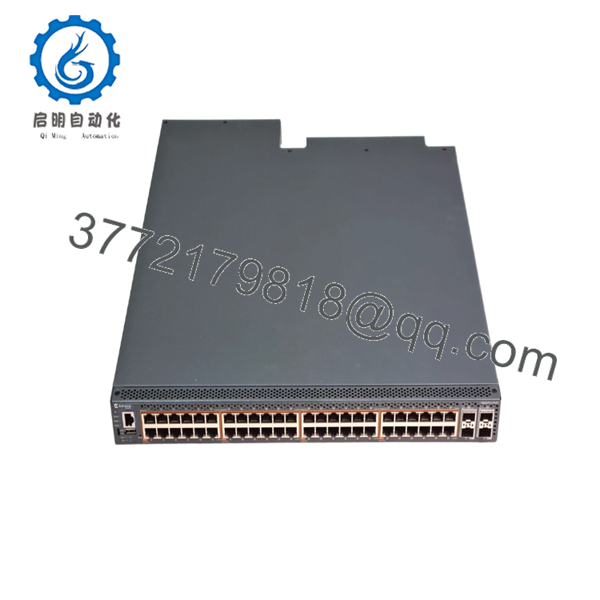
The Extreme Avaya AL590004X-E6 is a high-performance, 4-port 10 Gigabit Ethernet SFP+ expansion daughter card engineered specifically for the ERS 5900 series Ethernet Routing Switches. By inserting directly into the front-facing option slot of the host chassis, this module delivers crucial 10GbE fiber uplink aggregation capabilities to transition edge traffic up to core data center backbones. Featuring hardware-accelerated IEEE 802.1AE MacSec capabilities, it ensures secure, line-rate data encryption across local fiber links without inducing processing latency spikes.
For network architecture administrators maintaining legacy Avaya or Extreme enterprise structures, acquiring this component as a Brand New Surplus item is a vital supply chain insurance policy. Because this product line is EOL, the risk of extended stock-out incidents threatens plant operations if an uplink interface fails. Turning to used or refurbished alternative modules exposes systems to packet transport drops; micro-fissures in used transceiver pins can cause data corruption under high thermal load. Securing factory-sealed, unused surplus cards ensures total hardware parity, zero running hours on internal components, and low Total Cost of Ownership (TCO) compared to wholesale system overhauls.

- AL590004X-E6
- AL590004X-E6
Installation & Configuration Guide
Stage 1: Pre-Installation (Prep & Safety)
- Confirm the host ERS 5900 switch is stable. Check the power utilization logs to verify backplane capacity can handle the 25 W module overhead.
- Secure a grounded, anti-static ESD wrist strap around your wrist and connect the clip to an unpainted metal surface on the switch rack.
- Access the switch console via SSH or local connection to export a fresh copy of the running-config file and document all active interface settings.
- Keep the protective plastic dust caps inserted over the 4 SFP+ slots until physical insertion is completed.
Stage 2: Removal
- Unplug all optical fibers or Direct Attach Copper (DAC) cables from the slots of the faulty module.
- Using a Phillips screwdriver, loosen the captive retaining screws on both sides of the option slot cover plate or the failed expansion card faceplate.
- Grip the extraction handles firmly and pull the old module straight out along its integrated guide rails, avoiding contact with adjacent components.
- Slide the extracted module straight into a static shielding bag for protection or diagnostic review.
Stage 3: Installation (Clone & Seat)
- Extract the New Surplus AL590004X-E6 card from its factory packaging inside your ESD-safe working zone.
- Align the card edge connector carefully with the interior slide tracks of the open option slot on the ERS switch front panel.
- Slide the card firmly forward into the bay until the faceplate sits flush against the switch frame, establishing a precise seat with the interior backplane.
- Tighten the side captive screws manually to lock the module securely into position.
Stage 4: Power-On & Testing
- Check the front panel LEDs. The unit status indicator will initialize, flashing temporarily before changing to solid green, indicating a successful POST.
- Insert your clean SFP+ transceivers into the slots and attach your network cables.
- Execute the command
show sys plug-invia console to confirm the OS detects the module as a valid 4-port 10GbE card. - Monitor port link statuses using system commands to ensure proper light absorption levels and error-free line execution.
Firmware/Software Versions & Upgrade Notes
Operating Software Requirements
The AL590004X-E6 option card requires ERS 5900 Operating Software Agent Code Version 7.0 or higher for full MacSec and 10GbE functionality. Inserting the module into an asset utilizing older, unpatched code may leave the interfaces un-routable.
Software Sync Hazards
- Feature Loss Risks: Attempting configuration synchronization with firmware that predates module support will lead to immediate boot failures or drop interface initialization routines.
- Hot-Swap Restrictions: While the physical design permits hot-swapping, you must first administratively disable the option slot within the operating software before replacing hardware. This precaution prevents unexpected voltage transients from tripping internal circuit fuses.
Frequently Asked Questions (FAQ)
Q: Why is a New Surplus AL590004X-E6 module a better investment than an ordinary used card?
A: Used expansion cards are typically pulled from decommissioned high-traffic data centers where they were subjected to years of continuous heat stress. Over time, heat causes solder point degradation and component aging, resulting in intermittent link dropouts. This New Surplus module has zero operating hours, ensuring perfect structural integrity, reliable performance, and an extended service lifespan that reduces your overall maintenance risk.
Q: Are these units authentic Extreme/Avaya products or third-party clones?
A: Every unit we supply is 100% Brand New Surplus / Original New stock from genuine OEM channels. They have never been deployed in an active production chassis, have never undergone repairs, and are untouched by third-party refurbishing companies. They arrive in original factory-sealed static protection packaging, opened only for strict internal quality control inspections.
Q: Can this option module support older 1Gbps SFP transceivers if needed?
A: Yes. The SFP+ slots on the AL590004X-E6 are backward compatible with standard 1Gbps SFP modules. However, you must manually specify the port speed settings via the command line interface to override the default 10Gbps line rate autosensing function.
Q: Does this card require any specialized separate licenses to operate the MacSec encryption?
A: The underlying physical layer MacSec capability is built into the card’s hardware chipset. However, depending on the host switch software edition (Advanced vs. Base licenses), a separate system-wide software feature license may be required to enable MacSec control protocols.
Q: Will long-term storage in a warehouse affect the internal memory or functionality of the card?
A: No. The module does not rely on an internal backup battery to preserve its base hardware profiles or identification data. It uses non-volatile storage components that can sit unpowered in a temperature-controlled spare parts crib for years without data loss.
Q: What type of warranty protection is provided with this legacy component?
A: To match the high reliability of our New Surplus inventory, we back this module with an extended 1 year replacement warranty. If a hardware component fails within the warranty period, we will fast-track a replacement directly from our available stock to minimize your downtime.



