
 WhatsApp: +86 16626708626
 Email:
  Phone: +86 16626708626
Description
3. Key Technical Specifications
| Parameter | Value |
|---|---|
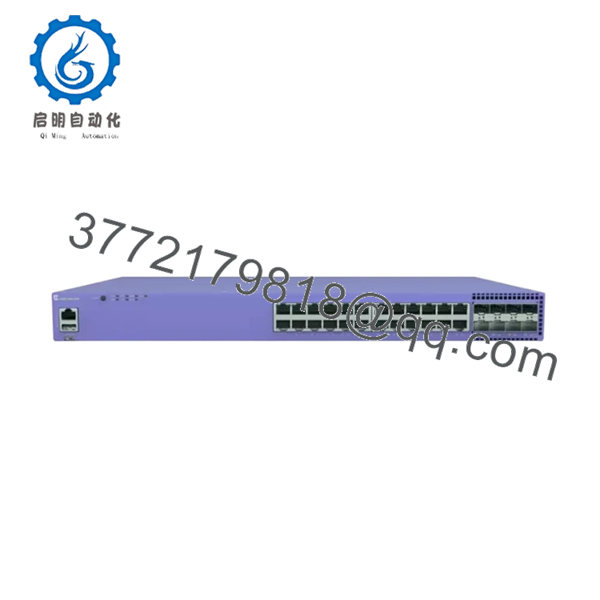
| Model | 5320-24P-8XE |
| Product Type | Universal Edge Managed Switch |
| Access Ports | 24 × 10/100/1000BASE-T RJ45 with IEEE 802.3af/at PoE+ |
| Uplink Ports | 8 × 10Gb SFP+ |
| PoE Budget | 370 W |
| Maximum PoE Output | 30 W per port |
| Switching Architecture | Non-blocking, wire-speed forwarding |
| Stacking | Up to 8 switches, 40 Gbps stacking bandwidth |
| Security | MACsec support on access and uplink ports |
| Management | CLI, SNMP, Web, ExtremeCloud IQ |
| Operating Temperature | Standard models: 0 °C to 50 °C (extended-temperature variants available) |
| Power Input | Internal AC Power Supply |
| Operating System | ExtremeXOS (Switch Engine), with selected Universal Platform deployment options |
The 24-port model includes eight dedicated 10 Gb SFP+ uplink interfaces and supports hardware stacking of up to eight switches, making it suitable for campus edge deployments requiring high uplink bandwidth.
4. Product Introduction
The Extreme Networks 5320-24P-8XE is a Universal Edge Switch Platform designed for enterprise campus access, branch offices, education, healthcare, and industrial Ethernet networks. It combines twenty-four Gigabit PoE+ access ports with eight dedicated 10 Gigabit SFP+ uplinks, delivering high-density edge connectivity while supporting advanced Layer 2 and Layer 3 networking features.
In production environments, the 5320 Series is commonly selected for organizations migrating toward modern Extreme fabrics while maintaining compatibility with existing ExtremeXOS deployments. The integrated 370 W PoE budget, MACsec encryption, wire-speed forwarding, and hardware stacking simplify network expansion without requiring additional aggregation hardware.
5. Installation & Configuration Guide
Stage 1 – Pre-Installation Preparation (10 Minutes)
⚠️ Safety First
- Notify operations personnel of the maintenance window.
- Verify redundant uplinks are operational.
- Perform Lock-Out/Tag-Out on the AC power source.
- Wait 5 minutes before servicing the switch.
Tools Required
- Grounded ESD wrist strap
- PH1 screwdriver
- Fluke 115 digital multimeter
- Cable labels
- Smartphone for documenting connections
Data Backup
- Export the running configuration.
- Save the startup configuration.
- Record the management IP address.
- Document VLAN assignments.
- Photograph every copper and fiber connection.
- Record the installed Switch Engine firmware version.
Stage 2 – Removing the Existing Switch (10 Minutes)
- Label every Ethernet and fiber cable.
- Remove all SFP+ transceivers carefully.
- Disconnect RJ45 patch cables.
- Remove AC power.
- Remove rack mounting screws.
- Slide the chassis straight out while supporting its weight evenly.
⚠️ Keep the original switch available until the replacement has completed production testing successfully.
Stage 3 – Installing the Replacement (10–15 Minutes)
- Wear a grounded ESD wrist strap.
- Verify the replacement model is exactly 5320-24P-8XE.
- Install the switch in the rack.
- Secure the mounting screws evenly.
- Reinstall SFP+ modules.
- Restore all Ethernet connections.
- Connect AC power.
Self-Checklist
- ☑ Model verified
- ☑ Rack secured
- ☑ SFP+ modules installed
- ☑ Cabling restored
- ☑ Ground connection confirmed
Stage 4 – Power-On & Testing (15 Minutes)
Pre-Power Check
- Measure the AC input voltage.
- Verify no short circuit exists on the power input.
- Inspect SFP+ transceivers before energizing the switch.
Startup Procedure
- Apply AC power.
- Observe the POST sequence.
- Confirm the Power and System LEDs indicate normal operation.
- Connect through the console or management interface.
- Verify the firmware version.
- Restore the saved configuration if necessary.
- Verify VLAN operation.
- Test PoE delivery on multiple ports.
- Verify all 10 Gb uplinks.
- Confirm stack membership if deployed.
⚠️ Troubleshooting Notes
- Solid fault LED: Check firmware compatibility before replacing hardware.
- 10 Gb uplinks remain down: Verify supported SFP+ optics and port configuration.
- Stack member fails to join: Confirm every switch is running a compatible software release.

- 5320-24P-8XE
Common Technical Pitfalls
❗ Firmware Revision Mismatch
One lesson from field deployments is that software consistency matters as much as hardware compatibility. I’ve seen a replacement switch boot successfully but fail to establish 10 Gb uplinks because it was running an older Switch Engine release. Record the original firmware version before removal and request the closest available revision. Beginning with Switch Engine 32.6, the separate 10 Gb port-speed license is no longer required.
❗ Unsupported Optical Modules
Not every third-party SFP+ module initializes correctly. Before replacing hardware, verify that installed optics are listed in the compatibility matrix to avoid unnecessary troubleshooting.
❗ PoE Budget Planning
The switch provides a 370 W PoE budget. Calculate the total power draw before connecting wireless access points, PTZ cameras, and high-power VoIP devices. Although each port supports up to 30 W, the total budget is shared across all powered ports.
❗ Stack Cabling
Stacking usually works reliably when every member runs the same firmware. Mixing software revisions is a common reason for stack formation failures during maintenance windows.
❗ Electrostatic Discharge (ESD)
Always use a grounded wrist strap and ESD work surface. Static damage often appears later as intermittent SFP+ or PoE faults rather than immediate hardware failure.
Keep these checks in mind and you’ll eliminate most of the common issues encountered during 5320 Series replacements.
6. Frequently Asked Questions (FAQ)
Q1. Can I hot-swap the 5320-24P-8XE?
No. This is a standalone fixed-configuration switch, not a chassis line card. Shut the unit down before replacement to prevent hardware damage and configuration issues.
Q2. Does this model support 10 Gigabit uplinks?
Yes. The switch includes eight dedicated 10Gb SFP+ uplink ports, providing high-bandwidth connectivity for aggregation and distribution layers.
Q3. What is the available PoE power budget?
The 5320-24P-8XE provides a 370 W PoE budget and supports IEEE 802.3af/802.3at with up to 30 W per port. Plan the connected device load carefully to remain within the total available power.
Q4. Will replacing the switch erase my configuration?
No, provided you’ve backed up the startup and running configurations before maintenance. Restore the saved configuration after installation and verify VLANs, routing, and uplinks before returning the switch to production.
Q5. Why is New Surplus hardware priced below the original OEM list price?
New Surplus equipment is unused inventory released through the secondary market after distribution channels change or projects are canceled. Pricing reflects current market availability rather than the original manufacturer list price. It differs from refurbished equipment, which has been previously deployed and then tested.
Q6. What quality inspections are completed before shipment?
Every 5320-24P-8XE undergoes a documented inspection process that includes:
- OEM model and serial number verification
- Visual inspection for corrosion, damaged connectors, and repair marks
- Power-on self-test
- RJ45 Ethernet port verification
- 10 Gb SFP+ communication testing
- PoE output verification under load
- Firmware version documentation
- Insulation and grounding checks
- Final QC approval
- ESD-safe packaging with anti-static protection and heavy-duty shipping materials
Power-on videos, port test reports, and inspection photographs are available upon request.



