
 WhatsApp: +86 16626708626
 Email:
  Phone: +86 16626708626
Description
3. Key Technical Specifications
| Parameter | Value |
|---|---|
| Model | BDXA-10G48T |
| Manufacturer | Extreme Networks |
| Product Type | 10 Gigabit Ethernet I/O Module |
| Platform | BlackDiamond X8 Series Chassis |
| Interface Type | 48 × 10GBASE-T RJ45 |
| Supported Speeds | 100 Mbps / 1 Gbps / 10 Gbps |
| Switching Performance | Wire-speed forwarding on all ports |
| Maximum Density | Up to 384 × 10GbE copper ports in a fully populated X8 chassis |
| Fabric Compatibility | 2.56 Tbps and 5.12 Tbps Fabric Modules |
| Operating System | ExtremeXOS |
| Minimum ExtremeXOS Version | 15.3.1 |
| Minimum BootROM Version | 1.0.0.11 |
| Last Supported ExtremeXOS | 16.x |
| Installation | Hot-insert capability depends on chassis redundancy and maintenance procedure |
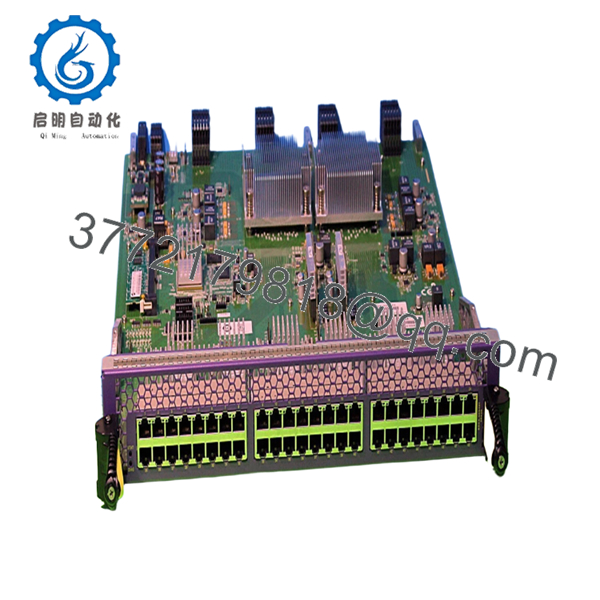
The BDXA-10G48T provides 48 copper 10GBASE-T interfaces and supports wire-speed 100/1000/10000 Mbps Ethernet. Up to eight modules can be installed in a BlackDiamond X8 chassis, providing as many as 384 non-blocking 10GbE RJ45 ports.
4. Product Introduction
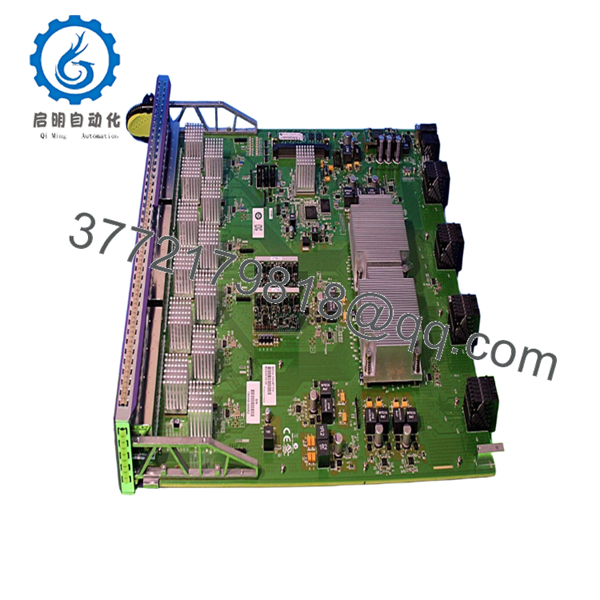
The Extreme Networks BDXA-10G48T is a high-density 10 Gigabit Ethernet line card designed for the BlackDiamond X Series modular switching platform. It delivers forty-eight 10GBASE-T copper interfaces for enterprise core, data center aggregation, and high-capacity campus deployments.
Compared with lower-speed Gigabit modules, the BDXA-10G48T enables direct 10 Gigabit copper connectivity while maintaining wire-speed forwarding across every port. It operates with both 2.56 Tbps and 5.12 Tbps fabric modules and supports ExtremeXOS software for advanced Layer 2 and Layer 3 networking.

- BDXA-10G48T
- BDXA-10G48T
5. Installation & Configuration Guide
Stage 1 – Pre-Installation Preparation (10 Minutes)
⚠️ Safety First
- Notify operations of the scheduled maintenance.
- Save the running configuration.
- Verify network redundancy before removing any active line card.
- Follow lockout/tagout procedures if chassis power removal is required.
- Allow several minutes for internal capacitors to discharge.
Tools Required
- Grounded ESD wrist strap
- Phillips screwdriver
- Flashlight
- Digital multimeter
- Console cable
- Smartphone for documenting slot assignments
Data Backup
- Save the active configuration.
- Record the installed ExtremeXOS version.
- Photograph slot locations.
- Record VLAN assignments and interface mappings.
Stage 2 – Removing the Existing Module (5 Minutes)
- Verify the module is no longer forwarding production traffic.
- Disconnect attached copper cables.
- Label all network connections.
- Loosen captive screws.
- Pull both ejector levers evenly.
- Remove the module straight out to avoid damaging the backplane connectors.
⚠️ Do not rock the module during removal. Misalignment can damage chassis connectors.
Stage 3 – Installing the New Module (10 Minutes)
- Wear an ESD wrist strap.
- Verify the replacement model is BDXA-10G48T.
- Inspect connectors for contamination or bent contacts.
- Insert the module into the guide rails.
- Push evenly until fully seated.
- Lock both ejector handles.
- Tighten captive screws.
- Reconnect Ethernet cables.
Installation Checklist
- ☑ Correct module installed
- ☑ Module fully seated
- ☑ Captive screws secured
- ☑ Network cables verified
- ☑ Slot recognized by chassis
Stage 4 – Power-On & Testing (10–15 Minutes)
Pre-Power Checks
- Verify power supplies are healthy.
- Confirm all fan trays are operational.
- Inspect fabric module status.
- Confirm redundant management module status if installed.
Startup Procedure
- Power the chassis or activate the module according to the maintenance plan.
- Verify LEDs indicate normal operation.
- Execute show slot to confirm module detection.
- Verify all 48 interfaces appear.
- Confirm negotiated link speeds.
- Test VLAN and routing functionality.
- Verify traffic forwarding.
⚠️ Troubleshooting
- Module not detected: Verify minimum ExtremeXOS 15.3.1 and BootROM 1.0.0.11.
- Ports remain down: Check copper cabling and auto-negotiation settings.
- Line card reports faults: Inspect the fabric module and backplane connectors.
- Unexpected communication errors: Verify software compatibility across all installed modules.
6. Frequently Asked Questions (FAQ)
Q1. What chassis supports the BDXA-10G48T?
The BDXA-10G48T is designed specifically for the BlackDiamond X8 Series modular switch. It is not compatible with earlier BlackDiamond 8800 platforms.
Q2. How many ports can a fully configured chassis provide?
A fully populated BlackDiamond X8 chassis can accommodate eight BDXA-10G48T modules, providing up to 384 wire-speed 10GBASE-T copper ports.
Q3. Which software version is required?
The module requires ExtremeXOS 15.3.1 or later, BootROM 1.0.0.11 or later, and is supported through ExtremeXOS 16.x. Running earlier software may prevent the chassis from recognizing the module.
Q4. Is this module still available as a new product?
No. The BlackDiamond X platform is a legacy product line. Most available inventory consists of genuine New Surplus or professionally tested refurbished units, and stock is becoming increasingly limited.
Q5. Can I replace this line card without affecting the rest of the chassis?
That depends on your redundancy design and maintenance procedure. In redundant BlackDiamond X deployments, planned replacement can often be completed with limited service impact. However, replacing an active production line card without proper planning can interrupt traffic on every connected interface.
Q6. What causes the most installation problems?
In practice, the three most common issues are:
- Installing a module on an unsupported ExtremeXOS release.
- Failing to fully seat the line card in the chassis connectors.
- Assuming copper 10G links will negotiate correctly with older network adapters or Category cabling.
I’ve seen engineers spend hours troubleshooting “dead” ports that were ultimately traced to outdated firmware or Cat5e cabling that couldn’t reliably support 10 Gigabit Ethernet. Verifying software versions and cable quality before installation usually eliminates most commissioning delays.



