
 WhatsApp: +86 16626708626
 Email:
  Phone: +86 16626708626
Description
3. Key Technical Specifications
| Parameter | Value |
|---|---|
| Model | BDXA-40G24X |
| Manufacturer | Extreme Networks |
| Product Type | 40 Gigabit Ethernet I/O Module |
| Platform | BlackDiamond X8 Series Chassis |
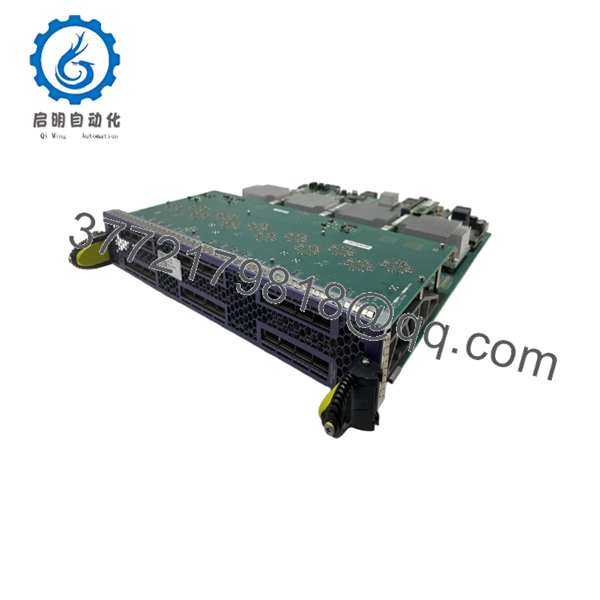
| Interface Type | 24 × QSFP+ 40GbE Ports |
| Ethernet Speed | 40 Gigabit Ethernet |
| Switching Performance | Wire-speed forwarding on every interface |
| Maximum Chassis Density | Up to 192 × 40GbE ports (8 modules per X8 chassis) |
| Fabric Compatibility | Requires BlackDiamond X Fabric Module |
| Operating System | ExtremeXOS |
| Minimum ExtremeXOS Version | 15.1.1 |
| Minimum BootROM Version | 1.0.0.6 |
| Last Supported ExtremeXOS Version | 16.x |
| Deployment | Enterprise core, data center aggregation, high-performance campus backbone |
The BDXA-40G24X provides twenty-four QSFP+ 40 Gigabit Ethernet interfaces for the BlackDiamond X platform. It requires ExtremeXOS 15.1.1 or later with BootROM 1.0.0.6 or newer and remains supported through the ExtremeXOS 16.x software family.
4. Product Introduction
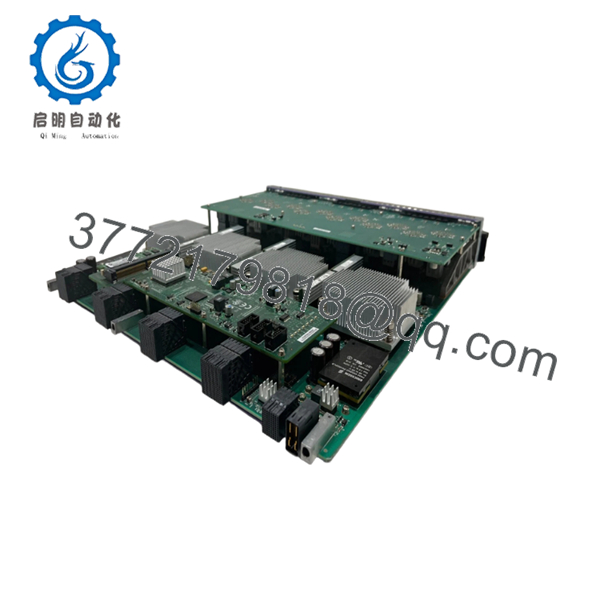
The Extreme Networks BDXA-40G24X is a high-density 40 Gigabit Ethernet line card developed for the BlackDiamond X8 modular switching platform. It delivers twenty-four QSFP+ interfaces for high-bandwidth switching in enterprise cores, cloud data centers, and large campus aggregation layers.
Compared with 10 Gigabit line cards, the BDXA-40G24X significantly increases uplink bandwidth while maintaining wire-speed forwarding. It is commonly deployed where multiple 10GbE access switches aggregate into a 40GbE backbone or where low-latency east-west traffic is required between servers and core switches.

- BDXA-40G24X
- BDXA-40G24X
5. Installation & Configuration Guide
Stage 1 – Pre-Installation Preparation (10 Minutes)
⚠️ Safety First
- Notify network operations of the maintenance window.
- Save both the running and startup configurations.
- Verify that redundant management and fabric modules are operational.
- Follow lockout/tagout procedures if chassis power-down is required.
- Wait at least five minutes for internal capacitors to discharge.
Tools Required
- Grounded ESD wrist strap
- Phillips screwdriver
- Digital multimeter
- Console cable
- Flashlight
- Smartphone for recording slot assignments
Data Backup
- Export the switch configuration.
- Record the installed ExtremeXOS version.
- Photograph the existing slot layout.
- Document QSFP+ port assignments and VLAN mappings.
Stage 2 – Removing the Existing Module (5 Minutes)
- Verify traffic has been migrated from the line card.
- Disconnect all QSFP+ cables.
- Label every cable before removal.
- Loosen the captive screws.
- Pull both ejector handles evenly.
- Remove the module straight out without twisting.
⚠️ Keep the original module until the replacement has completed testing successfully.
Stage 3 – Installing the New Module (10 Minutes)
- Wear an ESD wrist strap.
- Confirm the replacement is BDXA-40G24X.
- Inspect the chassis connector for contamination or bent pins.
- Slide the module into the guide rails.
- Push firmly until both ejector levers lock.
- Tighten the captive screws.
- Reconnect all QSFP+ connections.
Installation Checklist
- ☑ Model verified
- ☑ Module fully seated
- ☑ Captive screws secured
- ☑ QSFP+ cables connected
- ☑ Slot recognized by the chassis
Stage 4 – Power-On & Testing (10–15 Minutes)
Pre-Power Checks
- Verify power supply status.
- Confirm fan tray operation.
- Verify fabric module health.
- Confirm redundant management module synchronization.
Startup Procedure
- Apply chassis power or enable the module according to the maintenance plan.
- Verify normal LED indications.
- Execute show slot to confirm hardware detection.
- Verify all twenty-four ports appear correctly.
- Test QSFP+ link establishment.
- Verify VLANs, routing, and forwarding.
- Confirm traffic passes without interface errors.
⚠️ Troubleshooting Notes
- Module not detected: Verify ExtremeXOS and BootROM meet the minimum supported versions.
- Ports remain down: Confirm QSFP+ optics and DAC cables are supported.
- Link instability: Check fiber polarity, optical budget, and transceiver compatibility.
- Traffic forwarding issues: Verify the installed fabric module supports the deployed bandwidth.
6. Frequently Asked Questions (FAQ)
Q1. Which chassis supports the BDXA-40G24X?
The BDXA-40G24X is designed specifically for the Extreme Networks BlackDiamond X8 Series modular switch platform. It is not compatible with earlier BlackDiamond 8800 chassis.
Q2. Which software version is required?
The module requires ExtremeXOS 15.1.1 or later, BootROM 1.0.0.6 or newer, and is supported through the ExtremeXOS 16.x release family. Installing an earlier release can prevent successful hardware initialization.
Q3. What optical modules can be used?
The BDXA-40G24X uses QSFP+ 40GbE transceivers and compatible direct-attach cables qualified by Extreme Networks. Always verify the optics compatibility matrix before deployment to avoid unsupported transceiver errors.
Q4. Is the BDXA-40G24X still manufactured?
No. The BlackDiamond X platform is now a legacy product family. Most available inventory consists of genuine New Surplus stock or professionally tested refurbished units, so long-term availability is limited.
Q5. Can I hot-swap this line card?
Hot insertion capability depends on the chassis configuration, redundancy design, and maintenance procedure. In production environments, verify that redundant management and fabric modules are operating correctly before attempting any live replacement.
Q6. What installation mistakes are most common?
The issues I encounter most often are:
- Installing the module on an unsupported ExtremeXOS release.
- Using unsupported QSFP+ optics or passive cables.
- Failing to fully seat the line card in the backplane connectors.
- Assuming every fabric module supports the same forwarding capacity.
A software mismatch can make a healthy line card appear defective. Before replacing hardware, always compare the running ExtremeXOS version, BootROM version, and optics compatibility with the requirements for the BDXA-40G24X. Those checks usually resolve the majority of commissioning problems before they reach the data center floor.



