
 WhatsApp: +86 16626708626
 Email:
  Phone: +86 16626708626
Description
3. Key Technical Specifications
| Parameter | Value |
|---|---|
| Model | Summit X650-24t |
| Manufacturer | Extreme Networks |
| Product Type | Fixed Configuration Managed Ethernet Switch |
| Ethernet Ports | 24 × 10GBASE-T RJ45 (1G/10G dual-speed) |
| Management Port | 1 × 10/100/1000BASE-T Out-of-Band Ethernet |
| Console Port | RS-232 Serial Console |
| USB Port | USB for configuration and image management |
| Expansion Slot | 1 × VIM (Versatile Interface Module) |
| Optional Modules | VIM1-10G8X, VIM1-SummitStack, VIM3-40G4X (hardware dependent) |
| Switching Bandwidth | Up to 488 Gbps (base), higher with supported VIM modules |
| Forwarding Performance | Up to 363 Mpps (base configuration) |
| Operating System | ExtremeXOS |
| Supported Software | ExtremeXOS 12.2.1 through 15.3.x |
| High Availability | Dual hot-swappable AC/DC power supplies and field-replaceable fan tray |
| Deployment | Enterprise core, data center Top-of-Rack, campus aggregation |
The Summit X650-24t provides 24 non-blocking 10GBASE-T interfaces in a 1RU chassis. It supports optional interface modules for additional 10GbE uplinks, SummitStack connectivity, or 40GbE expansion, depending on the installed VIM.
4. Product Introduction
The Extreme Networks Summit X650-24t is a fixed-configuration 10 Gigabit Ethernet switch designed for enterprise core, data center Top-of-Rack (ToR), and aggregation applications. It combines high-density copper 10GbE connectivity with Layer 2 and Layer 3 routing features under the ExtremeXOS operating system.
One of its primary advantages is hardware flexibility. The integrated VIM expansion slot allows administrators to add high-speed uplinks or stacking interfaces without replacing the base switch, extending the platform’s useful service life in existing Summit deployments.
5. Installation & Configuration Guide
Stage 1 – Pre-Installation Preparation (10 Minutes)
⚠️ Safety First
- Notify network operations of the maintenance window.
- Save both the running and startup configurations.
- Verify redundancy if the switch participates in a stacked or redundant topology.
- Disconnect AC or DC input power before servicing.
- Allow five minutes for internal power supplies to discharge.
Tools Required
- Grounded ESD wrist strap
- Phillips screwdriver
- Digital multimeter
- Console cable
- Smartphone for documenting cable locations
- Cable labels
Data Backup
- Export the current configuration.
- Record the installed ExtremeXOS version.
- Photograph front and rear connections.
- Document VLAN assignments and IP addresses.
- Record VIM module configuration if installed.
Stage 2 – Removing the Existing Switch (10 Minutes)
- Disconnect management and uplink connections.
- Label every cable.
- Remove power cords.
- Remove rack mounting screws.
- Carefully slide the switch out of the rack.
- Inspect power connectors and cooling vents.
⚠️ Keep the original switch available until the replacement has passed functional testing.
Stage 3 – Installing the Replacement (10 Minutes)
- Wear an ESD wrist strap.
- Verify the replacement is Summit X650-24t.
- Install any required VIM module before rack installation.
- Mount the switch securely.
- Connect redundant power supplies if available.
- Restore network and management connections.
- Connect the console cable for verification.
Installation Checklist
- ☑ Model verified
- ☑ VIM installed correctly
- ☑ Power connected
- ☑ Network cables restored
- ☑ Console access available
Stage 4 – Power-On & Testing (15 Minutes)
Pre-Power Checks
- Verify power input.
- Confirm fan tray installation.
- Check airflow direction.
- Verify VIM seating.
Startup Procedure
- Apply power.
- Observe LED indicators during POST.
- Connect through the console.
- Verify the installed ExtremeXOS version.
- Restore the saved configuration if required.
- Confirm all 24 interfaces are operational.
- Verify routing, VLANs, and uplinks.
- Test redundancy and management connectivity.
⚠️ Troubleshooting Notes
- System does not boot: Verify power supply seating and input voltage.
- VIM module not detected: Confirm firmware compatibility and proper installation.
- 10G links fail to establish: Verify cable category, transceiver compatibility, and peer configuration.
- Configuration errors after replacement: Restore a configuration generated under a compatible ExtremeXOS release.
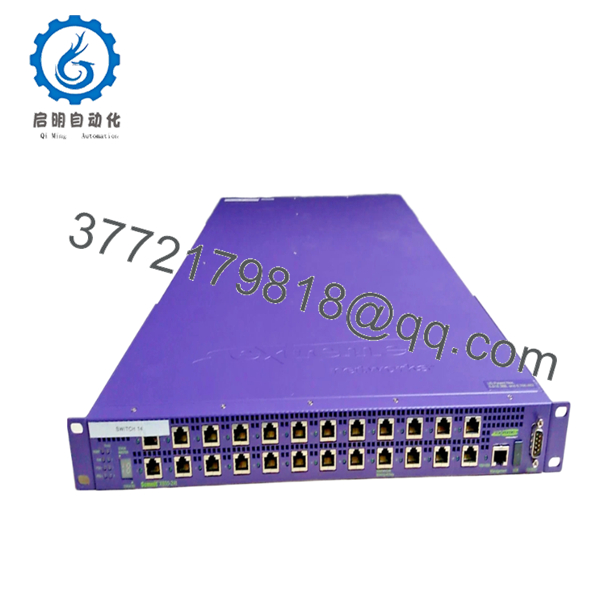
- Summit X650-24t
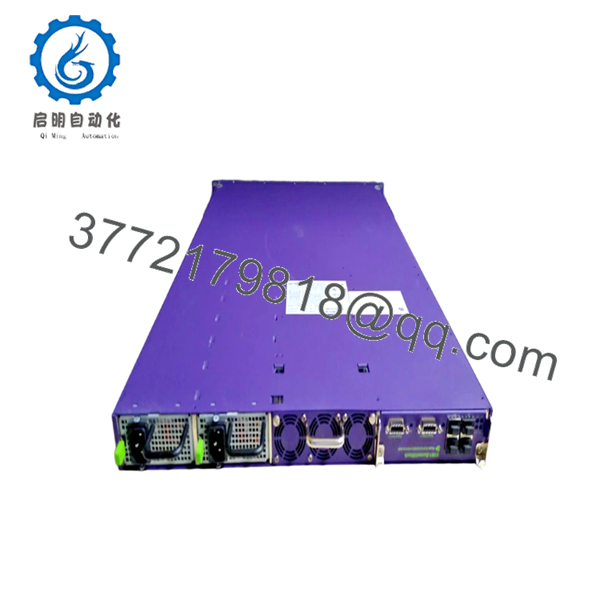
- Summit X650-24t
6. Frequently Asked Questions (FAQ)
Q1. What ports are available on the Summit X650-24t?
The switch includes 24 dual-speed 1G/10GBASE-T RJ45 ports, one dedicated Gigabit management port, one serial console port, one USB interface, and one VIM expansion slot for optional uplink or stacking modules.
Q2. Which ExtremeXOS versions support this switch?
The Summit X650-24t supports ExtremeXOS 12.2.1 through 15.3.x. Attempting to install unsupported software versions may prevent normal operation or hardware recognition.
Q3. Can the switch be expanded?
Yes. The integrated VIM (Versatile Interface Module) slot supports several expansion options, including additional 10GbE ports, SummitStack modules, and selected 40GbE uplink modules, depending on the hardware revision.
Q4. Is the Summit X650-24t still manufactured?
No. The Summit X650 Series is a legacy platform that has reached end-of-sale. Current availability is primarily through New Surplus inventory and professionally tested refurbished equipment.
Q5. Is the Summit X650-24t suitable for Top-of-Rack deployments?
Yes. The switch was designed for Top-of-Rack (ToR) applications requiring dense 10 Gigabit Ethernet connectivity with Layer 2/Layer 3 services, making it well suited for legacy enterprise data centers and campus aggregation networks.
Q6. What installation problems occur most frequently?
The most common issues I encounter are:
- Installing an unsupported ExtremeXOS release.
- Forgetting to verify the installed VIM module before restoring the configuration.
- Using copper cabling that does not meet 10GBASE-T requirements.
- Mixing incompatible stacking or expansion hardware.
One recurring issue is assuming every Cat5e installation will support stable 10 Gigabit Ethernet. In practice, cable quality and length are critical. Before blaming the switch, verify the cabling, confirm the software version, and ensure any optional VIM module is supported by the installed ExtremeXOS release. Those checks resolve most commissioning problems before hardware replacement becomes necessary.



