
 WhatsApp: +86 16626708626
 Email:
  Phone: +86 16626708626
Description
3. Key Technical Specifications
| Parameter | Value |
|---|---|
| Switching Ports | 8 × 10/100/1000BASE-T PoE+ |
| Uplink Ports | 4 × 1G SFP |
| Switching Capacity | Enterprise Gigabit Layer 2 architecture |
| PoE Standard | IEEE 802.3af / IEEE 802.3at PoE+ |
| Maximum PoE Output | Up to 30 W per port (power budget depends on installed PSU) |
| Management | CLI, Web GUI, SNMP, ExtremeCloud IQ |
| Operating System | ExtremeXOS |
| VLAN Support | IEEE 802.1Q |
| Layer Features | Layer 2 switching with enterprise management capabilities |
| Operating Temperature | Commercial enterprise operating environment |
| Mounting | Desktop or rack installation |
| Cooling | Fanless design on 8-port X435 models for quiet operation |
4. Product Introduction
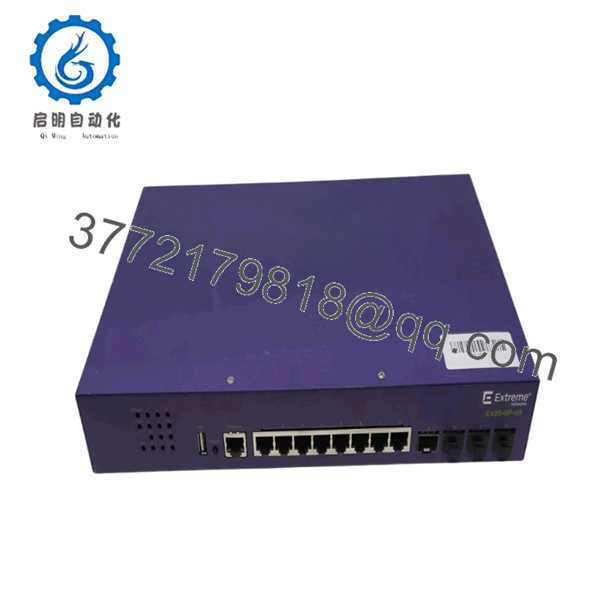
The Extreme Networks X435-8P-4S is a managed Gigabit Ethernet edge switch designed for branch offices, industrial control rooms, retail locations, and distributed enterprise networks. It combines eight PoE-capable Gigabit access ports with four dedicated SFP uplink interfaces for flexible fiber connectivity.
In field deployments, the X435 series is commonly selected where reliable Layer 2 switching, centralized management, and Power over Ethernet are required for IP phones, wireless access points, surveillance cameras, and industrial Ethernet devices. The fanless hardware on the 8-port models also makes it suitable for noise-sensitive installations.
5. Installation & Configuration Guide
Stage 1 – Pre-Installation Preparation (10 minutes)
⚠️ Safety First
- Notify operations of planned downtime.
- Follow lockout/tagout procedures.
- Disconnect AC power.
- Wait at least 5 minutes before handling equipment.
Tools Required
- Grounded ESD wrist strap
- PH1 screwdriver
- Digital multimeter
- Cable labels
- Smartphone for documentation
Data Backup
- Export switch configuration.
- Record management IP address.
- Save VLAN database.
- Photograph fiber and copper connections.
Stage 2 – Removing the Existing Switch (5 minutes)
- Disconnect network uplinks.
- Label every Ethernet and fiber cable.
- Remove rack mounting screws.
- Carefully slide the switch from the rack.
- Inspect SFP cages and connectors for contamination.
⚠️ Keep the original switch until the replacement passes all validation tests.
Stage 3 – Installing the New Switch (10 minutes)
- Verify model number matches X435-8P-4S.
- Install using ESD protection.
- Mount securely in the rack.
- Reconnect SFP uplinks.
- Connect copper ports.
- Restore power.
Self-Checklist
- Correct model verified
- Fiber polarity confirmed
- Power source verified
- Network cables secured
- Rack screws tightened
Stage 4 – Power-On & Commissioning (10–15 minutes)
- Verify no short circuit on the power input.
- Apply power.
- Confirm Power and Status LEDs indicate normal operation.
- Access the management interface.
- Verify firmware version.
- Restore saved configuration if replacing an existing unit.
- Confirm VLANs, spanning tree, and uplink status.
- Perform end-to-end network connectivity testing.
⚠️ Troubleshooting
- Solid fault LED often indicates startup or firmware issues.
- If uplinks remain down, verify SFP compatibility and fiber polarity.
- If management is unreachable, verify IP addressing and VLAN configuration before replacing hardware.

- X435-8P-4S
- X435-8P-4S
6. Frequently Asked Questions (FAQ)
Q1. Can I hot-swap the X435-8P-4S?
No. Although Ethernet cables can be connected while powered, replacing the switch itself should always be performed with power removed to prevent equipment damage and unexpected network outages.
Q2. Does it support Power over Ethernet?
Yes. The X435-8P-4S supports IEEE 802.3af and IEEE 802.3at PoE+, supplying up to 30 W per port. The available total PoE budget depends on the installed power supply.
Q3. Is this model still available new?
The X435 series remains widely available through industrial networking distributors and surplus inventory. Many units are offered as New Original or New Surplus because enterprise customers frequently purchase excess inventory.
Q4. Can I manage this switch without cloud services?
Yes. The switch supports local management through the command-line interface, web interface, and SNMP. ExtremeCloud IQ provides centralized management but is not required for basic operation.
Q5. What devices are commonly powered from this switch?
Typical connected equipment includes wireless access points, VoIP phones, IP surveillance cameras, industrial gateways, badge readers, and other IEEE 802.3af/at powered devices.
Q6. Why is surplus pricing often lower than OEM list pricing?
Many industrial networking products originate from project overruns, cancelled system expansions, or spare-part inventories. These units may remain factory sealed yet cost substantially less than direct OEM procurement. Always confirm the condition (New Original, New Surplus, or Refurbished) before purchase.
Q7. What should I verify before replacing an existing switch?
Document the management IP address, VLAN assignments, firmware version, SFP module types, and network topology. I’ve seen maintenance teams spend hours troubleshooting what appeared to be a failed switch, only to discover the replacement was running a different configuration. A complete backup before shutdown avoids most of that rework.



