
 WhatsApp: +86 16626708626
 Email:
  Phone: +86 16626708626
Description
3. Key Technical Specifications
| Parameter | Value |
|---|---|
| Switch Model | VSP7400-48Y-8C-AC-F |
| Form Factor | 1U rack-mount |
| Access Ports | 48 × 25Gb SFP28 |
| Uplink Ports | 8 × QSFP28 supporting 40GbE or 100GbE |
| Switching Architecture | Non-blocking, wire-speed forwarding |
| Network Role | Core, Aggregation, Spine, or Leaf |
| Network Operating System | VOSS (Virtualization Operating System Software) |
| Fabric Technology | Extreme Fabric Connect (IEEE 802.1aq SPB) |
| Power Supply | Dual hot-swappable AC power supplies |
| Cooling | Hot-swappable fan modules, Front-to-Back airflow (-F) |
| Management | CLI, SNMP, ExtremeCloud IQ, ExtremeCloud IQ Site Engine |
| Supported Speeds | 1Gb, 10Gb, 25Gb, 40Gb, and 100Gb Ethernet (transceiver dependent) |
Model Suffix Note: The AC-F version includes AC power supplies and Front-to-Back airflow, making it suitable for standard enterprise and data center rack layouts.
4. Product Introduction
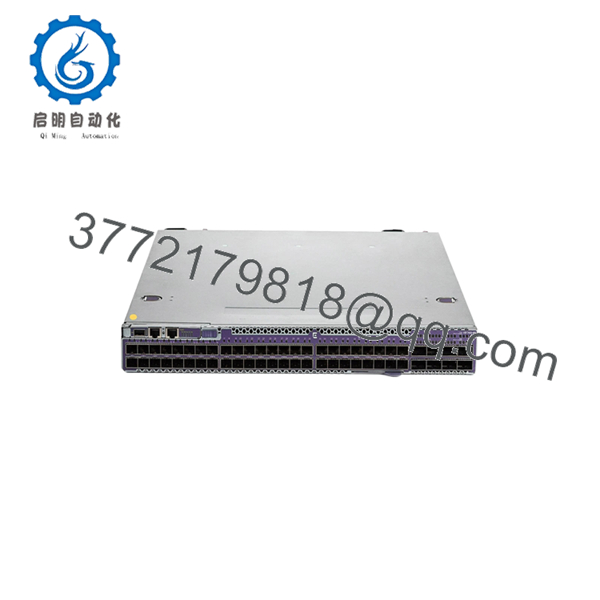
The Extreme Networks VSP7400-48Y-8C-AC-F is a high-performance data center and campus core switch designed for aggregation, spine-leaf, and high-density enterprise networking. It combines forty-eight 25 Gigabit SFP28 interfaces with eight 100 Gigabit QSFP28 uplinks in a compact 1U chassis while maintaining wire-speed forwarding across all ports.
The platform operates on VOSS and supports Extreme Fabric Connect, allowing simplified Layer 2/Layer 3 service provisioning, network virtualization, and automated traffic segmentation. Hot-swappable power supplies and fan modules reduce maintenance downtime, making the platform well suited for mission-critical environments.

- VSP7400-48Y-8C-AC-F
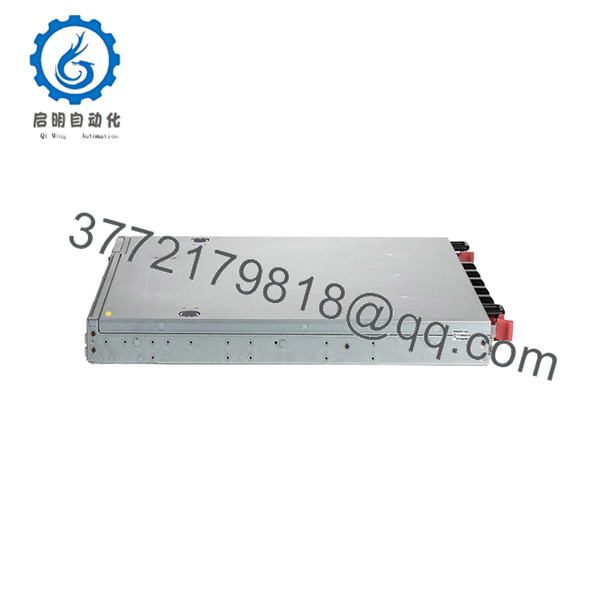
- VSP7400-48Y-8C-AC-F
5. Installation & Configuration Guide
Stage 1 – Pre-Installation Preparation (10–15 minutes)
⚠️ Safety First
- Notify network operations before maintenance.
- Save the running configuration.
- Follow Lockout/Tagout procedures.
- Disconnect AC power.
- Wait five minutes for internal capacitors to discharge.
Tools Required
- ESD wrist strap
- Phillips screwdriver
- Digital multimeter
- Fiber cleaning kit
- Cable labels
- Smartphone for documenting cable locations
Data Backup
- Export the complete VOSS configuration.
- Record management IP address.
- Record firmware version.
- Save Fabric Connect configuration.
- Photograph every fiber connection before removal.
Stage 2 – Removing the Existing Switch (10 minutes)
- Label every DAC, fiber, and management cable.
- Disconnect QSFP28 uplinks.
- Remove SFP28 modules only after labeling them.
- Remove rack mounting screws.
- Carefully slide the chassis from the rack.
⚠️ Keep the existing switch available until the replacement completes production testing.
Stage 3 – Installing the New Switch (15 minutes)
- Confirm the replacement is VSP7400-48Y-8C-AC-F.
- Verify airflow direction matches the data center design.
- Install both hot-swappable power supplies.
- Secure the chassis using all rack mounting points.
- Install QSFP28 and SFP28 optics.
- Reconnect all network cables according to documentation.
Self-Checklist
- Correct model number
- Airflow direction verified
- Power supplies fully seated
- Optics installed correctly
- Fiber polarity confirmed
- Ground connection completed
Stage 4 – Power-On & Commissioning (15–20 minutes)
- Verify AC input voltage.
- Apply power.
- Confirm all fan modules operate normally.
- Check system LEDs.
- Log in through the management interface.
- Verify the VOSS software version.
- Restore the saved configuration.
- Verify Fabric Connect services, routing, VLANs, and uplink status.
- Test traffic forwarding across 25Gb and 100Gb interfaces.
⚠️ Troubleshooting Notes
- If the system reports hardware faults, confirm both power supplies are fully inserted.
- If Fabric Connect services fail, verify the VOSS version matches the production environment.
- If uplinks remain down, verify QSFP28 compatibility and optical polarity before replacing hardware.
6. Frequently Asked Questions (FAQ)
Q1. Is the VSP7400-48Y-8C-AC-F designed for access-layer deployments?
Not typically. This platform is intended for core, aggregation, spine, or leaf roles where high-density 25Gb and 100Gb connectivity is required. It is generally deployed above the access layer.
Q2. What does the “-F” suffix mean?
The -F designation specifies Front-to-Back airflow. Airflow direction should always match the cooling design of your equipment rack to prevent thermal issues.
Q3. Does the switch support Fabric Connect?
Yes. The VSP7400 Series fully supports Extreme Fabric Connect, based on IEEE 802.1aq Shortest Path Bridging, allowing simplified service provisioning and network virtualization.
Q4. Can power supplies and fan modules be replaced while the switch is operating?
Yes. The hardware is designed with hot-swappable power supplies and fan modules, provided redundancy requirements are maintained during maintenance. The switch chassis itself should not be replaced while powered.
Q5. Will replacing the hardware erase my network configuration?
No. Configuration is backed up separately and should be exported before replacement. After installing the new chassis, restore the saved VOSS configuration and verify software compatibility before reconnecting production traffic.
Q6. What is the most common deployment mistake?
Firmware mismatches are a frequent source of commissioning delays. I’ve seen replacement switches installed with different VOSS releases, preventing Fabric Connect neighbors from establishing correctly. Record the running software version before removal and match it on the replacement whenever possible.
Q7. Is this model suitable for modern 100Gb data center networks?
Yes. The combination of 48 × 25Gb SFP28 ports and 8 × 100Gb QSFP28 uplinks makes it well suited for high-density server aggregation, campus cores, and spine-leaf architectures that require wire-speed forwarding and low-latency switching.



