
 WhatsApp: +86 16626708626
 Email:
  Phone: +86 16626708626
Description
Key Technical Specifications
| Parameter | Specification |
|---|---|
| Manufacturer | FANUC |
| Part Number | A05B-2452-C900 |
| Product Type | Cooling fan unit |
| Assembly Type | Dual fan assembly |
| Rated Voltage | 240 V AC |
| Phase | Single-phase |
| Fan Quantity | 2 |
| Individual Fan Part | A90L-0001-0487 |
| Product Series | A05B-2452 |
| Primary Application | FANUC robot controller cabinet cooling |
| Cabinet Application | B-cabinet |
| Associated Controller Family | FANUC R-J3iB |
| Approx. Listed Weight | 4.10 lb / 1.86 kg |
FANUC’s R-J3iB parts documentation lists A05B-2452-C900 as the B-cabinet fan unit and shows that the C900 assembly contains two A90L-0001-0487 fans.
Secondary technical listings independently identify the C900 version as a 240 V, single-phase dual cooling fan assembly.
Product Introduction
The FANUC A05B-2452-C900 is a dual cooling fan assembly used for forced-air cooling inside FANUC robot controller equipment. FANUC’s R-J3iB parts documentation specifically lists the C900 assembly as the fan unit for the B-cabinet, with two A90L-0001-0487 fan units incorporated into the assembly.
This part should be treated as a thermal-management component rather than a controller, servo amplifier, or robot CPU. Its function is mechanical/electrical air movement for cabinet cooling. The 240 V AC specification is especially important when comparing it with other A05B-2452 fan-unit variants.
Installation & Configuration Guide
Stage 1 — Pre-Installation Preparation
- Verify the existing part marking is A05B-2452-C900.
- Confirm the controller cabinet configuration before ordering the replacement.
- Check the existing fan assembly for abnormal noise, seized bearings, reduced airflow, or intermittent operation.
- Apply the plant’s LOTO procedure before opening the controller cabinet.
- Isolate the applicable AC supply.
- Allow the equipment to discharge for at least 5 minutes after power isolation.
- Photograph the original fan assembly and wiring before removal.
- Confirm the replacement voltage matches the installed cabinet configuration.
Do not substitute the C900 assembly solely on the basis of physical dimensions. The A05B-2452 family contains different fan-unit suffixes, so the complete part number matters. FANUC’s parts documentation lists , C901, and C902 as separate specifications.
Stage 2 — Removing the Existing Fan Unit
- Confirm that the controller is fully de-energized.
- Remove the applicable cabinet cover or access panel.
- Locate the fan assembly and identify its mounting position.
- Disconnect the fan power connection according to the controller service procedure.
- Remove the fan-unit mounting hardware.
- Carefully withdraw the assembly without damaging nearby wiring.
- Inspect the connector, wiring, mounting hardware, and ventilation path.
- Check for dust accumulation or foreign material around the cabinet cooling path.
Do not work on the fan assembly while the controller is energized. A failed fan can also indicate a broader ventilation or environmental problem, so inspect the cabinet rather than treating the fan replacement as an isolated repair.
Stage 3 — Installing A05B-2452-
- Verify the replacement marking: A05B-2452-C900.
- Confirm the assembly contains the expected dual-fan configuration.
- Position the fan assembly in the original cabinet location.
- Secure the assembly using the original mounting hardware.
- Reconnect the fan power connection exactly as documented.
- Confirm that the fan blades can rotate freely.
- Make sure no cable, tie, or cabinet component obstructs the airflow.
- Check that the air intake and exhaust paths are unobstructed.
The assembly is documented with two A90L-0001-0487 fan units. If the replacement arrives as an assembly, verify the actual nameplate and component markings rather than relying solely on a supplier photograph.
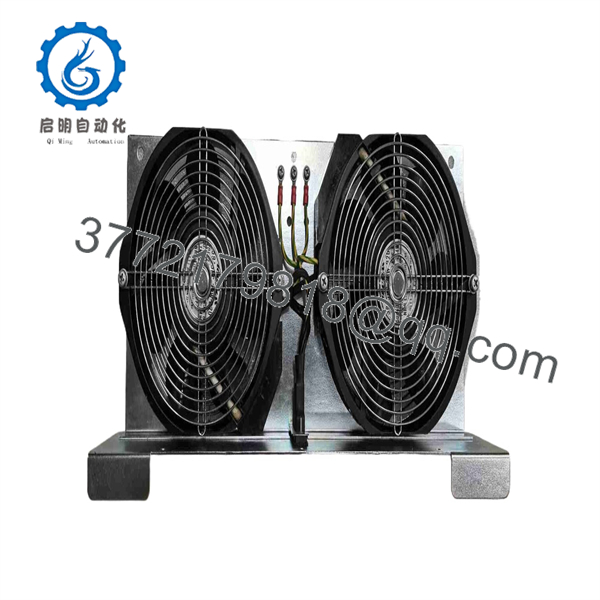
A05B-2452-C900
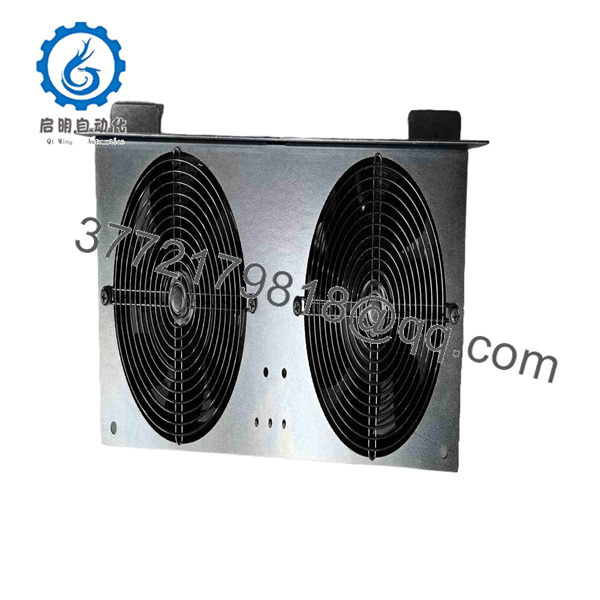
A05B-2452-C900
Stage 4 — Power-On & Testing
After installation:
- Reinstall the cabinet cover or access panel.
- Restore power according to the FANUC maintenance procedure.
- Confirm both fans start normally.
- Listen for bearing noise, scraping, vibration, or abnormal speed fluctuation.
- Verify airflow through the controller cabinet.
- Monitor controller temperature during normal operation.
- Check for controller thermal alarms or fan-related diagnostic messages.
- Allow the system to operate under representative load before closing the maintenance task.
Common Replacement Mistakes
Wrong voltage: The version is listed as a 240 V AC, single-phase fan assembly. Do not assume another suffix has the same electrical specification.
Wrong component classification: is a fan unit, not a FANUC robot controller or servo amplifier.
Replacing only one fan without checking the assembly: FANUC documentation identifies as an assembly containing two A90L-0001-0487 fans. If only one fan is replaced, verify the service procedure and compatibility of the remaining fan.
Ignoring cabinet contamination: Dust buildup can reduce airflow and shorten fan life. Clean the ventilation path as part of the maintenance inspection when permitted by the equipment service procedure.
Frequently Asked Questions (FAQ)
1. A?
is a FANUC dual cooling fan unit used for forced-air cooling in FANUC robot controller equipment. FANUC parts documentation identifies it specifically as the fan unit for the B-cabinet in the R-J3iB parts documentation.
2. Whatd use?
Available technical listings identify the version as a 240 V AC, single-phase fan assembly. Verify the nameplate on the installed equipment before applying power.
3. How many fans ard?
FANUC’s R-J3iB parts documentation lists two A90L-0001-0487 fanse assembly.
4. Is a robot controller?
No. It is a cooling fan assembly. Some poorly categorized aftermarket listings describe this part as a controller or general automation module, but FANUC parts documentation identifies it as a fan unit.
5. Which FANUC eu?
FANUC’s R-J3iB parts documentation identifies the fan unit for the B-cabinet. Secondary repair and parts sources also classify it as a FANUC robot/controller fan module.
6. Can -C901 or C902 replace ?
Do not assume direct interchangeability. FANUC lists , C901, and C902 as separate fan-unit specifications, and the associated fan components differ in the parts listing. Confirm the exact controller cabinet and electrical configuration before substituting a different suffix.
7. What should be checked before purchasing a replacement?
For a FANUC controller maintenance replacement, verify:
- exact part number
- 240 V AC rating
- Single-phase configuration
- Dual-fan assembly
- Fan component number where applicable
- Controller/cabinet model
- Connector and mounting arrangement
- Physical condition
- New, unused, or refurbished status
- Seller test documentation and warranty
Because this is a cooling component, voltage, connector configuration, airflow direction, and cabinet compatibility should be verified before installation, rather than selecting a replacement solely because it belongs to the same family.



