
 WhatsApp: +86 16626708626
 Email:
  Phone: +86 16626708626
Description
Key Technical Specifications
| Parameter | Specification |
| Manufacturer | FANUC Corporation |
| Part Number | A16B-3200-0600 |
| Control System Compatibility | FANUC Series 30i-A, 31i-A, 32i-A |
| Board Type | Main System CPU / Master Motherboard |
| Power Supply Input | 24 VDC (via rack backplane power supply) |
| Slot Configuration | Dedicated Master CPU Slot |
| Sub-Module Expandability | Accepts LSI option cards, FROM/SRAM modules, and PMC boards |
| Operating Temperature | 0 to 55 °C |
| Storage Temperature | −20 to 60 °C |
| Humidity Rating | 10 to 90% RH (non-condensing) |
| Weight | Approx. 0.85 kg (1.87 lbs) |
Product Introduction & Supply Chain Strategy
The FANUC A16B-3200-0600 is the main control motherboard engineered for FANUC Series 30i, 31i, and 32i Model A CNC systems. It serves as the primary processing center for numerical control algorithms, programmable machine controller (PMC) execution, and real-time servo bus communication. Installed directly into the main control rack, this module coordinates high-speed interpolation, axis positioning, and peripheral I/O processing across complex multi-axis milling, turning, and transfer machinery.
From a procurement perspective, holding an A16B-3200-0600 as New Surplus is a high-return risk mitigation strategy. Refurbished CPU boards often suffer from degraded solder joints, micro-cracks from thermal cycling, and compromised surface-mount capacitors that trigger intermittent system bus faults under load. Purchasing New Surplus guarantees clean logic traces, fresh memory components, and full dielectric insulation, providing a low Total Cost of Ownership (TCO) by keeping primary production lines running without unpredictable controller crashes.
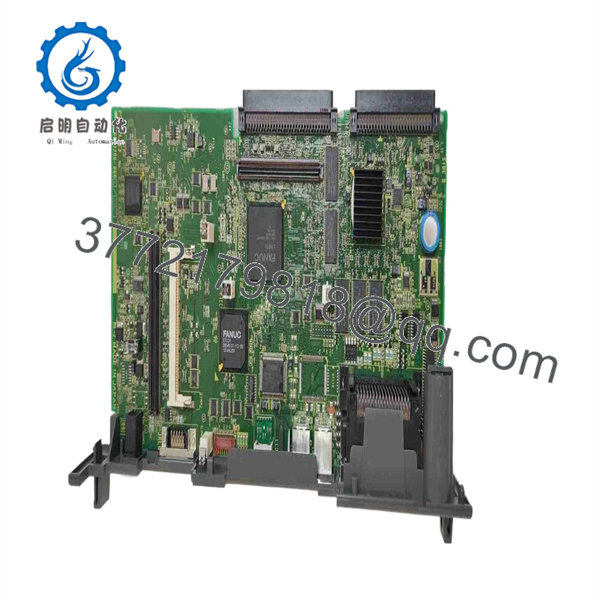
A16B-3200-0600
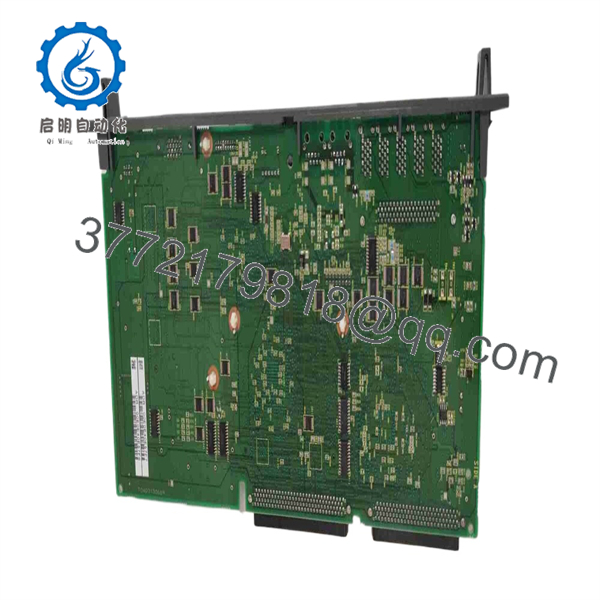
A16B-3200-0600
Installation & Configuration Guide
1.Stage 1: Pre-Installation (Prep & Safety):Perform full system backup and enforce LOTO safety.
Back up all CNC parameters, pitch error compensation data, PMC ladder programs, and custom macro variables to a memory card prior to taking the machine offline. Turn off all incoming power to the CNC cabinet and execute Lock-Out/Tag-Out (LOTO) protocols. Wait 10 minutes for power supplies to discharge completely. Strap on a grounded ESD wrist band before opening the control enclosure or handling printed circuit boards. Photograph all daughterboards, memory cards, and cable locations attached to the existing A16B-3200-0600.
2.Stage 2: Removal:Disconnect harnesses and extract main PCB cleanly.
Unscrew the cable lock fasteners and remove all optical, serial, and ribbon connectors attached to the main board faceplate. Gently release the plastic retaining latches at the top and bottom of the card slot. Pull the A16B-3200-0600 straight outward along its guide rails to disengage its rear high-density backplane connector without twisting or bending pins.
3.Stage 3: Installation (Clone & Seat):Transfer plug-in modules and seat card into backplane.
Set the old and new A16B-3200-0600 boards side-by-side on an ESD-safe mat. Transfer all socketed FROM/SRAM modules, option cards, and DIP switch/jumper configurations from the original board onto the new board. Align the new motherboard with the card cage guide rails and push firmly until the backplane connectors fully seat. Secure the top and bottom mounting latches and reconnect all interface harnesses matching your reference photos.
4.Stage 4: Power-On & Testing:Verify DC power rails and execute system restore.
Check for proper grounding and turn on the 24 VDC system power. Observe the motherboard status LEDs and 7-segment display on boot. Confirm the system clears boot diagnostic checks and enters normal operating state without system alarm codes (e.g., SYS ALM or RAM parity errors). If SRAM was cleared during hardware migration, perform a system memory restore from your memory card backup and test machine movements in JOG mode.
Firmware/Software Versions & Upgrade Notes
- System Bootware Compatibility: The relies on system software loaded onto the socketed FROM/SRAM daughtercard. Ensure the existing FROM card is migrated directly to maintain identical CNC control firmware, PMC software version, and option configuration.
- Hardware Revision Matching: Revision letters (e.g., /01A vs /02B) generally maintain backward pinout compatibility. However, mixed board revisions can require updated bootware if migrating across major manufacturing series.
- Firmware Mismatch Risk Warning: Never mix system software files from different CNC series (such as flashing 31i-B software onto a 31i-A CPU board). Software incompatibilities cause unrecoverable boot loops, bus communication timeouts, and corrupt system memory tables.
Frequently Asked Questions (FAQ)
Q: Why is this unit priced higher than refurbished options online, but lower than direct OEM list price?
A: This product is a Brand New Surplus unit. It is not used, not pulled from a decommissioned plant, and not refurbished. All modules undergo rigorous quality verification to ensure OEM-level reliability. Refurbished CPU boards often harbor hidden thermal degradation in BGA chips and passive components. Our pricing reflects genuine, factory-fresh inventory available immediately at a substantial discount compared to OEM list prices.
Q: Is the FANUC considered obsolete, and how should we manage spare parts stock?
A: While FANUC has introduced newer 30i-B and 30i-C series hardware, thousands of active production machines still rely on the Model A platform. Because replacing a main control rack requires complete system retrofitting, keeping 1 unit of this board as critical buffer stock is essential to avoid weeks of downtime during a major CPU failure.
Q: Will swapping this CPU board erase my CNC parameters and program memory?
A: Yes, if the SRAM card or battery-backed memory is removed or left unpowered. To prevent loss of parameter data, you must either back up all data to an external card prior to replacement or transfer the original SRAM daughterboard directly to the new main board.
Q: Can I replace an while the control cabinet is powered on?
A: Absolutely not. Inserting or pulling a main CPU card while 24 VDC backplane power is live causes severe electrical transients that destroy backplane driver ICs and ruin logic chips across the entire rack. Always shut down power completely before servicing the control rack.
Q: What documentation and warranty coverage come with this board?
A: Every board is shipped in static-shielding ESD packaging with verifiable OEM serial numbers and a functional QC Test Report covering backplane handshake and logic power verification. We back this New Surplus board with a full 1-year replacement warranty.



