
 WhatsApp: +86 16626708626
 Email:
  Phone: +86 16626708626
Description
3. Key Technical Specifications
| Parameter | Value |
|---|---|
| Function | Detachable display, programming, and monitoring unit |
| Serial Interface | RS-232 (DB-9 male) for press data output |
| Compatibility | SAN3 series units (SAN3-24S, SAN3-40S, SAN3-120S, etc.) |
| Mounting | Front-panel connection to SAN unit (CON1) |
| Display | LCD for press results, parameters, and status |
| Controls | Keypad for local programming and operation |
| Data Output | Configurable via System Parameter 00-37 |
| Buffer | Up to 16 KB output buffer (FIFO) |
| Power | Supplied from host SAN unit |
| Additional Feature | Supports external measurement data input via RS-232 |
4. Product Introduction
The FEC SAN3-DP2S is the optional detachable keypad display and programming unit for the enFORCE DSP1500 SAN3 Digital Servo Press system. It mounts directly to the front of a compatible SAN unit and provides local viewing of press results, parameter programming, and status monitoring.
The DP2S adds an RS-232 serial port for outputting press data to a printer or external device and can also accept external measurement data. It is used when operators need standalone programming capability without relying solely on the DSP User Console software. As a discontinued accessory, remaining New Surplus units continue to support existing -based press installations.
5. Installation & Configuration Guide
Stage 1: Pre-Installation Preparation (≈5 min)
⚠️ Safety First: Power down the SAN unit and lock out the three-phase supply. Allow residual energy to dissipate.
Tools Required: None beyond basic handling; ESD strap recommended. Smartphone for photos of existing display (if present) and parameter settings.
Data Backup: Record current System Parameter 00-37 (data output enable) and any critical press parameters using the existing display or DSP software.
Stage 2: Removing the Old Unit (≈5 min)
- Confirm the SAN unit is powered down.
- If a previous DP unit is installed, carefully unplug it from the front CON1 connector.
- Inspect the CON1 connector for bent pins or contamination.
⚠️ Keep the old display available until the new unit is verified.
Stage 3: Installing the New Unit (≈5–10 min)
- Verify the exact model marking -DP2S.
- Align the unit with the front CON1 connector on the SAN unit and press firmly until fully seated.
- If using the RS-232 port, connect a DB-9 cable to the serial connector.
- Set System Parameter 00-37 to the desired data-output mode if serial output is required (default is 0 = disabled).
Self-Checklist: [ ] Model confirmed [ ] Fully seated on CON1 [ ] RS-232 cable secured if used [ ] Parameter 00-37 set correctly.
Stage 4: Power-On & Testing (≈10 min)
- Restore power to the SAN unit.
- Confirm the DP2S powers up and displays the expected system status or menu.
- Use the keypad to navigate parameters and verify communication with the host SAN unit.
- If RS-232 output is enabled, trigger a press cycle and confirm data is transmitted (CTS must be active for continuous output).
- Perform a short test press and confirm results appear correctly on the display.
⚠️ Troubleshooting Note: No display usually indicates incomplete seating on CON1 or a host SAN fault. No serial data output is most often caused by Parameter 00-37 set to 0 or inactive CTS signal. Data will buffer (up to 16 KB) and then overwrite in FIFO order if CTS remains inactive.
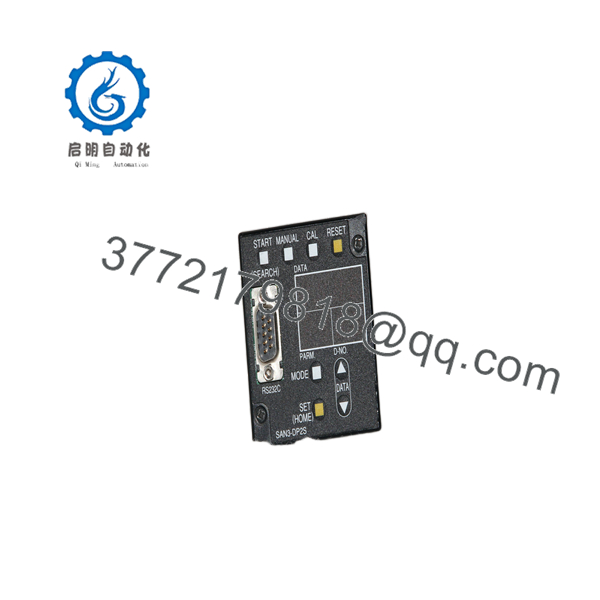
SAN3-DP2S
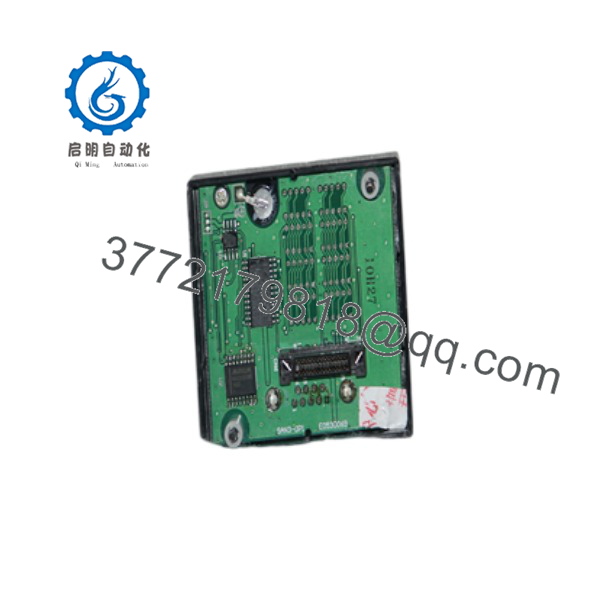
SAN3-DP2S
6. Frequently Asked Questions (FAQ)
Q: Can the -DP2S be hot-swapped?
The unit is designed as a “hot-swappable” detachable display in normal operation, but best practice is to power down the SAN unit before removal or installation to avoid any risk of connector damage or communication glitches.
Q: Is this model obsolete, and is the stock genuinely new?
Yes, the -DP2S is a discontinued accessory for the FEC enFORCE DSP1500 system. Available units are New Original (new surplus) stock that has been functionally verified. Quantities are limited.
Q: What is the difference between -DP1S and -?
Both provide local display and programming. The adds an RS-232 serial port for press data output and the ability to accept external measurement data. The DP1S lacks the serial interface.
Q: Will I lose parameters when I replace the display?
No. All press parameters and firmware reside in the host SAN unit’s flash memory. The is only a local interface. Always confirm critical settings after installation.
Q: Why is the price lower than original FEC list price?
These are New Surplus units from secondary-market inventory. They provide the same form, fit, and function as original production displays and are fully tested, but they are no longer current-production catalog items.
Q: Does the RS-232 port require special configuration?
Yes. System Parameter 00-37 must be set to enable data output (default is 0 = disabled). The CTS signal on the DB-9 must be active for continuous transmission; otherwise data buffers up to 16 KB and then overwrites.
Q: Which SAN units are compatible?
The – is designed for -series units including -24S, -40S, -120S and related models. Confirm mechanical fit and connector compatibility before ordering.



