
 WhatsApp: +86 16626708626
 Email:
  Phone: +86 16626708626
Description
Key Technical Specifications
| Parameter | Value |
|---|---|
| Manufacturer | Fireye |
| Model | 95UVS2-1 |
| Product Family | InSight I / Type 95 |
| Product Type | Integrated UV Flame Scanner |
| Detection Technology | Solid-state ultraviolet |
| Supply Voltage | 24 VDC, +10% / -15% |
| Supply Current | 0.35 A |
| Power | 8.5 VA |
| Electrical Connection | 12-pin quarter-turn quick-disconnect |
| Flame Relay | SPST, normally open |
| Fault Relay | SPST, normally closed |
| Analog Output | 4–20 mA DC |
| Maximum Analog Load | 750 Ω |
| Display | 8-character alphanumeric LED |
| Operator Interface | 4 pushbuttons |
| Ambient Temperature | -40°F to +150°F (-40°C to +65°C) |
| Internal Temperature | -40°F to +178°F (-40°C to +81°C) |
| Enclosure | NEMA 4X / IP66 on applicable configurations |
| Mounting | Threaded mounting flange, ordered separately |
| Air Cooling | 4 SCFM typical; up to 15 SCFM under demanding conditions |
| Connection Cable | 12-conductor shielded cable; maximum 1,000 ft / 305 m |
| Recommended Replacement | 95UVS4-1WINC |
The published technical data identifies the 95UVS2-1 as a 24 VDC InSight UV scanner with integrated flame and fault relays, 4–20 mA output, display, and keypad.
Fireye currently identifies 95UVS2-1 as obsolete and recommends 95UVS4-1WINC as its replacement. The recommendation also applies to the 95UVS2-1 variants with the same basic model designation.
Product Introduction
The Fireye 95UVS2-1 is an InSight I Type 95 integrated ultraviolet flame scanner for continuous flame supervision in industrial burner and combustion systems. It uses solid-state UV detection and incorporates flame processing, adjustable flame thresholds, and an internal flame relay rather than requiring a separate remote flame amplifier.
The S2 configuration adds automatic selection of flame-modulation frequency and sensor gain during setup, with manual override capability. The unit provides a 4–20 mA flame-signal output, fault relay, local display, and keypad.
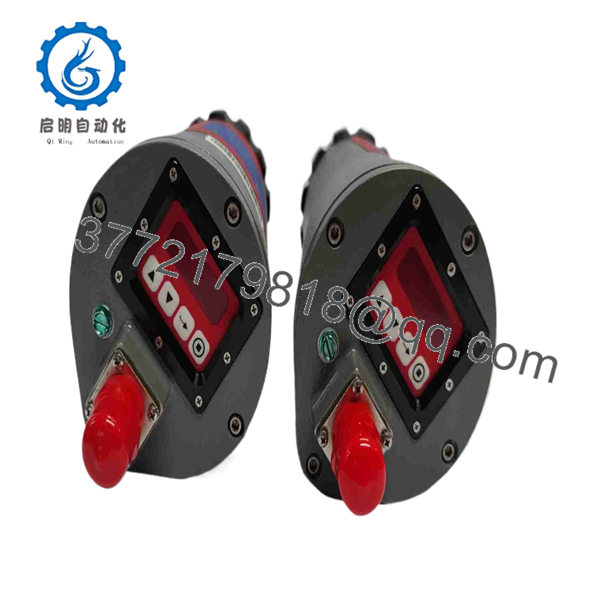
95UVS2-1
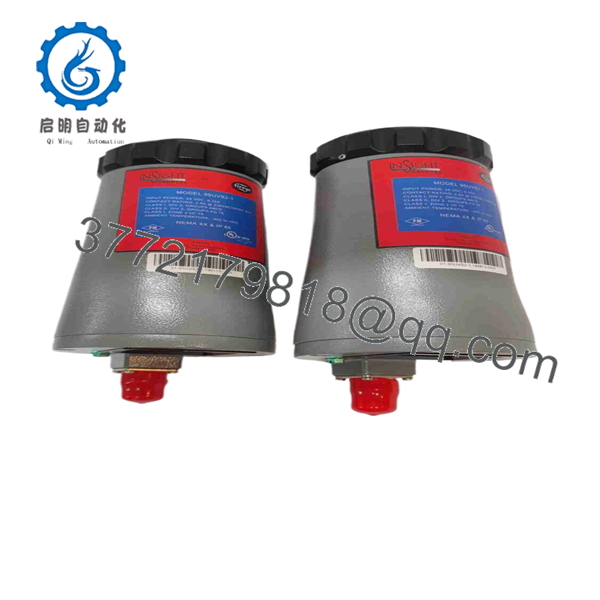
95UVS2-1
Installation & Configuration Guide
Stage 1: Pre-Installation Preparation
Estimated time: 20–30 minutes
⚠️ Safety First: This scanner is part of a combustion safety system. Shut down the burner, isolate fuel and electrical energy according to the plant’s approved LOTO procedure, and allow hot equipment to reach a safe working temperature.
Tools Required:
- ESD wrist strap
- CAT-rated multimeter
- Appropriate screwdriver/wrench
- Wire labels
- Smartphone/camera
- Fireye InSight documentation
- Correct mounting flange
Data Backup:
- Record the complete 95UVS2-1 model number.
- Photograph the scanner and mounting arrangement.
- Record the scanner’s sighting angle.
- Photograph the 12-pin connector wiring.
- Record existing flame-signal values.
- Record programmed flame settings and files where accessible.
- Document the burner-management controller.
- Record the existing scanner cable type and length.
⚠️ Do not substitute a 95UVS2-1 with another Type 95 scanner simply because the mechanical housing looks similar. UV, IR, and dual-sensor versions perform different detection functions.
Stage 2: Removing the Old Module
Estimated time: 15–20 minutes
- Place the burner in the approved safe shutdown state.
- Apply electrical and fuel-system LOTO.
- Verify the scanner’s 24 VDC supply is isolated.
- Allow the burner assembly to cool.
- Photograph the scanner orientation.
- Label the field wiring.
- Disconnect the 12-pin connector.
- Remove the scanner from its mounting flange.
- Protect the optical window.
- Inspect the sight pipe for soot, ash, or other deposits.
⚠️ Do not disturb the scanner alignment unnecessarily. Incorrect sighting can produce poor flame discrimination even when the replacement scanner is electrically healthy.
Stage 3: Installing the New Scanner
Estimated time: 15–25 minutes
- Verify the replacement is 95UVS2-1.
- Confirm the replacement is the same connection/configuration variant.
- Inspect the optical window.
- Verify the mounting flange.
- Install the scanner in the original position.
- Restore the original sighting angle.
- Secure the scanner mechanically.
- Reconnect the 12-pin connector.
- Check cable shielding and grounding.
- Verify the cooling-air arrangement where required.
- Ensure the scanner is aimed at the intended flame envelope.
Self-Checklist:
- 95UVS2-1 verified
- 24 VDC supply confirmed
- 12-pin connector secured
- Correct flange installed
- Optical window clean
- Sight angle restored
- Shielding checked
- Cooling air verified
Stage 4: Power-On & Testing
Estimated time: 30–60 minutes
- Verify all wiring against the Fireye schematic.
- Restore 24 VDC power.
- Confirm the scanner display initializes normally.
- Check the fault status.
- Start the approved burner ignition sequence.
- Confirm the scanner detects flame at the expected point.
- Allow the S2 setup/AutoTune procedure to establish appropriate flame discrimination.
- Verify the flame signal.
- Check the 4–20 mA output.
- Verify flame and fault relay operation.
- Perform the approved flame-failure test.
- Confirm the burner-management system removes the fuel permissive when flame is lost.
- Record final scanner settings and flame signal.
- Return the burner to normal operation only after the complete safety loop passes testing.
⚠️ Never bypass the flame relay or burner-management interlock to test the scanner. A flame scanner is a combustion-safety component, not merely a process transmitter.
Frequently Asked Questions (FAQ)
What is Fireye 95UVS2-1?
The 95UVS2-1 is a Fireye InSight I Type 95 integrated UV flame scanner with a 12-pin quick-disconnect connection. It is designed to detect and supervise the presence or absence of a target burner flame.
What voltage does the 95UVS2-1 require?
The documented specification is 24 VDC, with a supply tolerance of +10% / -15% and approximately 0.35 A supply current.
Does the 95UVS2-1 need a separate flame amplifier?
No. The InSight Type 95 architecture incorporates flame processing and an internal flame relay. Fireye describes this as eliminating the need for a separate remote flame amplifier.
What does the S2 designation mean?
The S2 configuration provides automatic selection of the flame-modulation frequency and sensor gain during setup, while retaining manual override capability. It also provides expanded configuration and communications functions compared with the S1 configuration.
Is 95UVS2-1 obsolete?
Yes. Fireye identifies the 95UVS2-1 as obsolete and recommends 95UVS4-1WINC as the replacement. The manufacturer’s replacement table specifically maps 95UVS2-1 to 95UVS4-1WINC.
Is 95UVS4-1WINC a direct drop-in replacement?
It should not be assumed to be a mechanical and commissioning drop-in replacement without checking the existing installation. Fireye identifies it as the recommended replacement, but the mounting, wiring, configuration, burner-management interface, and commissioning procedure should still be verified against the applicable Fireye documentation.
Does the 95UVS2-1 include the mounting flange?
The scanner requires a separately ordered threaded mounting flange. Available specifications identify 1-inch NPT and 1-inch BSP mounting options, with cooling-air connections incorporated into the applicable flange assemblies.
What should procurement specify for a surplus 95UVS2-1?
Specify Fireye 95UVS2-1, the 12-pin quick-disconnect configuration, physical condition, display/keypad condition, optical-window condition, functional-test status, and warranty. Because Fireye has discontinued the model, also ask whether the unit is New Original/New Surplus, Used Tested, or Refurbished. Current secondary-market listings continue to identify the exact model, while Fireye’s own documentation directs buyers toward the 95UVS4-1WINC replacement.



