
 WhatsApp: +86 16626708626
 Email:
  Phone: +86 16626708626
Description
3. Key Technical Specifications
| Parameter | Value |
|---|---|
| Manufacturer | GE General Electric |
| Model | DS200TCQAG1BED |
| Product Type | Analog I/O Board |
| Series | GE Mark V Speedtronic |
| Functional Acronym | TCQA |
| Functional Revisions | B/E/D revision structure |
| Application Core | R1, R2, R3 I/O cores |
| Supported Signals | LVDT/LVDR, thermocouple, 4–20 mA, vibration, pulse |
| Analog Signal Processing | Scaling and signal conditioning |
| Communication Interface | 3PL data bus interface |
| Signal Exchange Connectors | JA, JB, JD, JE, JF, JG |
| PCB Coating | Standard industrial coating |
| Approximate Weight | 0.6–0.8 kg |
| Application | Gas and steam turbine control systems |
The TCQA platform conditions analog signals including LVDT inputs, servo valve outputs, thermocouple signals, vibration inputs, and process current loops before routing them into Mark V control processing.
4. Product Introduction
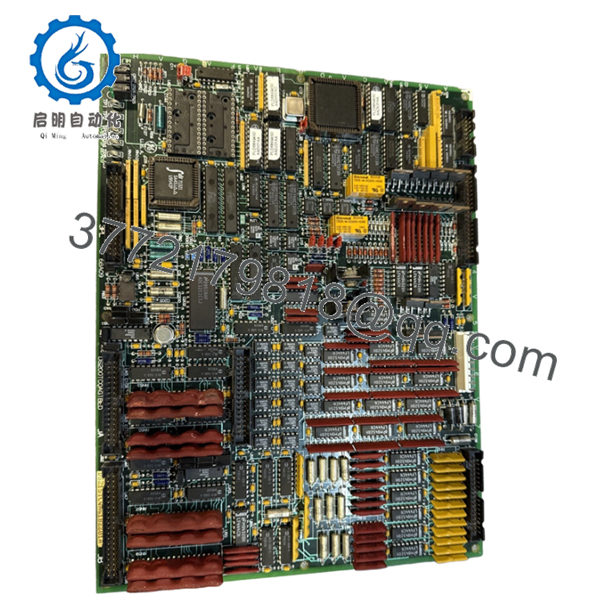
GE DS200TCQAG1BED is a Mark V Analog I/O Board used within GE Speedtronic turbine control systems. The board scales and conditions analog process signals received from terminal boards installed in R1, R2, and R3 I/O cores before transferring them into the control architecture.
In field deployments of Mark V systems, TCQA boards frequently handle fuel flow, servo positioning, thermocouple signals, vibration monitoring, and LVDT feedback. Plants often maintain spare inventory because replacing the board is far easier than redesigning turbine signal paths during an outage.
5. Installation & Configuration Guide
Stage 1: Pre-Installation Preparation
Estimated Time: 10 minutes
⚠️ Safety First: Notify operations personnel of downtime. Confirm safe equipment state. Apply lockout/tagout procedures. Wait at least 5 minutes for cabinet discharge.
Tools Required
- ESD wrist strap
- PH1 screwdriver
- Fluke 115 multimeter
- Wire labels
- Smartphone for documentation photos
Data Backup
- Export active turbine logic and configuration files.
- Record I/O core location.
- Photograph all connectors and board locations.
- Capture cable routing and wiring orientation.
- Record board revision suffixes.
Stage 2: Removing the Old Module
Estimated Time: 5 minutes
- Open cabinet access panel.
- Label all connectors.
- Disconnect field wiring carefully.
- Release locking hardware.
- Pull the board straight outward.
- Inspect edge connectors and rack slots.
⚠️ Keep the original board until startup succeeds.
I’ve seen technicians discover one undocumented connector orientation after the old board was already buried in a parts box.
Stage 3: Installing the New Module
Estimated Time: 10 minutes
- Put on ESD protection.
- Verify DS200TCQAG1BED matches the removed revision.
- Configuration Clone (Crucial): Copy all jumper settings and connector positions.
- Verify all cable locations before insertion.
- Insert the board evenly into guide rails.
- Confirm complete seating and retention lock engagement.
- Reconnect wiring.
Self-Checklist:
[ ] Connectors match
[ ] Wiring secured
[ ] Lock tabs seated
❗This is the most common rookie mistake, but it happens constantly. Take a picture before you pull it. I can’t stress this enough.
Stage 4: Power-On & Testing
Estimated Time: 5 minutes
Pre-Power Check
Use a Fluke 115 meter to verify no shorts exist on supply rails.
Power-Up Steps
- Energize rack power only.
- Observe startup indicators.
- Verify communication status.
- Connect maintenance software.
- Confirm board detection.
- Simulate analog signal values.
⚠️ Troubleshooting Note: Incorrect analog readings immediately after startup often indicate signal path or revision mismatches.
Veteran Survival Guide — Technical Pitfalls
❗ Firmware Revision Mismatch
I’ve seen systems spend two days in fault investigation because someone assumed all TCQA revisions behaved identically. Record the full suffix before ordering replacement hardware.
❗ DIP Switch / Jumper Misconfiguration
Take pictures before removal.
Seriously.
You think you’ll remember. You won’t. By hour three of troubleshooting, every jumper starts looking identical.
❗ Terminal and Wiring Assumptions
Connector assignments can shift across revisions. Similar GE boards do not guarantee identical pin definitions.
Check documentation. Never wire from memory.
❗ Power Draw Miscalculations
Calculate total rack loading and leave 20% headroom.
One additional module can expose an already stressed power supply.
❗ ESD Damage
I once watched an engineer swap boards in dry winter air with no grounded strap. Powered the cabinet up and immediately smelled burned electronics.
That board never came back.
Keep these checks in mind and you’ll save yourself 90% of typical rework time.
SOP Quality Transparency
1. Inbound Inspection & Traceability
- Verify source records and procurement documentation
- Check serial labels and anti-counterfeit markings
- Inspect for corrosion, scratches, UV discoloration, and rework evidence
- Verify included accessories and documentation
2. Live Functional Testing
Testing performed on a genuine GE Mark V rack where available.
Procedure:
- Power-on self-test
- Startup LED verification
- Communication handshake checks
- Analog signal simulation
- LVDT and current-loop testing
- Continuous runtime exceeding 24 hours
- Thermal monitoring and documented reporting
Test videos and photos available upon request.
3. Electrical Parameter Testing
- 500 V Megger insulation resistance test (>10 MΩ)
- Ground continuity verification
- Voltage measurement using Fluke 115
- Hipot testing where applicable
4. Firmware & Configuration Verification
- Record revision levels
- Document jumper positions
- Create photographic configuration records
5. Final QC & Packaging
- QC inspector sign-off
- Anti-static ESD packaging
- Bubble-wrap protection
- Heavy-duty corrugated shipping carton
- QC-passed label with inspection date
Verified fully functional under load testing.

- DS200TCQAG1BED
6. Frequently Asked Questions (FAQ)
Q1: Can I hot-swap this module?
No.
Mark V systems were not built for live insertion. Pulling the board under power risks backplane damage and communication faults.
Power down first.
Q2: Is DS200TCQAG1BED obsolete?
Yes.
Mark V hardware is now considered legacy equipment. Most available inventory today comes from surplus channels or specialized industrial stock suppliers.
Q3: Is this genuinely new hardware?
Most current inventory falls into New Surplus or tested refurbished categories. Request photos, serial labels, and testing documentation before purchase.
Q4: Will I lose programming logic if I replace it?
No, normally not.
TCQA is an analog I/O processing board, not the primary control processor. Still back everything up. After enough 2 AM outages, assumptions stop being your friend.
Q5: What if DS200TCQAG1BED is unavailable?
Verify alternate TCQA revisions carefully.
GE revision suffixes matter. Physical similarity does not guarantee interchangeability.
Q6: Why are field values incorrect after replacement?
Start by checking connector placement and revision compatibility.
I’ve watched engineers replace sensors, wiring, and terminal boards before realizing the replacement revision differed from the original.
Q7: Why is surplus pricing lower than original OEM pricing?
Most inventory comes from plant shutdowns, canceled projects, and excess procurement stock rather than active OEM manufacturing channels. Availability and condition usually determine price more than historic list value.



