
 WhatsApp: +86 16626708626
 Email:
  Phone: +86 16626708626
Description
3. Key Technical Specifications
| Parameter | Value |
| Product ID | DS215UDSAG1AZZ01A |
| System Series | Speedtronic Mark V |
| Board Type | UDSA Digital I/O |
| Logic Voltage | 24 VDC / 125 VDC (Configuration Dependent) |
| I/O Capacity | Multiple Digital Inputs/Outputs |
| Dimensions | 10.5 in x 7.25 in (Standard Mark V Frame) |
| Weight | 1.45 lbs (0.66 kg) |
| Operating Temp | 0 to 60°C (32 to 140°F) |
| Humidity | 5% to 95% Non-condensing |
| Mounting | Card Cage / Standoff Mount |
4. Product Introduction
The GE DS215UDSAG1AZZ01A is a critical Digital I/O board (UDSA) within the Mark V Speedtronic Turbine Control System. Designed for high-reliability environments, this board interfaces field digital signals with the control core, managing essential feedback for gas and steam turbine operations.
Engineers favor the UDSA board for its precise signal conditioning and its ability to operate within both Triple Modular Redundant (TMR) and Simplex system architectures. Unlike later Mark VI/VIe components, the DS215 series utilizes specialized hardware logic that ensures deterministic response times for critical trip circuits and status monitoring.
5. Installation & Configuration Guide
Stage 1: Pre-Installation Preparation (Estimated Time: 10 mins)
- ⚠️ Safety First: Ensure the turbine is in a safe, barred-over, or stopped state. This board often handles trip signals; an accidental trigger can cause a full unit trip. Lock out all relevant DC power sources.
- Tools Required: ESD wrist strap (mandatory), PH1/PH2 screwdrivers, non-conductive tweezers for jumpers.
- Data Backup: Ensure you have a recent copy of the
UNIT1.DATor equivalent configuration files. Photograph the existing board’s jumper (J) and DIP switch settings.
Stage 2: Removing the Old Module (Estimated Time: 5 mins)
- Attach your ESD strap to the cabinet ground.
- Carefully disconnect the ribbon cables (typically 3PL, 4PL, etc.). Do not pull on the wires; use the pull-tabs on the connectors.
- Unscrew the mounting hardware or release the nylon standoffs.
- Pull the board straight out. ⚠️ Note: Check the backplane connectors for any signs of arcing or carbon buildup.
Stage 3: Installing the New Module (Estimated Time: 10 mins)
- Configuration Clone (Crucial): Move the jumpers (e.g., J1 through Jxx) on the new DS215UDSAG1AZZ01A to match the old board exactly. These jumpers define voltage levels and signal routing.
- Align the board with the standoffs and press firmly until seated.
- Reconnect the ribbon cables. Ensure the locking tabs “click” into place.
- Self-Checklist: [ ] Jumpers verified, [ ] Ribbon cables seated, [ ] Hardware tightened.
Stage 4: Power-On & Testing (Estimated Time: 5 mins)
- Apply control power. Observe the LED heartbeat on the board (if applicable) and the operator interface (HMI).
- Check for “Board Mismatch” or “I/O Configuration” alarms on the <I> or GE Cimplicity station.
- Perform a loop check on a non-critical digital input to verify the board is communicating with the core.
- ⚠️ Troubleshooting Note: If the board is not recognized, verify that the ‘AZZ01A’ suffix matches your system configuration requirements in the control software.
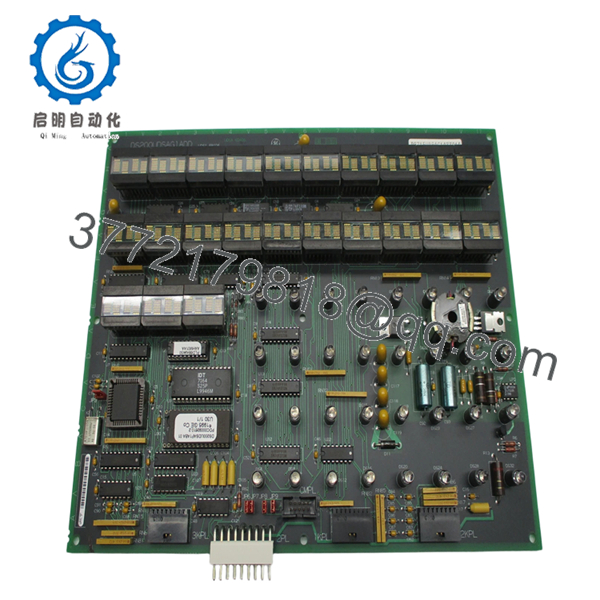
- DS215UDSAG1AZZ01A
6. Frequently Asked Questions (FAQ)
Q: Can I hot-swap the DS215UDSAG1AZZ01A while the turbine is running?
A: Technically, the Mark V rack allows for some “live” card pulls in a TMR system, but I strongly advise against it for this specific UDSA board. Since it handles digital I/O that often includes trip strings, pulling it under power can cause an “Invalid State” on the voting logic, potentially tripping your unit. Always power down the specific core first.
Q: Is this board compatible with Mark V Simplex and TMR systems?
A: Yes. The “UDSAG1” version is designed to work in both. However, the way you set the jumpers is completely different between the two. If you copy the jumper settings from a TMR board into a Simplex system, you’ll likely see a “Contact Input Power Loss” alarm immediately.
Q: What does the “AZZ01A” suffix signify?
A: In GE nomenclature, these suffixes often denote specific firmware revisions or hardware “artwork” changes. The “A” at the end usually indicates a specific functional version. If your current board is an “AAA” and you are moving to an “AZZ,” verify your specific control sequence documentation, though they are generally backward compatible.
Q: Why should I buy “New Surplus” instead of a cheaper refurbished unit?
A: Honestly, refurbished Mark V boards are a gamble. These boards have been in hot cabinets for 20+ years. Capacitors dry out and traces become brittle. New Surplus units have zero “power-on hours,” meaning you get the full remaining lifespan of the components. For a multi-million dollar turbine, saving $500 on a used board is a poor trade-off.
Q: Will I lose my turbine logic by replacing this board?
A: No. The logic is stored in the EEPROMs on the Control Processor boards (like the TCCA or LOCA). The UDSA is just the “hands and ears” of the system. As long as your jumpers are set correctly, the processor will start talking to the new board immediately upon boot-up.



