
 WhatsApp: +86 16626708626
 Email:
  Phone: +86 16626708626
Description
3. Key Technical Specifications
| Parameter | Value |
|---|---|
| Model Number | DS3800HLNE1B1B |
| Manufacturer | GE General Electric |
| Series | Speedtronic Mark IV DS3800 |
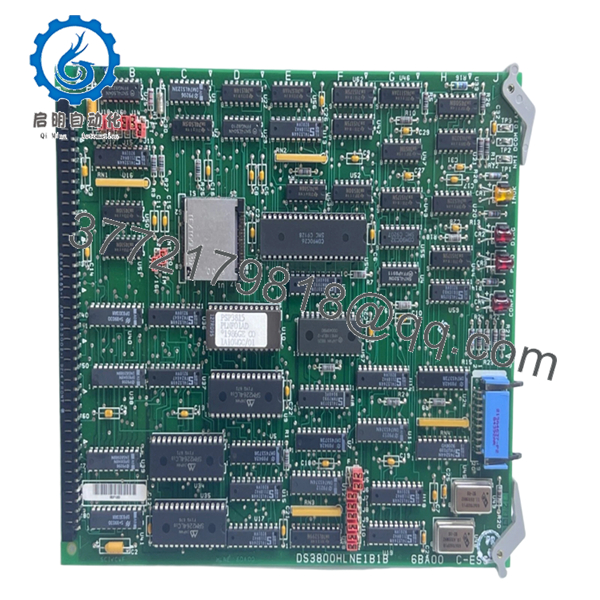
| Product Type | Network Controller Board |
| Primary Function | Rack-level network communication control |
| Application | Gas and Steam Turbine Control |
| System Compatibility | GE Mark IV Control Systems |
| Processor Type | Onboard microprocessor architecture |
| EEPROM Support | 4 EEPROM sockets |
| Jumper Configuration | 16 configurable jumpers |
| Connector Type | 34-pin connector |
| Status Indicators | 3 red LEDs, 1 amber LED |
| Logic Devices | TTL integrated circuits |
| Mounting Style | Rack-mounted PCB |
| PCB Protection | Industrial conformal coating |
| Operating Temperature | 0 °C to +50 °C typical cabinet environment |
| Storage Temperature | −40 °C to +85 °C |
| Communication Method | Proprietary GE Mark IV backplane |
| Product Status | Legacy / Obsolete Hardware |
4. Product Introduction
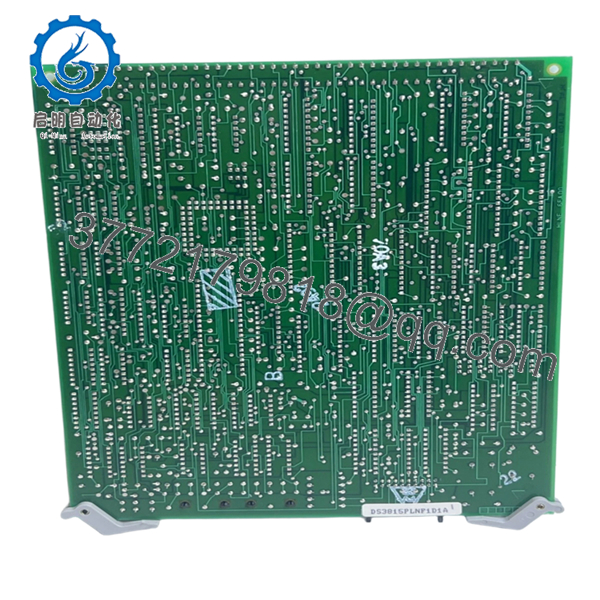
The GE DS3800HLNE1B1B is a Network Controller Board used in GE Speedtronic Mark IV turbine control systems for managing rack-level communication and control data exchange between system modules. It operates within legacy gas and steam turbine control environments where stable backplane communication is critical.
In field maintenance work, this board is commonly replaced during Mark IV lifecycle support projects where aging EEPROM devices, unstable communications, or intermittent watchdog faults begin affecting turbine startup reliability. Plants maintaining legacy Mark IV systems typically prefer direct board replacement to avoid expensive control migration outages.
5. Installation & Configuration Guide
Stage 1: Pre-Installation Preparation (Estimated Time: 10 Minutes)
⚠️ Safety First
- Notify plant operations before taking the turbine control cabinet offline.
- Verify the turbine is fully shut down and mechanically secured.
- Apply lockout/tagout procedures to all cabinet power sources.
- Wait at least 5 minutes for stored capacitor energy to discharge.
Tools Required
- ESD wrist strap
- PH1 screwdriver
- Fluke 115 multimeter
- Wire labels
- Smartphone for documentation photos
- Flashlight for rack inspection
Data Backup
- Backup all available Mark IV configuration data.
- Photograph:
- EEPROM locations
- Jumper settings
- Connector orientation
- Rack slot position
- Record all board revision labels before removal.
❗Take clear photos of the EEPROM placement. I have seen engineers move EEPROM chips into the wrong sockets and spend hours chasing startup faults that were completely self-inflicted.
Stage 2: Removing the Old Module (Estimated Time: 5–10 Minutes)
- Open the Mark IV cabinet front panel.
- Label all connected cables before disconnecting anything.
- Remove connectors carefully without flexing the PCB.
- If EEPROM modules are installed:
- Document socket IDs
- Remove chips carefully using an IC extraction tool if available
- Release rack retention hardware.
- Pull the board straight outward to protect edge connectors.
- Inspect the rack for:
- Bent pins
- Corrosion
- Carbon tracking
- Dust buildup
⚠️ Note
Keep the original board available during startup testing. Legacy Mark IV systems often contain undocumented field modifications.
Stage 3: Installing the New Module (Estimated Time: 10 Minutes)
- Wear a grounded ESD wrist strap before touching the board.
- Verify the exact model number: DS3800HLNE1B1B.
- Inspect the replacement board for:
- Connector damage
- Cracked solder joints
- Oxidized IC sockets
- Shipping damage
Configuration Clone (Crucial)
- Replicate all jumper positions exactly from the original board.
- Transfer EEPROM modules to matching socket IDs.
- Verify connector orientation before installation.
❗This is where most installation mistakes happen on older GE boards. Someone moves an EEPROM into the wrong socket or leaves one jumper in factory default position, and suddenly the entire rack starts reporting communication faults.
I once watched a contractor spend nearly 12 hours troubleshooting a “bad replacement board” that turned out to be one EEPROM chip installed one socket off.
- Slide the board evenly into rack guides.
- Press firmly until fully seated.
- Tighten retention hardware.
- Reconnect all cables carefully.
Self-Checklist
- EEPROM positions verified
- Jumpers match original
- Connectors seated correctly
- Rack tabs locked
- No loose wiring
Stage 4: Power-On & Testing (Estimated Time: 10–15 Minutes)
Pre-Power Check
- Verify no shorts exist on cabinet power rails.
- Confirm proper cabinet grounding continuity.
- Inspect connector seating one final time.
Power-On Steps
- Energize the Mark IV rack only.
- Observe onboard LEDs during startup.
- Verify:
- Normal LED sequence
- No persistent amber fault indicators
- Stable communication status
- Connect the engineering workstation.
- Confirm:
- Rack communication
- Board recognition
- Stable processor communication
- No watchdog alarms
- Perform dry-run signal verification before enabling turbine permissives.
⚠️ Troubleshooting Note
- Solid fault LEDs commonly indicate:
- EEPROM mismatch
- Incorrect jumper settings
- Firmware incompatibility
- Improper board seating
- Intermittent communication faults often point to:
- Oxidized backplane contacts
- Aging EEPROM devices
- Power supply instability
I have seen cabinets where the replacement board worked perfectly, but oxidation on the backplane connector caused intermittent faults under thermal load. Clean the rack before assuming the new board failed.

- DS3800HLNE1B1B
- DS3800HLNE1B1B
6. Frequently Asked Questions (FAQ)
Q1: Can the DS3800HLNE1B1B be hot-swapped?
No. This board is not designed for live insertion.
Removing or installing it under power can corrupt Mark IV rack communication and potentially damage backplane circuitry. Shut down cabinet power completely before replacement.
Q2: Is this model obsolete?
Yes. The DS3800HLNE1B1B belongs to the legacy GE Mark IV Speedtronic platform, which has been obsolete for many years. Most available inventory today comes from surplus industrial stock or specialized turbine control suppliers.
Many power plants still maintain Mark IV systems because migration costs and outage risks remain substantial.
Q3: What should I do with the EEPROM chips during replacement?
Move them carefully to the exact same socket locations on the replacement board unless engineering documentation specifies otherwise.
❗This is critical. Incorrect EEPROM placement can prevent startup or create unpredictable communication faults.
Take high-resolution photos before touching anything.
Q4: Will replacing this board erase turbine programming?
Potentially, depending on how the Mark IV system stores configuration and firmware.
Before replacement:
- Backup all configuration files.
- Archive EEPROM data if possible.
- Document jumper settings and board revisions.
Never assume legacy backups are usable until you verify them.
Q5: Why are jumper settings so important on this board?
Because the DS3800HLNE1B1B relies heavily on hardware configuration for communication behavior and addressing.
A single incorrect jumper can cause:
- Communication timeout alarms
- Rack synchronization failures
- Startup sequencing faults
Honestly, jumper mistakes are one of the biggest causes of avoidable commissioning delays on legacy GE systems.
Q6: Is New Surplus inventory reliable for this board?
Usually yes, if the supplier performs proper testing and storage control.
A proper QC process should include:
- Anti-counterfeit inspection
- PCB trace inspection
- EEPROM socket verification
- Power-on testing in a compatible Mark IV rack
- Communication handshake verification
- 24-hour thermal load testing
- Insulation resistance testing with a 500 V Megger
- ESD-safe packaging with QC documentation
Test videos and startup reports should be available upon request.
Q7: What is the most common failure point during installation?
EEPROM handling and jumper mismatch.
I have seen engineers install perfectly good replacement boards only to discover:
- EEPROM chips installed backward
- One jumper left in default position
- Connector not fully seated
Legacy Mark IV systems are not forgiving about configuration errors.
Keep these checks in mind and you’ll save yourself 90% of typical rework time.



