
 WhatsApp: +86 16626708626
 Email:
  Phone: +86 16626708626
Description
3. Key Technical Specifications
| Parameter | Value |
| Processor Type | 16-Bit Microprocessor |
| System Compatibility | GE Speedtronic Mark IV Control Systems |
| Input Voltage | +5 VDC, ±15 VDC (Backplane Supplied) |
| PCB Layers | Multilayer High-Density Construction |
| Communication | Parallel Bus Architecture |
| Mounting | Card Cage / Rack Mount |
| Connectors | High-Pin Count Edge Connectors |
| Operating Temp | 0 to 60°C (32 to 140°F) |
4. Product Introduction & Supply Chain Strategy
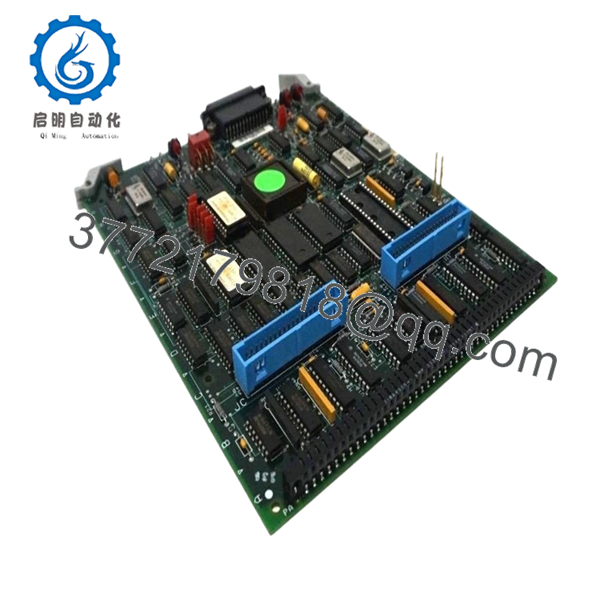
The GE DS3800HMPK1N1K is a primary 16-bit microprocessor board used within the Speedtronic Mark IV turbine control system. It functions as the computational heart of the control rack, processing sensor inputs and executing logic required for stable turbine operation, fuel regulation, and protection sequencing in power generation environments.
From a supply chain perspective, the Mark IV system is now in the “Mature/Legacy” phase of its lifecycle. Procuring this module as New Surplus is a strategic move to lower the Total Cost of Ownership (TCO). While refurbished units carry high risks of dried-out electrolytic capacitors or latent thermal stress, New Surplus inventory provides the original OEM reliability needed to avoid catastrophic downtime. Securing these units now serves as an essential insurance policy against future stock-outs of EOL hardware.
5. Installation & Configuration Guide
- Stage 1: Pre-Installation (Prep & Safety): Perform a full system backup of the turbine control parameters. Follow standard lock-out/tag-out procedures to de-energize the control cabinet. Wear a grounded ESD wrist strap to prevent static discharge to the microprocessor.
- Stage 2: Removal: Identify the faulty board in the card cage. Gently loosen the retaining screws or ejector tabs. Pull the module straight out along the guide rails to prevent bending the sensitive backplane pins or damaging the edge connectors.
- Stage 3: Installation (Clone & Seat): Compare the hardware revision and jumper settings of the new DS3800HMPK1N1K with the original board. Replicate all jumper positions exactly. Slide the new board into the slot and apply firm, even pressure until the edge connectors seat fully into the backplane.
- Stage 4: Power-On & Testing: Restore power to the rack. Monitor the diagnostic LEDs on the faceplate; a green “RUN” or “OK” status should appear. Verify that the control system recognizes the board without parity errors. If applicable, reload the specific application code to the board memory.
6. Firmware/Software Versions & Upgrade Notes
The DS3800HMPK1N1K relies on specific EPROM-based firmware tailored to the turbine’s operational profile. When swapping hardware, you must ensure the firmware chips on the new board match the version used by your existing system. Version mismatches can lead to communication “timeouts” or incorrect logic execution. We advise against upgrading firmware during a hardware swap unless mandated by a critical GE service bulletin, as this introduces additional variables during the troubleshooting process.

- DS3800HMPK1N1K
7. Frequently Asked Questions (FAQ)
- How can you guarantee these boards are “New Surplus” and not used?
We maintain a strict quality gate. Every DS3800HMPK1N1K is inspected for witness marks on the mounting holes, dust in the components, and wear on the gold-plated edge connectors. These units come from climate-controlled spare parts rooms and have never been energized in a live rack.
- Is the Mark IV system still supported by GE?
The Mark IV is largely considered EOL (End of Life). This means GE no longer mass-produces these boards, making New Surplus inventory the only way to maintain the system without undergoing a multi-million dollar full control system migration.
- Can I “Hot-Swap” this board while the turbine is running?
No. The Mark IV backplane architecture is not designed for hot-swapping. Attempting to pull or plug this microprocessor board while the rack is powered can cause electrical arcing, which may fry the backplane or adjacent control modules.
- Does the board come with the firmware chips installed?
Most New Surplus units come with standard factory firmware. However, since Mark IV logic is often site-specific, you may need to transfer the EPROMs from your old board to the new one to maintain your specific configuration.
- What is the warranty on this obsolete module?
Despite its EOL status, we provide a 1-year functional warranty. This covers any component failure and offers significantly better protection than the 30-day “best effort” warranties typically found on refurbished parts.



