
 WhatsApp: +86 16626708626
 Email:
  Phone: +86 16626708626
Description
3. Key Technical Specifications
| Parameter | Value |
| System Compatibility | Mark IV Speedtronic Control |
| Function | Digital to Analog Signal Conversion |
| Output Channels | Multiple independent analog channels |
| Resolution | 12-bit precision |
| Revision Suffix | G1B1C (Specific hardware/firmware iteration) |
| Connection | Gold-plated edge fingers for backplane mounting |
| Diagnostic Features | On-board test points for voltage verification |
| Mounting | Standard VME-style card cage slot |
4. Product Introduction & Supply Chain Strategy
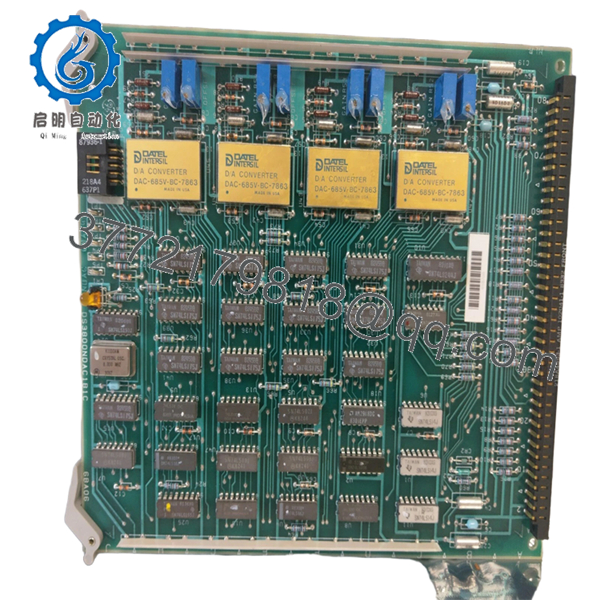
The GE DS3800NDAC1B1C is a vital link in the Mark IV Speedtronic control chain, functioning as the Digital-to-Analog Converter (NDAC) board. It translates the digital computational results from the control processors into precise analog voltages or currents required to drive fuel valves, guide vanes, and other proportional actuators. Accurate conversion is non-negotiable for stable turbine governing and heat rate optimization.
Maintaining a New Surplus DS3800NDAC1B1C in your critical spares inventory is a high-priority defensive strategy for legacy plants. DAC boards are susceptible to “analog drift” caused by the aging of precision resistors and capacitors. A refurbished board may “work,” but its output may have shifted slightly from calibrated values, leading to hunting in valve positions or inefficient combustion. A New Surplus unit provides factory-calibrated accuracy, ensuring your turbine responds exactly as the control logic dictates.
5. Installation & Configuration Guide
Stage 1: Pre-Installation (Prep & Safety)
Ensure the turbine is in a safe, offline state and the control cabinet power is turned off. Use a grounded ESD wrist strap to handle the board. Locate and document any manual jumpers on the existing board that define the output ranges (e.g., 0-10V vs. 4-20mA).
Stage 2: Removal
Unlock the card cage handles. Gently pull the DS3800NDAC1B1C straight out of its slot, avoiding any lateral movement that could scratch the edge connectors or damage the backplane pins. Place the board in an ESD-protective bag.
Stage 3: Installation (Clone & Seat)
Verify that all jumper settings on the new DS3800NDAC1B1C are identical to the board being replaced. Align the board with the card guides and push firmly until the edge connector is fully seated. Secure the locking handles to maintain a tight connection against vibration.
Stage 4: Power-On & Testing
Restore power and monitor the system boot sequence. Use a calibrated multimeter at the board’s test points to verify that the analog output signals correspond to the values shown on the HMI. Perform a “stroking” test on the connected valves to ensure smooth, linear movement without jitter.

- DS3800NDAC1B1C
6. Firmware/Software Versions & Upgrade Notes
- Revision Integrity: The ‘G1B1C’ suffix must be matched. Even minor revision changes in DAC boards can result in different output scaling factors or initialization timings.
- Calibration: While New Surplus boards are factory-tested, we recommend verifying the zero and span settings within the Mark IV software after installation to account for field wiring resistance.
- No Software Load: This board uses hard-wired logic for conversion; however, the I/O configuration in the system’s EEPROM must match the hardware revision for proper signal mapping.
7. Frequently Asked Questions (FAQ)
What happens if the NDAC board fails?
A failure typically results in “frozen” or “saturated” analog outputs, causing fuel valves or actuators to fail to their safe positions, which usually triggers an immediate turbine trip.
Can I calibrate this board manually?
Most NDAC boards have on-board potentiometers for fine-tuning zero and span. However, these are factory-set. We suggest only adjusting them if the software-based calibration cannot compensate for field loop variances.
Is it safe to buy “New Surplus” for a board this old?
Yes. Unlike refurbished boards that have been heat-stressed in a live rack for years, New Surplus boards have been stored in controlled environments, preserving the integrity of the sensitive analog components.
Do you provide the jumpers with the board?
Our boards ship with the standard factory jumper configuration. You must move or verify these jumpers to match your specific site application during installation.
Why is my new board showing a “Diagnostic Alarm”?
Check the seating of the board first. If the alarm persists, verify that the revision (G1B1C) matches the hardware definition in your Mark IV configuration files; a mismatch can cause the core to reject the board.



