
 WhatsApp: +86 16626708626
 Email:
  Phone: +86 16626708626
Description
3. Key Technical Specifications
| Parameter | Value |
| Control System | Speedtronic Mark IV |
| Module Type | Memory Extension / Expansion |
| Revision Level | G1H |
| Memory Architecture | Static RAM / EPROM Support |
| Bus Compatibility | Mark IV Proprietary Backplane |
| Connector Plating | Gold over Nickel |
| Operating Voltage | +5 VDC (Backplane Supplied) |
| Diagnostic LEDs | Parity Error / Access Status |
| Thermal Range | 0 to 60 °C (32 to 140 °F) |
4. Product Introduction & Supply Chain Strategy
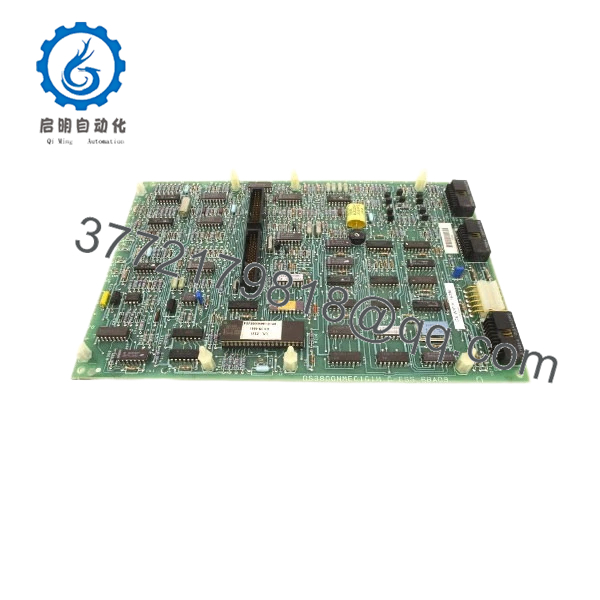
The GE DS3800NMEC1G1H serves as the primary memory extension module for the Speedtronic Mark IV turbine control system. It provides the necessary computational “headroom” required for the processor to execute complex sequencing, alarm management, and real-time data logging. Without a functional NMEC board, the control system cannot load the full instruction set, leading to “Processor Halted” states and total system unavailability.
From a strategic inventory perspective, the NMEC board is a high-criticality component with a limited global supply of New Surplus units. Relying on refurbished memory boards is a high-risk gamble; aged memory chips and solder joints are prone to intermittent parity errors that cause “phantom” turbine trips. By investing in New Surplus DS3800NMEC1G1H inventory, you ensure a stable Total Cost of Ownership (TCO) and avoid the catastrophic revenue loss associated with an unplanned outage caused by a failed legacy memory card.
5. Installation & Configuration Guide
Stage 1: Pre-Installation (Prep & Safety)
- Backup Logic: Ensure you have a current backup of the turbine control software and EEPROM data.
- ESD Safety: Static electricity is the primary killer of memory modules. Use a grounded ESD mat and wrist strap.
- Inspection: Photograph the jumper positions (JP1, JP2, etc.) and any socketed ICs on the old board.
Stage 2: Removal
- Power down the Mark IV control rack completely.
- Disengage the card ejectors and pull the board straight out to avoid damaging the backplane pins.
- If specific EPROMs must be moved, use a professional IC extractor tool to avoid pin fatigue.
Stage 3: Installation (Clone & Seat)
- Hardware Matching: Set the jumpers on the new DS3800NMEC1G1H to match the memory addressing of the original card.
- Seating: Slide the board into its dedicated slot. Apply firm, even pressure until the gold edge connectors are fully engaged with the backplane.
Stage 4: Power-On & Testing
- Restore power to the rack.
- Self-Test: Monitor the boot sequence on the operator interface. The system should pass the initial memory parity check without errors.
- Verification: Confirm that all turbine logic segments are loaded and the “Memory Healthy” status is visible.

- DS3800NMEC1G1H
- DS3800NMEC1G1H
6. Firmware/Software Versions & Upgrade Notes
- Revision Delta: The “G1H” revision includes specific timing updates for high-speed data access. If you are replacing an earlier “C” or “D” revision, verify that your processor firmware supports the G1H timing parameters.
- EPROM Compatibility: If transferring EPROMs, ensure they are compatible with the socket speed ratings on the NMEC board.
- Warning: Never remove or insert the NMEC board while the 5V logic bus is active, as this can cause a “Bus Error” and potentially corrupt the non-volatile memory on adjacent cards.
7. Frequently Asked Questions (FAQ)
Q: Is the DS3800NMEC1G1H a “Plug-and-Play” replacement?
A: Not entirely. While the hardware fits perfectly, you must ensure the jumper settings for memory addressing are identical to your old board, or the processor will not be able to locate the extended memory banks.
Q: Why choose New Surplus over a much cheaper refurbished board?
A: Memory chips have a finite lifespan and are sensitive to thermal stress. A refurbished board has already seen years of heat inside a control cabinet, making it susceptible to intermittent bit-flips and parity errors. New Surplus offers “Day 1” reliability.
Q: Does this board come with the EPROMs installed?
A: Typically, New Surplus boards are “blank” or contain factory-default firmware. Most sites transfer their specific turbine logic EPROMs from the old board to the new one during the swap.
Q: What happens if the memory parity error light comes on?
A: This usually indicates either a jumper mismatch or a poorly seated board. Power down, reseat the board, and verify your address jumpers before attempting to restart.
Q: Is this board compatible with Mark V systems?
A: No. This board is specifically engineered for the Mark IV proprietary architecture and backplane. It is not interchangeable with newer Speedtronic generations.



