
 WhatsApp: +86 16626708626
 Email:
  Phone: +86 16626708626
Description
Key Technical Specifications
| Parameter | Value |
| Processor Type | 80383EX running at 25 MHz |
| Total User Memory | 240 KB bytes (shared between logic program, register data, and system config) |
| Integrated Communication | 1 x RS-232 Port (Port 1), 1 x RS-485 Port (Port 2) |
| Protocols Supported | SNP, SNPX, Modbus RTU Slave, Serial Read/Write |
| Discrete I/O Capacity | Up to 2,048 inputs and 2,048 outputs |
| Analog I/O Capacity | Up to 1,024 inputs and 1,024 outputs |
| Internal Baseplate Current Draw | 890 mA from +5 VDC power rail |
| Maximum Software Timers/Counters | 1,000+ (User defined within memory constraints) |
| Operating Temperature Range | 0 to +60 °C (32 to 140 °F) |
Product Introduction & Supply Chain Strategy
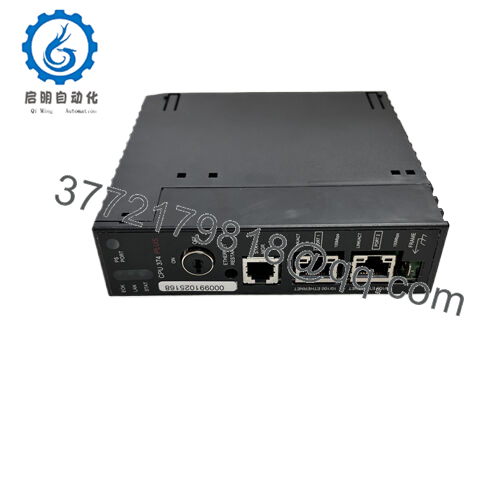
The GE Fanuc IC693CPU363-BG is a high-capacity, single-slot central processing unit engineered for the Series 90-30 PLC platform. Featuring a 25 MHz processor and 240 KB of configurable internal memory, this module delivers the processing power required for complex math operations, recipe handling, and multi-rack I/O layouts. Unlike single-port legacy units, the CPU363 incorporates two independent, built-in serial ports directly on its faceplate, allowing simultaneous communication with local operator interfaces (HMIs), supervisory SCADA hardware, or programming terminals without requiring separate coprocessor cards.
From a supply chain and life-cycle standpoint, the IC693CPU363-BG is an essential asset preservation component. Because the Series 90-30 system has reached mature obsolescence, finding pristine hardware to prevent long-term factory shutdowns is increasingly difficult. Opting for a Brand New Surplus module isolates your operation from the technical pitfalls of refurbished cards—such as dried-out electrolytic capacitors or worn chassis connections—ensuring an expected 10–15 year field service life. Keeping this high-tier CPU in your critical on-site inventory acts as an absolute insurance policy against unexpected, multi-day production losses.

- IC693CPU363-BG
Installation & Configuration Guide
Stage 1: Pre-Installation (Prep & Safety)
- Completely isolate and de-energize the PLC baseplate using standard plant lock-out/tag-out (LOTO) procedures.
- Fasten a grounded ESD wrist strap to your arm and attach the clip to a clean, unpainted metallic surface on the control enclosure.
- Label and disconnect any serial communications cables attached to the front DB-9 or RJ-45 ports.
Stage 2: Removal
- Loosen the top and bottom captive retaining screws holding the faceplate to the rack frame.
- Press down on the top and bottom plastic release tabs located at the edge of the module casing.
- Pull the old CPU card firmly and horizontally straight out of the slot guides. Do not twist or torque the card during extraction to prevent fracturing the backplane socket pins.
Stage 3: Installation (Clone & Seat)
- Remove the new surplus IC693CPU363-BG from its anti-static bag and inspect the rear connector pins for alignment.
- Note that the IC693CPU363-BG has no mechanical DIP switches for hardware addressing. All communication baud rates, port allocations, and memory sizes are handled through software configurations.
- Align the module with the card guides of Slot 1 (directly adjacent to the power supply). Slide the module in smoothly until it snaps tightly into the backplane. Tighten the faceplate screws to 6 in-lbs of torque.
- Securely reconnect the serial interface cables back into their designated communication ports.
Stage 4: Power-On & Testing
- Restore main power to the baseplate power supply unit.
- Observe the front indicator lights. The PWR indicator on the power supply must be solid, and the CPU OK LED on the new module should illuminate green after completing its internal self-diagnostics.
- Connect your programming PC using Proficy Machine Edition. Establish an online connection, download your archived program file, and confirm that configuration matrices match perfectly.
- Turn the software key or toggle the system to RUN mode. Verify the green RUN LED lights up solid, showing active logic execution.
Firmware/Software Versions & Upgrade Notes
The IC693CPU363-BG utilizes specific firmware revisions to unlock full dual-port functionality. To configure Modbus RTU Master/Slave operations seamlessly via the built-in serial ports, the module must use firmware Version 8.10 or higher. For full configuration compatibility within modern Proficy Machine Edition software (up to v9.80), firmware version 9.02 or 9.10 is recommended.
When substituting an older processor revision (such as an early -E or -F revision) with this newer -BG hardware variant, verify that your software project configuration file is updated to match the specific firmware level of the new module. Attempting to force an older software configuration onto a newer chip version can lead to a hardware configuration error, forcing the CPU to remain in a faulted state until the firmware parameters in the software match the physical module.
Frequently Asked Questions (FAQ)
What does the “-BG” suffix indicate on this part number?
The “-BG” suffix denotes the specific hardware and firmware manufacturing revision level of the module. It tracks continuous product updates implemented by the factory, including optimizations to the internal electronic components and updated baseline firmware. A newer revision level such as -BG is fully backward compatible with older revision suffixes (like -AA through -BF) assuming the software configuration is compiled correctly.
Are these modules new surplus or are they clean refurbished items?
These units are 100% genuine New Surplus items. They are unused factory stock that has never spent time in a live panel panel, never undergone board repairs, and never had components replaced. Every card undergoes complete inbound tracing, visual verification, and complete electronic diagnostic validation to ensure it meets original factory performance thresholds.
Why should we buy a new surplus CPU instead of a lower-priced refurbished one?
A refurbished PLC processor card carries a significant risk of hidden, internal wear. Components such as internal quartz crystals and logic chips degrade quietly under continuous heat exposure inside electrical panels. While a refurbished card may complete a power-on test, its long-term reliability is unpredictable. Buying a verified new surplus card delivers a fresh, zero-hour component, eliminating the danger of an unexpected failure that could result in plant downtime costs far exceeding the cost of the module.
How do the two communication ports on the faceplate differ?
Port 1 is a 9-pin sub-D connector that primarily supports RS-232 communication levels for short-distance connections directly to HMIs or programming computers. Port 2 is a high-density connector configured for RS-485 signaling, which handles longer multi-drop networks or interfaces with older SNP/SNPX master architectures across the plant floor.
Does this CPU retain its memory program if the rack loses power?
The CPU module uses internal volatile RAM to hold logic arrays and variable tables. To preserve this data when the power is turned off, the module relies on the lithium backup battery located inside the adjacent rack power supply module. If this battery dies while the main power is turned off, the program will be lost. We recommend checking and replacing the power supply backup battery every 12 to 24 months.



