
 WhatsApp: +86 16626708626
 Email:
  Phone: +86 16626708626
Description
Key Technical Specifications
| Parameter | IC695CMM004 |
|---|---|
| Manufacturer | GE Fanuc / Emerson |
| Platform | PACSystems RX3i |
| Module Type | Serial Communications Module |
| Number of Ports | 4 independent ports |
| Connector | RJ-45 |
| Serial Interface | RS-232 or RS-485/422 |
| RS-485/422 Mode | 4-wire full duplex or 2-wire half duplex |
| RS-232 Flow Control | RTS/CTS, RFR/CTS, or none |
| Baud Rates | 1,200 / 2,400 / 4,800 / 9,600 / 19.2K / 38.4K / 57.6K / 115.2K |
| Parity | Even / Odd / None |
| Data Bits | 7 / 8 |
| Stop Bits | 1 / 2 |
| Protocols | Modbus Master/Slave, CCM Slave, DNP3 Master/Slave, Serial I/O |
| 3.3 VDC Consumption | 0.7 A maximum |
| 5 VDC Consumption | 0.150 A maximum |
| Operating Temperature | 0 to +60 °C |
| RS-485/422 Input Impedance | >96 kΩ |
| RS-232 Input Impedance | 3–7 kΩ |
| Maximum Overvoltage | ±25 V |
| Port-to-Backplane Isolation | 250 VAC continuous; 1,500 VAC for 1 minute |
| Port-to-Port Isolation | 500 VDC continuous; 710 VDC for 1 minute |
The IC695CMM004 supports up to six serial communications modules in the main RX3i CPU backplane. The current RX3i documentation also permits CMM004 modules in certain remote-rack configurations, subject to the scanner architecture and supported protocols.
Firmware revision affects available protocol functions. Published GE documentation records later revisions adding CCM Slave and DNP3 Master/Slave support, so the exact hardware and firmware revision should be checked when replacing an older unit.
Product Introduction
The GE Fanuc IC695CMM004 is a four-port serial communications module for PACSystems RX3i controllers. Each port can operate as RS-232 or RS-485/422, allowing an RX3i system to communicate with serial instruments, drives, meters, controllers, and other industrial devices.
The module provides electrical isolation between serial ports and the backplane, configurable baud rates up to 115.2 kb/s, and support for several industrial protocols. Protocol availability depends on the module firmware and RX3i software configuration.
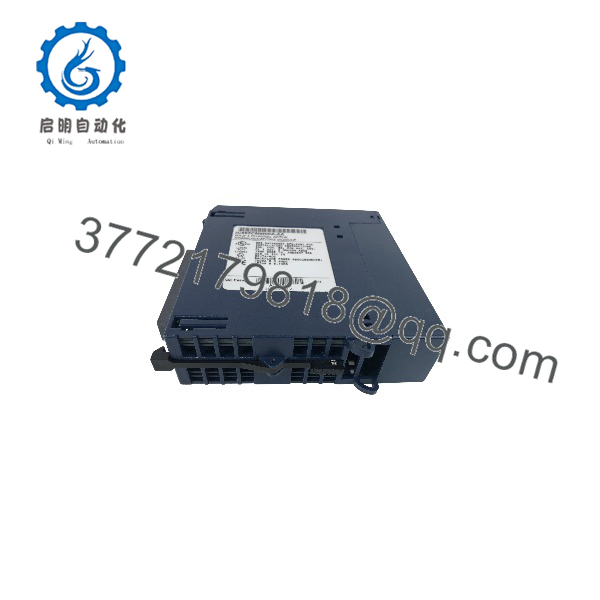
IC695CMM004
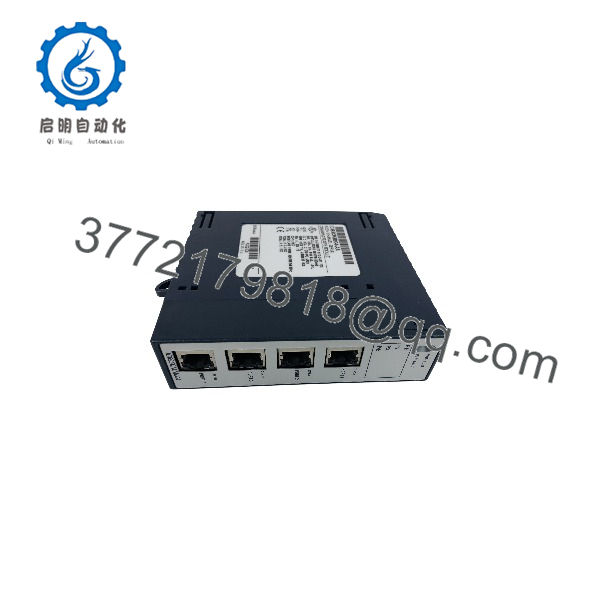
IC695CMM004
Installation & Configuration Guide
Stage 1 — Pre-Installation Preparation
Estimated time: 20–30 minutes
- Record the complete catalog number IC695CMM004 and hardware revision.
- Record the module firmware version if available.
- Back up the RX3i hardware and communication configuration.
- Document each port’s interface mode: RS-232 or RS-485/422.
- Record baud rate, parity, data bits, stop bits, and protocol for each port.
- Photograph the existing RJ-45 connections.
- Verify the connected devices and cable pinouts.
⚠️ The RJ-45 connector does not mean the port uses Ethernet. The IC695CMM004 uses RJ-45 connectors for serial communications.
Stage 2 — Removing the Existing Module
Estimated time: 15–20 minutes
- Place the controlled process in its approved shutdown state.
- Apply the site’s lockout/tagout procedure.
- Remove power from the RX3i rack unless the approved procedure specifically permits hot insertion.
- Label each serial cable by port number.
- Disconnect the four RJ-45 serial connections.
- Release the module retaining hardware.
- Remove the CMM004 from the backplane.
- Protect the removed module against ESD.
Stage 3 — Installing the IC695CMM004
Estimated time: 15–25 minutes
- Confirm the replacement catalog number and revision.
- Inspect the backplane connector and module housing.
- Insert the module into the designated RX3i slot.
- Secure the module according to the RX3i installation procedure.
- Reconnect each serial cable to its original port.
- Verify the port configuration against the PLC hardware configuration.
- Confirm that shielded cabling is used where required for EMC compliance.
⚠️ Do not assume the four RJ-45 ports share the same electrical configuration. Each port must be checked against its configured protocol and physical interface.
Stage 4 — Power-On & Testing
Estimated time: 30–60 minutes
- Restore RX3i rack power.
- Observe the Module OK LED during startup.
- Confirm the module receives its configuration from the CPU.
- Check the Port Fault LED.
- Verify activity on each required port.
- Test communication with the connected serial devices.
- Confirm the selected baud rate and serial framing.
- Test Modbus, CCM, DNP3, or Serial I/O communication as applicable.
- Check PLC diagnostic status for communication errors.
- Record the final port configuration and firmware revision.
FAQ
1. What is the ?
The is a four-port serial communications module for the GE Fanuc/Emerson PACSystems RX3i platform. It provides four independent, isolated serial channels.
2. Does the use RS-232 or RS-485?
It supports both RS-232 and RS-485/422, with the interface selected through configuration. RS-485/422 supports two-wire half-duplex or four-wire full-duplex operation.
3. Which protocols does the CMM004 support?
Depending on firmware and configuration, supported protocols include Modbus Master, Modbus Slave, CCM Slave, DNP3 Master, DNP3 Slave, and Serial I/O.
4. Can all four ports use different protocols?
The module supports independent port configuration for supported protocols. However, there are protocol-specific restrictions. For example, if a port is configured for DNP3 Master or Slave, the other ports on that module must also use Master or Slave configurations.
5. What is the maximum baud rate?
The supported range extends from 1,200 to 115,200 bit/s. Parity can be set to even, odd, or none, while data length can be 7 or 8 bits and stop bits can be 1 or 2.
6. How many CMM004 modules can an RX3i system use?
GE documentation specifies up to six serial communications modules in the main CPU backplane. Remote-rack limits depend on the RX3i scanner architecture and rack configuration.
7. What should I verify before purchasing a replacement?
Verify the catalog number, hardware revision, firmware revision, port configuration, protocol requirements, and cable pinout. This is particularly important when replacing an older CMM004 because later firmware revisions added protocol capabilities that may not exist on earlier versions.



