
 WhatsApp: +86 16626708626
 Email:
  Phone: +86 16626708626
Description
Key Technical Specifications
| Parameter | Value |
|---|---|
| Manufacturer | GE Fanuc / GE Intelligent Platforms / Emerson |
| Model Number | IC695CPE305 |
| Product Series | PACSystems RX3i |
| Module Type | Central Processing Unit |
| Processor Speed | 1 GHz |
| User Memory | 5 MB |
| Non-Volatile Flash Memory | 5 MB |
| Program Blocks | Up to 512 |
| Maximum Block Size | 128 KB |
| Ethernet Interface | 1 × RJ-45, 10/100 Mbps |
| Ethernet Functions | SRTP, EGD, Modbus TCP, programming |
| Serial Interface | 1 × isolated RS-232 |
| Serial Protocols | Modbus RTU Slave, SNP Slave, Serial I/O |
| USB Interface | USB 2.0-compatible removable data storage |
| Programming Languages | Ladder Diagram, Structured Text, Function Block Diagram, C |
| Discrete Reference Tables | Up to 32 Kbits each for %I and %Q |
| Analog Reference Tables | Up to 32 Kwords each for %AI and %AQ |
| Boolean Execution Speed | Approximately 0.072 ms / 1,000 Boolean instructions |
| Floating Point | Supported |
| Operating Temperature | 0 to 60 °C (32 to 140 °F) |
| Time-of-Day Clock Accuracy | Maximum 2 seconds/day drift |
| RTC Battery | IC690ACC001, approximately 5-year life |
| Energy Pack | IC695ACC400 |
| Backplane Interface | RX3i dual PCI/serial backplane |
| Installation | Main RX3i rack, two adjacent slots |
| Lifecycle | Legacy / Discontinued |
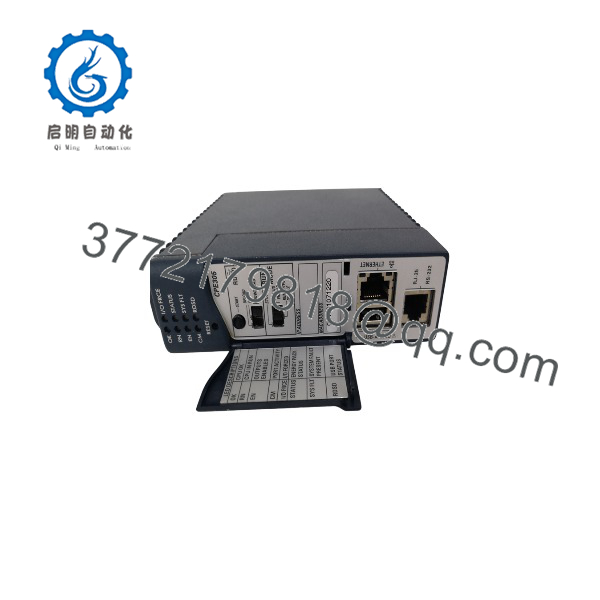
The IC695CPE305 is a 1 GHz PACSystems RX3i CPU with 5 MB of user memory and 5 MB of non-volatile flash memory. It provides one embedded 10/100 Mbps Ethernet port, one isolated RS-232 interface, and USB-compatible removable data storage. ([turn0search0])
The CPU supports Ladder Diagram, Structured Text, Function Block Diagram, and C programming. Its Ethernet interface can be used for programming and supported industrial communications, while the RS-232 interface supports Modbus RTU Slave, SNP Slave, and Serial I/O. ([turn0search1])
Product Introduction
The GE Fanuc IC695CPE305 is a PACSystems RX3i central processing unit designed for real-time machine, process, and material-handling control. It executes PLC logic from 5 MB of user memory and communicates with RX3i I/O and intelligent option modules through the dual PCI/serial backplane. ([turn0search1])
The embedded 10/100 Mbps Ethernet port handles programming and Ethernet communications, while the isolated RS-232 port provides serial connectivity. Battery-less user-memory retention is provided through non-volatile storage, with the IC695ACC400 Energy Pack supporting transfer of user memory to non-volatile storage during system power loss. ([turn0search1])
IC695CPE305
Installation & Configuration Guide
Stage 1: Pre-Installation Preparation — About 15 Minutes
⚠️ Safety First
- Notify operations and obtain an approved PLC downtime window.
- Place the controlled process in a verified safe state.
- Apply lockout/tagout where required.
- Remove power from the RX3i rack unless your site procedure specifically permits an energized module replacement.
- Wait at least 5 minutes for stored energy to discharge.
- Verify the rack power state with an appropriate multimeter.
Tools Required
- ESD wrist strap
- PH1 screwdriver
- Digital multimeter
- Wire labels
- Smartphone or camera
- Laptop with compatible Proficy Machine Edition / PAC Machine Edition software
- Ethernet cable
- IC693CBL316 if using the RS-232 interface
Data Backup
Before removing the existing CPE305:
- Save the complete Machine Edition project.
- Record the exact IC695CPE305 hardware revision.
- Record the installed firmware version.
- Document the CPU IP address.
- Record subnet mask and gateway.
- Photograph Ethernet connections.
- Record the RS-232 configuration.
- Save hardware configuration.
- Record Energy Pack status.
- Record the RTC battery installation date if known.
⚠️ Do not order solely against “IC695CPE305.” The hardware suffix and firmware history matter when replacing a legacy RX3i CPU. Emerson documentation distinguishes Axxx and later Bxxx hardware platforms, and the memory specifications differ between generations. ([turn0search21])
Stage 2: Removing the Old Module — About 5 Minutes
- Confirm the PLC has reached a safe state.
- Remove rack power according to the approved shutdown procedure.
- Photograph the CPU front panel.
- Photograph the Ethernet and serial connections.
- Disconnect the Ethernet cable.
- Disconnect the RS-232 cable if installed.
- Release the CPU locking mechanism.
- Pull the CPE305 straight out of the backplane.
- Inspect the backplane connector for damage or contamination.
Check for:
- Bent connector contacts
- Dust or contamination
- Heat discoloration
- Damaged retention hardware
- Loose Ethernet connector
- Damaged RS-232 connector
⚠️ Keep the old CPU available until the replacement has successfully loaded the application and established all required communications.
Stage 3: Installing the New Module — About 10 Minutes
- Put on a grounded ESD wrist strap.
- Verify the nameplate:
GE Fanuc IC695CPE305
- Confirm the exact hardware suffix against the existing CPU.
- Verify the replacement firmware requirement.
- Verify the RX3i Universal Backplane is compatible.
- Install the CPU into the approved pair of adjacent rack slots.
- Seat the module firmly.
- Lock the CPU into position.
- Reconnect the Ethernet cable.
- Reconnect the RS-232 cable if used.
- Verify the Energy Pack connection where applicable.
- Verify the RTC battery pull-tab has been removed on a new CPU.
The CPE305 is installed in a pair of slots in the main RX3i controller rack, excluding the two highest-numbered slots. The CPU communicates with I/O and intelligent option modules over the dual PCI/serial backplane. ([turn0search0])
Configuration Clone Checklist
- Exact CPE305 catalog number verified
- Hardware suffix verified
- Firmware version documented
- IP address recorded
- Subnet mask recorded
- Gateway recorded
- Ethernet configuration backed up
- Serial configuration backed up
- Hardware configuration saved
- Energy Pack verified
- RTC battery verified
- Ethernet cable secured
- CPU fully seated
Stage 4: Power-On & Testing — About 15–20 Minutes
Pre-Power Check
- Verify the CPU is fully seated.
- Confirm rack power-supply connections.
- Check the Ethernet cable.
- Check the serial cable if used.
- Confirm the Energy Pack connection.
- Verify no backplane connector pins are damaged.
- Confirm the replacement CPU matches the project hardware configuration.
Power-On Steps
- Energize the RX3i rack.
- Observe the CPU LEDs.
- Confirm the CPU completes its startup sequence.
- Connect PAC Machine Edition to the controller.
- Verify the CPU is reachable over Ethernet.
- Confirm the IP address.
- Verify the firmware version.
- Check the hardware configuration.
- Download the backed-up configuration if required.
- Restore the application logic where required.
- Confirm I/O modules initialize.
- Verify Ethernet communications.
- Test serial communications.
- Return the CPU to the required operating mode.
- Monitor the system during a controlled production test.
The CPE305’s embedded Ethernet port automatically senses 10/100 Mbps speed, duplex mode, and straight-through/crossover cabling. The RS-232 port is electrically isolated. ([turn0search1])
⚠️ Troubleshooting Notes
- CPU does not reach RUN: Check firmware compatibility, hardware configuration, and fault tables.
- No Ethernet connection: Check IP address, subnet mask, switch port, and Ethernet cable.
- Serial communication fails: Verify the configured protocol and use the specified IC693CBL316 cable; the CPE305 RS-232 port does not provide the 5 VDC output found on some other GE CPUs. ([turn0search1])
- Program does not match: Check whether the correct project and hardware configuration were downloaded.
- Unexpected Modbus behavior: Verify firmware because Modbus/TCP support was added in later firmware revisions.
- Memory retention problem: Check the Energy Pack and non-volatile storage behavior.
Common Replacement Pitfalls From Field Experience
❗ 1. Ignoring the Hardware Suffix
This is probably the biggest procurement trap with the .
You will see listings for suffixes such as -ABAH, -ABAG, -ABAF, and Bxxx variants. These are not simply cosmetic markings. Firmware capabilities and supported hardware differ by revision. Emerson’s current documentation separates -Bxxx platforms from earlier Axxx hardware. ([turn0search21])
Avoidance: Photograph the entire CPU label before ordering. Match the suffix, not just the base catalog number.
❗ 2. Assuming Every Has the Same Firmware Capabilities
The firmware history matters.
For example, firmware 7.30 added Modbus/TCP Server, Modbus/TCP Client, SRTP Server, and SRTP channels through the embedded Ethernet interface. ([turn0search5])
If the existing application depends on one of those functions, installing an older firmware revision can create a very confusing commissioning problem.
Avoidance: Record the old firmware version before pulling the CPU.
❗ 3. Forgetting the Energy Pack
The uses battery-less retention of user memory, with the IC695ACC400 Energy Pack providing power long enough for user memory to be written to non-volatile storage during power loss. ([turn0search1])
That is different from simply assuming the RTC battery protects the PLC program.
Avoidance: Treat the RTC battery and Energy Pack as two different maintenance items.
❗ 4. Assuming the RTC Battery Protects the PLC Program
The ‘s IC690ACC001 battery is for the real-time clock. GE documentation gives it an estimated five-year life and states that a failed or missing RTC battery resets the CPU date/time while the CPU itself can continue operating normally. ([turn0search1])
Avoidance: Do not use RTC battery condition as your program-retention strategy. Maintain a verified project backup and understand the Energy Pack/NVS mechanism.
❗ 5. Using the Wrong RS-232 Cable
The ‘s RS-232 interface is unusual compared with some other GE CPUs.
The documentation specifically calls for IC693CBL316 for RS-232 connections and notes that the serial port does not provide the 5 VDC power available on certain other RX3i and Series 90-30 CPUs. ([turn0search1])
Avoidance: Check the cable pinout before connecting a field device or programming computer.
❗ 6. Expecting 5 MB in Every Revision
The original specification provides 5 MB user memory and 5 MB non-volatile flash user memory. Later Bxxx platforms have different memory specifications; Emerson’s 2025 documentation lists 6 MB for -Bxxx. ([turn0search21])
Avoidance: When a replacement is being considered across hardware generations, verify application memory requirements and compatibility instead of assuming the base catalog number tells the whole story.
❗ 7. Replacing the CPU Without Saving the IP Configuration
A replacement CPU does not magically know the plant’s Ethernet configuration.
The embedded Ethernet interface requires the appropriate IP address, subnet mask, and gateway configuration. GE’s startup documentation specifically instructs engineers to configure these values through Machine Edition. ([turn0search1])
Avoidance: Photograph the existing configuration and record the IP parameters before removal.
Frequently Asked Questions (FAQ)
Q1: What is the used for?
The is the central processing unit for PACSystems RX3i. It executes PLC application logic and coordinates communication with local I/O, intelligent option modules, HMIs, SCADA systems, and supported Ethernet/serial devices. ([turn0search1])
Q2: How much memory does have?
The original specification provides 5 MB of user memory and 5 MB of non-volatile flash user memory. ([turn0search0])
Be careful with later -Bxxx hardware. Emerson’s current documentation identifies 6 MB user and 6 MB non-volatile flash memory for that later hardware platform. ([turn0search21])
Q3: Does have Ethernet?
Yes. The has one embedded RJ-45 Ethernet interface with automatic 10/100 Mbps speed and duplex detection. It supports programming communication and, depending on firmware/configuration, functions including SRTP, EGD, and Modbus/TCP. ([turn0search1])
Q4: Can communicate through RS-232?
Yes. It has one isolated RS-232 serial interface supporting Modbus RTU Slave, SNP Slave, and Serial I/O. GE specifies IC693CBL316 for RS-232 connections. ([turn0search0])
Q5: Can be hot-swapped?
The replacement procedure should be treated as a controlled CPU replacement, not a casual hot-swap.
Even where the RX3i platform provides removal/insertion capabilities for certain modules, replacing the active CPU can interrupt machine control and communications. For a production CPU, schedule a controlled shutdown unless the site’s documented architecture and procedures explicitly permit otherwise.
Q6: Is obsolete?
The is a legacy RX3i CPU, and original hardware revisions are increasingly handled through industrial surplus and refurbished channels. However, newer hardware platforms continue to appear in Emerson documentation, so “” alone is not sufficient to determine the exact lifecycle or compatibility status of a particular unit.
For a critical spare, request the complete catalog suffix, hardware revision, firmware version, nameplate photograph, condition, test report, and warranty before purchasing.
Q7: Will I lose my PLC program when replacing ?
The uses non-volatile storage for user-memory retention, but you should not rely on the installed CPU to preserve the application during a replacement.
Save the complete Machine Edition project before removing the CPU. The Energy Pack supports transferring user memory to non-volatile storage during system power loss, while the RTC battery serves the time-of-day clock function. ([turn0search1])
For a production replacement, the correct approach is simple: have a verified project backup before touching the CPU.



