
 WhatsApp: +86 16626708626
 Email:
  Phone: +86 16626708626
Description
Key Technical Specifications
- Module Type: RX3i Redundancy Memory Xchange (RMX) Module
- Platform: GE PACSystems RX3i
- Catalog Number: IC695RMX128
- Primary Function: High-speed data synchronization between redundant RX3i CPUs
- Memory Capacity: 128 MB reflective memory
- Network Technology: Reflective Memory Fiber-Optic Network
- Communication Speed: 2.12 Gbaud synchronization link
- Fiber Interface: LC-type fiber optic connector conforming to IEC 61754-20
- Backplane Support: RX3i Universal Backplane with PCI bus
- Rack Position: Single-slot module
- Power Consumption: 580 mA @ 3.3 V DC; 220 mA @ 5 V DC
- Redundancy Support: Supports RX3i Hot Standby CPU Redundancy systems
- Maximum Redundant Controller Distance: Up to 300 m between controllers
- Maximum RMX Modules: Up to two RMX modules configured as redundancy links
- Reflective Memory Network Nodes: Up to 256 nodes when used as a network module
- Operating Environment: Industrial control cabinet installation
- Configuration Software: Proficy Machine Edition (PME) compatible
- Required CPU Firmware: RX3i CPU firmware V5.70 or later for redundancy applications
Product Introduction
The GE Fanuc IC695RMX128 is a PACSystems RX3i Redundancy Memory Xchange Module designed for high-availability control architectures. It provides a dedicated high-speed communication path between redundant RX3i CPUs in Hot Standby configurations and can also operate as a node in a reflective memory network.
The RMX128 uses fiber-optic communication and 128 MB reflective memory to synchronize controller data without placing additional processing load on the CPU. Before replacement, verify CPU firmware revision, Proficy Machine Edition compatibility, RX3i backplane type, and redundancy configuration.
IC695RMX128
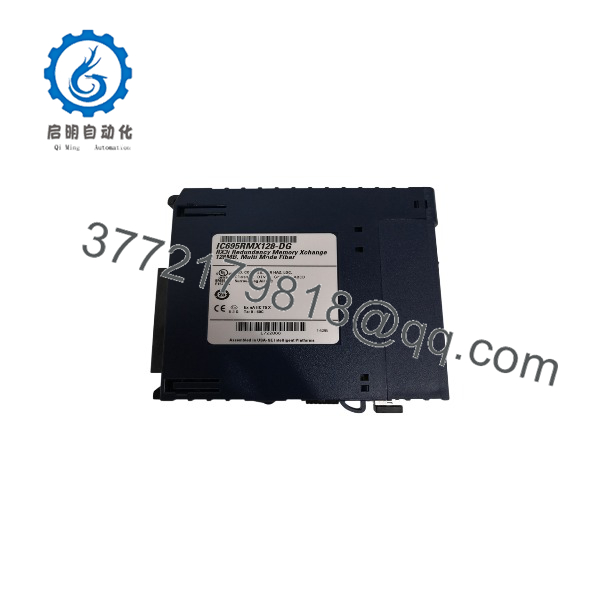
IC695RMX128
Installation & Configuration Guide
Stage 1: Pre-Installation Preparation (15–20 minutes)
⚠️ Safety First:
- Notify operations before interrupting the redundant control system.
- Confirm the standby controller state before removing hardware.
- Apply lockout/tagout procedures if the rack must be powered down.
- Wait at least 5 minutes after power removal before handling the module.
Tools Required:
- ESD wrist strap
- PH1 screwdriver
- Fiber optic cleaning kit
- Digital multimeter
- Wire labels
- Smartphone/camera for documentation
Data Backup:
- Export the RX3i hardware configuration from Proficy Machine Edition.
- Record CPU firmware versions.
- Document RMX module firmware revision.
- Photograph fiber connections and rack locations.
- Record redundancy link assignments.
- Verify CPU redundancy parameters.
⚠️ Compatibility Check:
The IC695RMX128 requires an RX3i Universal Backplane with PCI bus support. It is not intended for IC694CHSxxx expansion bases. For CPU redundancy operation, the system requires compatible RX3i redundancy CPUs such as the IC695CRU320 platform.
Stage 2: Removing the Old Module (10 minutes)
Steps:
- Place the redundant system into the approved maintenance state.
- Disconnect the fiber optic LC connectors carefully.
- Protect fiber ends with dust caps.
- Release rack locking tabs.
- Pull the RMX128 module straight outward.
- Inspect the backplane connector and fiber ports.
⚠️ Important:
Do not discard the old RMX module until the replacement has completed synchronization testing. Firmware revision and configuration details may be required during troubleshooting.
Stage 3: Installing the New Module (15 minutes)
Steps:
- Wear an ESD wrist strap.
- Confirm the module label reads IC695RMX128.
- Insert the module into the correct RX3i rack slot.
- Ensure full engagement with the PCI backplane connector.
- Lock the module retaining mechanism.
- Connect fiber optic cables using correct TX/RX orientation.
Configuration Clone Checklist:
☐ Correct rack slot confirmed
☐ Firmware revision verified
☐ Fiber link connected correctly
☐ Redundancy parameters restored
☐ CPU communication verified
☐ Diagnostics cleared
Stage 4: Power-On & Testing (20–30 minutes)
Pre-Power Check:
- Verify rack power supply status.
- Check module seating.
- Inspect fiber optic connections.
- Confirm no damaged LC connectors.
Power-On Steps:
- Restore RX3i rack power.
- Observe RMX128 LED indicators.
- Confirm LINK status.
- Connect Proficy Machine Edition.
- Verify module identification.
- Confirm redundancy synchronization.
- Perform controlled CPU switchover testing.
- Review diagnostic logs.
⚠️ Troubleshooting Notes:
- LINK LED OFF: Check fiber connection, TX/RX orientation, and fiber cleanliness.
- Redundancy not synchronized: Verify CPU firmware compatibility and RMX configuration.
- Module fault: Check hardware configuration and PME version.
- Intermittent communication: Inspect fiber attenuation and connector condition.
Frequently Asked Questions (FAQ)
Q1: What is the main purpose of the GE IC695RMX128?
The IC695RMX128 provides high-speed data exchange between redundant PACSystems RX3i CPUs. In a Hot Standby redundancy system, it acts as the communication link that maintains synchronized controller data.
Q2: Can the be used as a normal memory module?
Yes, when it is not configured as a CPU redundancy link, the RMX128 can operate as a reflective memory network node. However, when configured for CPU redundancy, it cannot simultaneously function as a general-purpose Memory Xchange module.
Q3: Is compatible with all RX3i racks?
No. The RMX128 requires an RX3i Universal Backplane using the PCI bus. It is not compatible with IC694CHSxxx expansion bases.
Q4: What firmware requirements should be checked before replacement?
For redundancy applications, verify that the RX3i CPU firmware meets the required revision level and that Proficy Machine Edition supports the installed RMX128 hardware revision. Earlier documentation specifies PME 5.90 SIM1 or later and RX3i CPU firmware 5.70 or later for compatibility.
Q5: Can I replace without changing the PLC program?
Usually, the ladder logic does not require modification. However, the hardware configuration, redundancy settings, and module parameters must match the original system.
Always save the complete RX3i project before replacement.
Q6: What is the difference between and IC695CMX128?
The is designed specifically for RX3i redundancy applications and can operate as a dedicated CPU synchronization link. The CMX128 provides reflective memory exchange functions but does not provide the same redundancy link role.
Q7: Why is expensive compared with standard communication modules?
This module is part of a high-availability control architecture. Its value comes from maintaining synchronized controller operation in applications where downtime has a direct operational cost.
When purchasing surplus inventory, verify serial traceability, firmware revision, fiber interface condition, and functional test records before installation.



