
 WhatsApp: +86 16626708626
 Email:
  Phone: +86 16626708626
Description
Key Technical Specifications
- Module Type: Genius Remote I/O Scanner
- Platform: GE Series 90-70 PLC
- Catalog Number: IC697BEM733
- Primary Function: Interfaces IC697 remote I/O racks with an IC66*/Genius bus network
- Bus Interface: Genius Serial Bus (IC66*)
- Effective Data Rate: 38.4 Kbaud
- Maximum Controller Distance: 7,500 ft (2,275 m)
- Discrete I/O Capacity: Up to 128 input/output bytes per remote drop
- Analog Capability: Supports analog input/output modules within remote drops
- Rack Support: IC697 5-slot and 9-slot remote racks
- Maximum Remote Drop Configuration: Up to 8 racks linked through Bus Transmitter and Bus Receiver modules
- Serial Ports: 2 ports (RS-422 compatible serial port and Hand-Held Monitor port)
- Power Requirement: 5 V DC, 0.8 A from rack backplane
- Bus Cable: Twisted pair with shield, Twinax, fiber optic cable, or modem connection options
- Bus Termination: 75 Ω, 100 Ω, 120 Ω, or 150 Ω termination resistor depending on cable type
- Maximum Genius Devices: Up to 32 devices per Genius bus segment depending on baud rate configuration
- Mounting: Single-slot installation in IC697 remote rack
- Supported Modules: IC697 discrete I/O, analog I/O, PCM, ADS, and analog expander modules
- Host Compatibility: IC697 PLC systems and compatible Genius bus controllers/computers
Product Introduction
The GE Fanuc IC697BEM733 is a Series 90-70 Genius Remote I/O Scanner designed to connect distributed IC697 I/O racks to an IC66* Genius bus network. The module installs in a remote rack and exchanges I/O data between field modules and the host PLC controller. It supports discrete and analog I/O expansion for distributed automation architectures.
The BEM733 is commonly found in legacy GE Series 90-70 installations where remote I/O stations are located far from the main PLC rack. Before replacement, verify Genius bus baud rate, rack configuration, termination resistance, and the existing host controller compatibility.
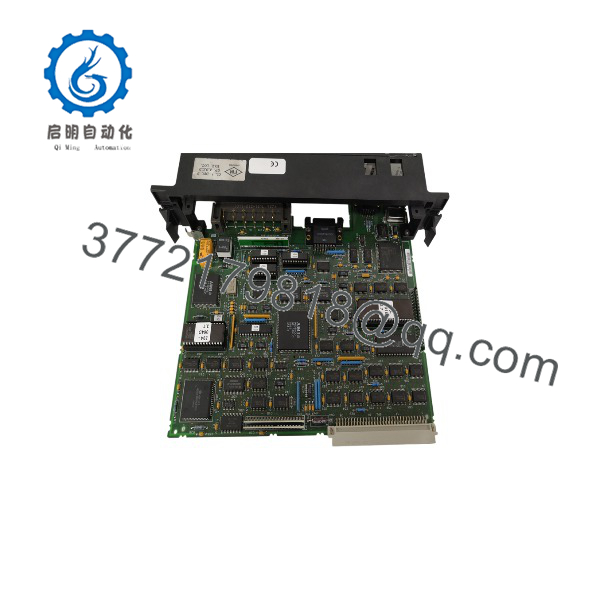
IC697BEM733
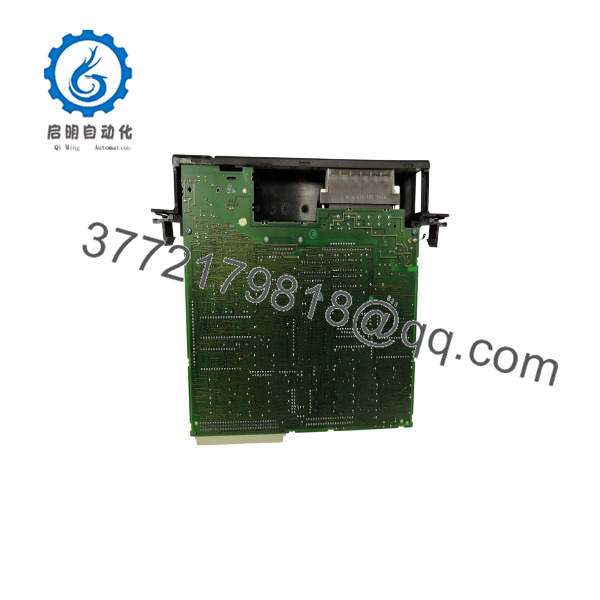
IC697BEM733
Installation & Configuration Guide
Stage 1: Pre-Installation Preparation (15–20 minutes)
⚠️ Safety First:
- Notify operations before disconnecting the remote I/O station.
- Place the controlled equipment into a safe maintenance condition.
- Apply lockout/tagout procedures before removing rack power.
- Wait at least 5 minutes after power removal before handling modules.
Tools Required:
- ESD wrist strap
- PH1 screwdriver
- Digital multimeter
- Wire labels
- Smartphone/camera for configuration records
Data Backup:
- Save the Series 90-70 PLC hardware configuration.
- Record Genius bus address settings.
- Document rack layout and module positions.
- Photograph wiring and termination resistor locations.
- Record Genius bus baud rate configuration.
⚠️ Compatibility Check:
Confirm the replacement module is IC697BEM733 and that the existing system uses a compatible Genius bus architecture. The BEM733 operates as a remote I/O scanner, not as a standalone PLC CPU or Genius Bus Controller.
Stage 2: Removing the Old Module (10 minutes)
Steps:
- Remove power from the remote rack.
- Label Genius bus wiring before removal.
- Disconnect communication connectors carefully.
- Release rack retaining hardware.
- Pull the module straight outward from the rack.
- Inspect the backplane connector for dust or damaged pins.
⚠️ Important:
Keep the original module until the replacement is fully tested. Existing bus settings and firmware details may be needed during troubleshooting.
Stage 3: Installing the New Module (15 minutes)
Steps:
- Wear an ESD wrist strap.
- Verify the module label shows IC697BEM733.
- Insert the scanner into the correct remote rack slot.
- Confirm the module seats completely into the backplane connector.
- Secure the module.
- Reconnect Genius bus wiring.
Configuration Clone Checklist:
☐ Genius bus address verified
☐ Baud rate matched
☐ Termination resistor checked
☐ Rack configuration restored
☐ I/O modules confirmed
☐ Bus cable polarity verified
Stage 4: Power-On & Testing (20–30 minutes)
Pre-Power Check:
- Verify 5 V DC rack supply voltage.
- Check Genius bus wiring continuity.
- Confirm termination placement.
- Verify rack module seating.
Power-On Steps:
- Energize the remote rack.
- Observe module status LEDs.
- Confirm Genius bus communication.
- Connect PLC programming software.
- Verify remote rack recognition.
- Check input data updates.
- Test output operation with a controlled device.
- Review PLC diagnostics.
⚠️ Troubleshooting Notes:
- No communication: Check Genius bus wiring, address settings, and termination.
- Intermittent data: Check cable shielding and bus length limitations.
- Remote rack offline: Verify module configuration and host Genius Bus Controller settings.
- I/O errors: Confirm module addressing and rack configuration.
Frequently Asked Questions (FAQ)
Q1: What is the GE IC697BEM733 used for?
The IC697BEM733 is a Genius Remote I/O Scanner used to connect Series 90-70 remote I/O racks to a Genius bus network. It allows distributed I/O modules to exchange data with the main PLC controller.
Q2: Is a Genius Bus Controller?
No. The BEM733 is a Remote I/O Scanner. It operates on the remote rack side. A separate Genius Bus Controller, such as the IC697BEM731, is normally installed in the host PLC rack to manage the Genius network.
Q3: How far can be installed from the PLC?
The module supports remote installations up to 7,500 ft (2,275 m) from the controller when configured with the appropriate Genius bus settings and cable type.
Q4: Can I replace without changing the PLC program?
Usually, the ladder logic does not require modification. However, the hardware configuration, Genius bus parameters, and remote rack settings must match the original installation.
Always back up the Series 90-70 configuration before replacement.
Q5: Is obsolete?
The Series 90-70 platform is a legacy PLC family. units are typically supplied through existing inventory, New Original/New Surplus stock, or tested refurbished channels.
For critical applications, verify module condition, serial traceability, and functional test records before installation.
Q6: What common mistakes happen when replacing ?
The most common issues are:
- Incorrect Genius bus address
- Wrong termination resistor placement
- Incorrect baud rate
- Damaged shield connection
- Remote rack configuration mismatch
A photo of the original installation before removal prevents many commissioning delays.
Q7: What I/O modules can be installed in an remote drop?
The remote drop can contain discrete modules, analog modules, analog expansion modules, PCM modules, and ADS modules. Modules that depend on I/O interrupts or COMREQ-based operation have configuration restrictions.



