
 WhatsApp: +86 16626708626
 Email:
  Phone: +86 16626708626
Description
Key Technical Specifications
- Module Type: Central Processing Unit (CPU)
- Platform: GE PACSystems RX7i
- Catalog Number: IC698CPE010
- Processor: Intel Celeron microprocessor
- Processor Speed: 300 MHz
- Processing Capability: Floating-point calculation support
- User Memory: 10 MB battery-backed RAM
- Flash Memory: 10 MB non-volatile user flash memory
- Discrete I/O Memory: 32 Kbits for %I and %Q
- Analog I/O Memory: Up to 32 Kwords for %AI and %AQ
- Program Blocks: Up to 512 blocks
- Backplane Interface: VME64 standard rack-mounted backplane
- Ethernet Interface: Two embedded 10/100 Mbps Ethernet ports
- Serial Communication: Three onboard serial ports
- RS-232
- RS-485
- SNP / Modbus RTU Slave capable
- Web Server Capability: Supports embedded Ethernet monitoring functions
- FTP Support: Built-in FTP server capability
- Power Requirements:
- +5 V DC: 3.2 A nominal
- +12 V DC: 0.042 A nominal
- -12 V DC: 0.008 A nominal
- Battery: IC698ACC701 lithium battery module
- Operating Temperature:
- 0 °C to 50 °C standard
- 0 °C to 60 °C with fan tray
- Boolean Execution Speed: Approximately 0.33 ms per 1,000 Boolean contacts/coils
- Programming Software: Proficy Machine Edition
- Programming Languages: Ladder Diagram, Structured Text, Function Block Diagram, C
Product Introduction
The GE Fanuc IC698CPE010 is a PACSystems RX7i Central Processing Unit designed for real-time industrial control applications. It combines a 300 MHz Intel Celeron processor with 10 MB battery-backed RAM and 10 MB non-volatile flash memory for PLC logic, configuration data, and runtime information. The CPU communicates with RX7i I/O and intelligent option modules through the VME64 backplane.
The CPE010 is commonly installed in legacy RX7i systems controlling machines, process equipment, and material handling applications. Before replacement, verify firmware revision, Proficy Machine Edition compatibility, rack power capacity, and existing I/O configuration. The embedded Ethernet ports simplify programming access and HMI communication without requiring an additional Ethernet module.
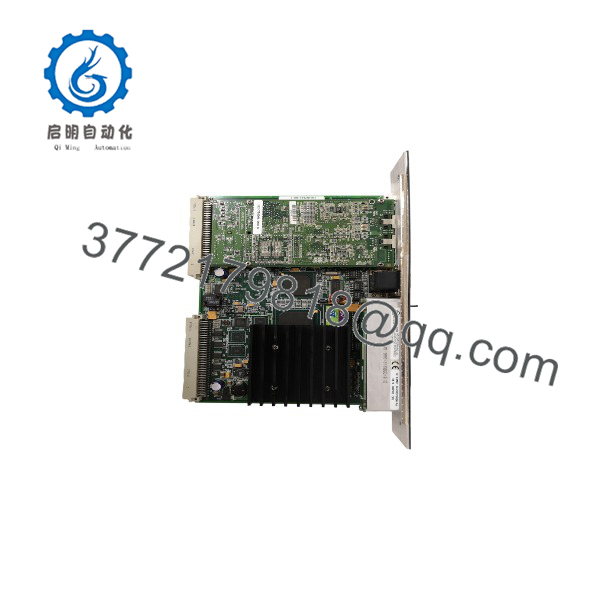
IC698CPE010
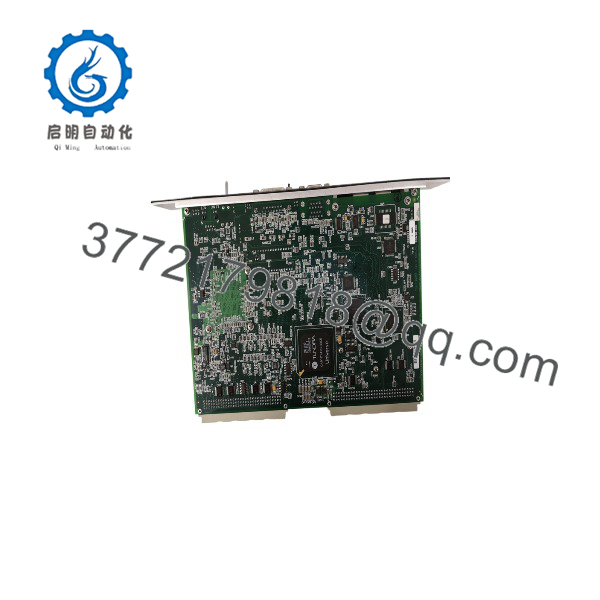
IC698CPE010
Installation & Configuration Guide
Stage 1: Pre-Installation Preparation (15–20 minutes)
⚠️ Safety First:
- Notify operations before stopping the control system.
- Place the controlled equipment into a safe operating condition.
- Apply lockout/tagout procedures before removing rack power.
- Wait for stored energy discharge before handling the CPU.
Tools Required:
- ESD wrist strap
- PH1 screwdriver
- Digital multimeter
- Wire labels
- Smartphone/camera for documentation
Data Backup:
- Upload and save the existing RX7i project using Proficy Machine Edition.
- Record CPU catalog number and firmware revision.
- Document rack layout and slot assignments.
- Photograph Ethernet and serial connections.
- Record IP addresses and network parameters.
- Verify battery condition.
⚠️ Compatibility Check:
Confirm the replacement CPU is IC698CPE010 or an approved equivalent. The module belongs to the RX7i family and requires a compatible PACSystems RX7i rack using the VME64 backplane. It is not a direct replacement for RX3i CPUs without a migration review.
Stage 2: Removing the Old Module (10 minutes)
Steps:
- Place the CPU in STOP mode.
- Remove power from the RX7i rack.
- Disconnect Ethernet and serial communication cables.
- Release CPU retaining hardware.
- Pull the CPU module straight out from the rack.
- Inspect the backplane connector for contamination or bent contacts.
⚠️ Important:
Keep the original CPU until the replacement has completed startup testing. Firmware revision, memory configuration, and communication settings may be required for troubleshooting.
Stage 3: Installing the New Module (15 minutes)
Steps:
- Wear an ESD wrist strap.
- Verify the module label shows IC698CPE010.
- Insert the CPU into the RX7i CPU slot.
- Secure the retaining screws.
- Install the IC698ACC701 battery if required.
- Reconnect Ethernet and serial communication cables.
Configuration Clone Checklist:
☐ Firmware revision verified
☐ CPU hardware configuration matched
☐ IP settings restored
☐ Serial parameters checked
☐ Battery installed correctly
☐ Project backup available
Stage 4: Power-On & Testing (20–30 minutes)
Pre-Power Check:
- Verify rack supply voltage.
- Confirm CPU seating.
- Check battery connection.
- Verify network cable installation.
Power-On Steps:
- Restore RX7i rack power.
- Observe CPU status LEDs.
- Confirm CPU OK indicator.
- Connect Proficy Machine Edition.
- Verify hardware identification.
- Restore PLC application if required.
- Check Ethernet communication.
- Perform controlled I/O testing.
⚠️ Troubleshooting Notes:
- CPU OK LED OFF: Check power supply, rack connection, and CPU seating.
- Program fault after startup: Verify firmware compatibility and project revision.
- Ethernet communication failure: Check IP address, subnet configuration, and Ethernet port status.
- Battery warning: Replace IC698ACC701 before extended power removal.
Frequently Asked Questions (FAQ)
Q1: What is the GE IC698CPE010 used for?
The IC698CPE010 is the main CPU module for PACSystems RX7i PLC systems. It executes user application logic and manages communication with RX7i I/O and intelligent option modules.
Q2: How much memory does provide?
The CPU provides 10 MB of battery-backed user RAM and 10 MB of non-volatile flash user memory.
Q3: Does have built-in Ethernet?
Yes. The RX7i CPE010 includes embedded Ethernet capability with two Ethernet ports supporting 10 Mbps and 100 Mbps communication.
Q4: Can replace IC697 Series 90-70 CPUs?
No direct replacement should be assumed. Although both families originate from GE Fanuc, RX7i uses the PACSystems architecture and VME64-based hardware design. A migration review is required before substitution.
Q5: Will replacing erase my PLC program?
The replacement CPU does not contain the original application automatically. Always upload and save the existing project before removing the installed CPU.
After installation, restore the approved hardware configuration and application program.
Q6: Is obsolete?
The RX7i CPE010 is a legacy controller model. Many plants continue operating RX7i systems because validated control applications and production requirements often justify lifecycle support instead of immediate migration.
New Original, New Surplus, and tested refurbished units are commonly used for maintenance support.
Q7: What should I check before ordering ?
Verify:
- CPU catalog number
- Hardware revision
- Firmware version
- RX7i rack model
- Power supply capacity
- Proficy Machine Edition compatibility
- Existing Ethernet configuration
A firmware or configuration mismatch can prevent startup even when the replacement CPU is electrically compatible.
Q8: What battery does use?
The CPU uses the IC698ACC701 lithium battery module for memory retention. Battery condition should be checked during every CPU replacement because a failed battery can result in loss of retained data after power removal.



