
 WhatsApp: +86 16626708626
 Email:
  Phone: +86 16626708626
Description
3. Key Technical Specifications
- Function: Bridge Application Interface Board (BAIA) for signal isolation and interface
- System Compatibility: GE Mark VI Speedtronic turbine control system
- Interface Type: RS-232C communication to DSPX board / operator interface
- Memory: Onboard EEPROM with factory firmware (non-field programmable)
- Mounting: VME-style rack-mounted PCB, Slot 1 only (critical constraint)
- I/O Capability: Supports analog input conditioning and digital signal interfacing
- Relays: 3 Form-C relay outputs
- Analog Channels: 2 bipolar analog input channels
- Configuration: Jumper-based input impedance and burden resistor settings
- Indicators: IMOK LED status indicator on faceplate
- Weight: ~1 kg shipping weight
- Application: Gas, steam, and wind turbine control systems
4. Product Introduction
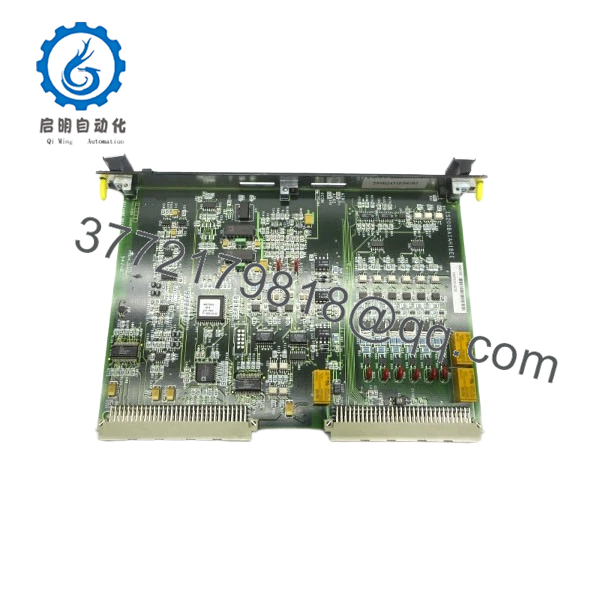
The GE IS200BAIAH1BEE is a Bridge Application Interface Board used in the Mark VI Speedtronic turbine control system. It provides signal isolation, grounding reference, and communication bridging between terminal boards, DSPX processors, and operator interfaces.
In real installations, this board sits at a critical junction between field I/O and control processing. It handles both analog signal conditioning and serial communication. Compared to earlier Mark V hardware, Mark VI boards integrate more interface functionality, but still rely on strict slot assignment and hardware configuration—there is no tolerance for misplacement.

- IS200BAIAH1BEE
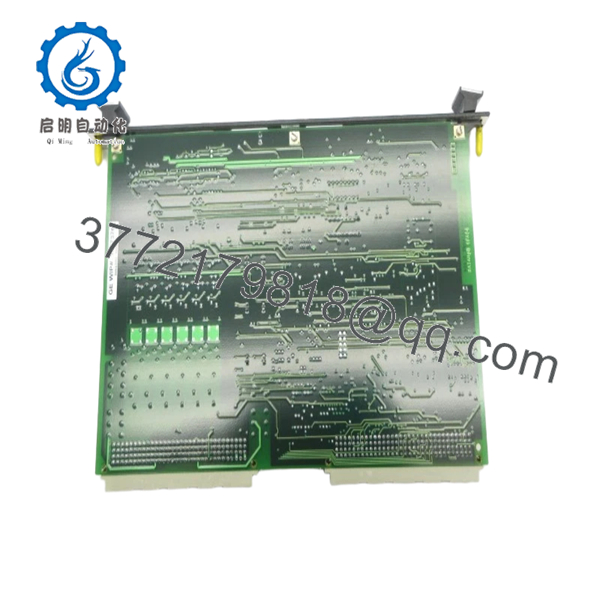
- IS200BAIAH1BEE
5. Installation & Configuration Guide
Stage 1: Pre-Installation Preparation (Estimated: 10 minutes)
- ⚠️ Safety First:
Shut down turbine/control system. Apply lockout/tagout. Wait 5+ minutes for DC bus discharge. - Tools Required:
ESD wrist strap, PH1 screwdriver, multimeter, labels, smartphone - Data Backup:
- Record system configuration via ToolboxST / CIMPLICITY if accessible
- Photograph slot position (Slot 1) and wiring
- Document jumper settings (JP5A, JP5B, JP6A, JP6B)
Stage 2: Removing the Old Module (Estimated: 5–10 minutes)
- Open Mark VI control cabinet.
- Locate BAIA board in Slot 1 (verify before removal).
- Label all connectors and cables.
- Disconnect RS-232 and signal wiring.
- Release retaining clips.
- Pull board straight out—avoid backplane damage.
- ⚠️ Note: Slot position is not optional. This board is hard-mapped to Slot 1.
Stage 3: Installing the New Module (Estimated: 10 minutes)
- Wear ESD protection.
- Verify model: IS200BAIAH1BEE (revision must match if possible).
- Configuration Clone (Critical):
- Replicate all jumper settings exactly
- Insert board into Slot 1 only
- Ensure full seating into backplane connectors
- Reconnect all wiring
- Self-Checklist:
- Installed in Slot 1
- Jumpers match
- Wiring secure
- Board fully seated
Stage 4: Power-On & Testing (Estimated: 10–15 minutes)
- Pre-Power Check:
Verify no shorts on communication lines and analog inputs. - Power-On Steps:
- Power rack only
- Check IMOK LED (healthy status)
- Verify communication with DSPX / HMI
- Confirm analog signal integrity
- Validate system alarms are clear
- ⚠️ Troubleshooting Note:
- No comms → check RS-232 path and DSPX board
- Fault LED → jumper or slot issue
- Intermittent signals → grounding/isolation problem
6. Frequently Asked Questions (FAQ)
Q1: Can I install this board in any slot?
No. Slot 1 only. Installing it elsewhere can damage the board or prevent system startup.
Q2: Is this board hot-swappable?
No. Mark VI systems are not designed for hot-swapping this type of interface board. Power down before replacement.
Q3: What happens if the EEPROM firmware is corrupted?
You replace the entire board. The EEPROM is factory-programmed and not field-serviceable.
Q4: Is IS200BAIAH1BEE backward compatible with earlier revisions?
Partially. Earlier revisions may be compatible, but not guaranteed. Always match revision when possible to avoid interface inconsistencies.
Q5: Why is this board critical to turbine operation?
It provides signal isolation and communication bridging. If it fails, you lose visibility or control interaction between subsystems.
Q6: Why are surplus units still widely used?
Mark VI systems remain active globally. Full system migration (to Mark VIe) is expensive, so operators maintain legacy boards as spares.
SOP Quality Transparency
1. Inbound Inspection & Traceability
- Verified GE part number and revision codes
- Visual inspection: no corrosion, no rework, no connector damage
- EEPROM and component integrity checked
2. Live Functional Testing
- Tested on a genuine Mark VI rack with DSPX interface
- RS-232 communication verified (PC handshake test)
- Analog signal injection and relay output validation
- 24-hour continuous operation test with thermal monitoring
- Test reports available upon request
3. Electrical Parameter Testing
- Insulation resistance: >10 MΩ @ 500 V Megger
- Ground continuity verified
- Power rail stability checked
4. Firmware & Configuration Verification
- EEPROM presence verified (factory firmware intact)
- Jumper configuration documented
5. Final QC & Packaging
- QC sign-off with traceable ID
- ESD-safe packaging
- Industrial-grade protective boxing
Technical Pitfall & Survival Guide
❗ 1. Wrong Slot Installation (Critical Failure Point)
- Issue: Board installed outside Slot 1 → system fault or hardware damage
- Avoidance: Always confirm slot labeling before insertion
- Real case: I’ve seen boards destroyed because someone assumed “any free slot works”
❗ 2. Jumper Misconfiguration
- Issue: Incorrect input impedance or burden resistor settings
- Avoidance: Photograph and replicate jumper positions
- This causes subtle signal distortion that’s hard to trace
❗ 3. RS-232 Communication Assumptions
- Issue: Expecting Ethernet-style diagnostics
- Reality: This is legacy serial communication—check baud, wiring, and DSPX interface
❗ 4. Ground Reference Issues
- Issue: Improper grounding introduces noise
- Avoidance: Maintain original grounding scheme
- These boards provide isolation for a reason—don’t bypass it
❗ 5. ESD Damage
- Issue: Latent failure after installation
- Avoidance: Use wrist strap and grounded surface
- I’ve personally seen boards fail hours later due to static discharge



