
 WhatsApp: +86 16626708626
 Email:
  Phone: +86 16626708626
Description
3. Key Technical Specifications
| Parameter | Value |
| Product ID | IS200EBRGH2ADA |
| System Compatibility | Mark VI Speedtronic / EX2100 Excitation |
| Board Function | Bridge Personality (EBRG) |
| Application | Exciter Bridge Feedback and Control |
| Voltage Attenuation | High-voltage sensing with galvanic isolation |
| I/O Interface | Connection to EPSM and EMIO boards |
| Operating Temp | -30 to +65°C (-22 to 149°F) |
| Revision | H2ADA (Group 2, Rev A) |
4. Product Introduction
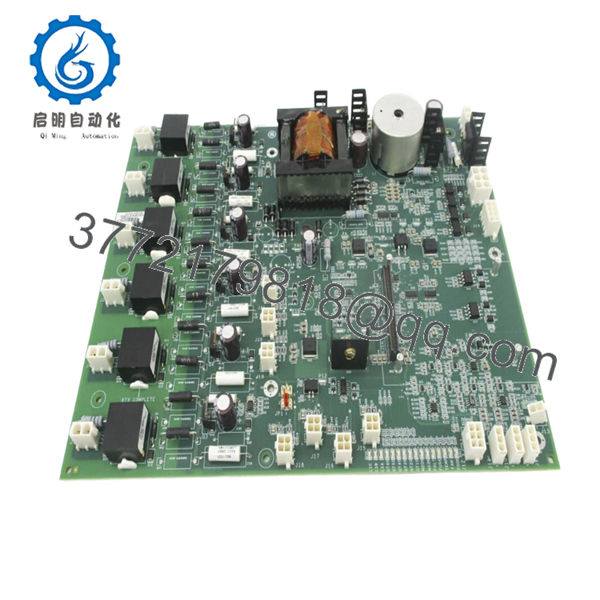
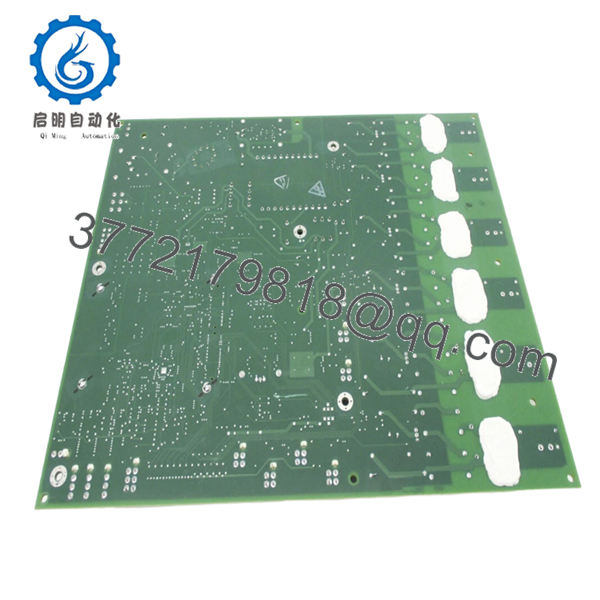
The GE IS200EBRGH2ADA is a critical Bridge Personality board (EBRG) utilized within the GE Mark VI control system and EX2100 Excitation systems. It functions as the primary physical and electrical interface between the high-power SCR (Silicon Controlled Rectifier) bridges and the low-voltage control electronics.
Specifically, the EBRG board is responsible for attenuating high-voltage signals from the bridge for safe monitoring by the control processors. It also handles pulse transformer distribution for SCR firing. In my experience with EX2100 commissioning, this board is the “front line” of the excitation system; it must be robust enough to handle the electrical noise and thermal stresses inherent in generator excitation environments.
5. Installation & Configuration Guide
Stage 1: Pre-Installation Preparation (Estimated Time: 15 mins)
- ⚠️ Safety First: Excitation systems involve lethal voltages. Verify the generator is de-excited and the field breaker is locked out. Use a multimeter to confirm zero voltage on the bridge bus before entry.
- Tools Required: ESD wrist strap, 3/16″ nut driver or Phillips screwdriver, and a calibrated multimeter for post-install checks.
- Data Backup: The EBRG is a “personality” board, meaning its settings are often defined by hardware jumpers. Document the position of all jumpers (J1, J2, etc.) on the old board.
Stage 2: Removing the Old Module (Estimated Time: 10 mins)
- Ensure your ESD strap is properly grounded to the cabinet.
- Label and disconnect all wire harnesses. Pay close attention to the firing pulse cables and the high-voltage sensing leads.
- Loosen the mounting screws. ⚠️ Note: Be careful not to drop screws into the SCR bridge assembly below, as this could cause a catastrophic short circuit upon restart.
- Carefully lift the board away from its standoffs.
Stage 3: Installing the New Module (Estimated Time: 10 mins)
- Configuration Clone: Check the “H2ADA” suffix. Match every jumper on the new IS200EBRGH2ADA to the old board. These jumpers set the attenuation ratios for voltage feedback; a mistake here will lead to incorrect generator voltage readings.
- Mount the board onto the standoffs and secure the screws.
- Reconnect all harnesses. Ensure the multi-pin connectors are fully seated and clicked into place.
- Self-Checklist: [ ] Jumpers verified, [ ] High-voltage leads secure, [ ] Screws tightened.
Stage 4: Power-On & Testing (Estimated Time: 20 mins)
- Apply control power (not field power) and check for diagnostic “Board Mismatch” alarms on the ToolboxST or <I> station.
- Verify the bridge temperature and voltage feedback readings show “zero” or ambient levels correctly.
- If possible, perform a firing pulse test (Gate Pulse Test) through the software to ensure the EBRG is correctly routing pulses to the SCRs.
- ⚠️ Troubleshooting Note: If you see “Phase Loss” or “Bridge Feedback Fault” during initial startup, re-verify the jumper settings on the feedback attenuation circuit.

- IS200EBRGH2ADA
6. Frequently Asked Questions (FAQ)
Q: What is the difference between Group 1 (H1) and Group 2 (H2) EBRG boards?
A: The “H2” in IS200EBRGH2ADA signifies a specific hardware grouping, often related to the voltage rating or the number of bridges it can support. You cannot typically swap an H1 for an H2 without reconfiguring the excitation software and potentially changing the physical wiring. Always match your Group number.
Q: Can this board cause a “Generator Overvoltage” trip?
A: Absolutely. If the attenuation jumpers are set incorrectly, the board might report a lower-than-actual voltage to the controller. The controller will then ramp up excitation to compensate, leading to a real overvoltage condition. This is why the “Configuration Clone” stage is the most important part of the install.
Q: Is it necessary to replace the firing pulse cables when replacing the EBRG?
A: Not mandatory, but highly recommended if you see any signs of heat damage or “browning” on the insulation. The EBRG board works hard, and the heat from the SCRs can degrade the cables over time. At the very least, clean the contacts with an approved electronic cleaner.
Q: Why is there a “Revision A” at the end of the part number?
A: The “ADA” suffix refers to the artwork and minor component revisions. In the Mark VI and EX2100 lines, GE ensures that later revisions (like ADA) are backward compatible with earlier ones (like AAA), provided the “H2” group matches.
Q: Does “New Surplus” mean the capacitors are still good?
A: Yes. We store our IS200 series boards in climate-controlled, anti-static environments. Unlike boards pulled from a running (hot) cabinet, these components have not been subjected to thermal aging, ensuring the electrolytic capacitors remain within their design tolerance.



