
 WhatsApp: +86 16626708626
 Email:
  Phone: +86 16626708626
Description
. Key Technical Specifications
- Number of Channels: 24 configurable discrete points (inputs or outputs)
- Voltage Ranges: 24 V dc, 48 V dc, or 125 V dc (jumper selectable)
- Contact Rating: 125 V dc at 0.5 A per point (output mode)
- Isolation: 1500 V optical isolation per channel group
- Terminal Type: Screw-clamp, accepts 12–18 AWG wire
- Grounding: Enhanced shield and common ground bars (H2 revision)
- Power Supply: 24 V dc nominal from I/O pack backplane
- Operating Temperature: -40 to +70°C
- Dimensions: Standard Mark VIe terminal board footprint, 18.4 cm x 12.7 cm
- Weight: Approximately 1.1 kg (2.4 lb)
- Mounting: DIN rail or direct rack mounting behind I/O pack
- Compatibility: Designed for use with IS220PDIAH1A or IS220YDOAH1A I/O packs
4. Product Introduction
The GE IS200TDBSH2ACC is a discrete I/O terminal board in the Mark VIe series used with turbine control systems. It provides field wiring termination for up to 24 discrete signals when paired with compatible I/O packs such as the PDIA or YDOA. The H2 revision includes updated grounding and shielding for better noise immunity in harsh turbine environments.
This board handles both input and output signals depending on the attached I/O pack. In field deployments I have supported, the TDBSH2ACC gives reliable connectivity when correctly jumpered for the site voltage and properly shielded.
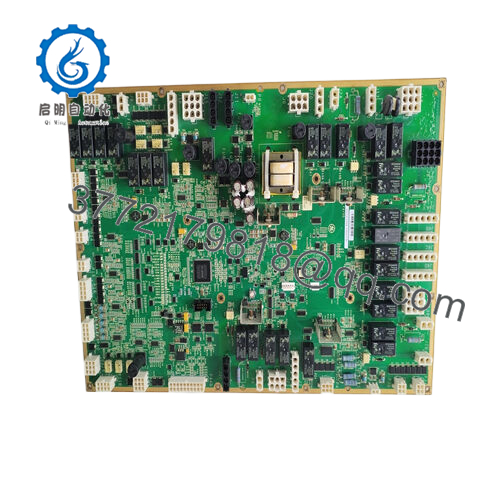
- IS200TDBSH2ACC
5. Installation & Configuration Guide
Stage 1: Pre-Installation Preparation (10–15 minutes) ⚠️ Safety First: Notify operations, schedule downtime, lock out/tag out power to the I/O rack, and wait 5 minutes for capacitor discharge. Tools Required: Grounded ESD wrist strap, PH2 screwdriver, digital multimeter, wire labels, torque screwdriver (set to 0.5–0.6 Nm), smartphone for photos. Data Backup: Photograph all existing wiring, note jumper positions for voltage range and grounding, document channel assignments.
Stage 2: Removing the Old Module (5–8 minutes)
- Remove the front cover of the I/O pack if installed.
- Label each wire or group of wires before disconnection.
- Loosen terminal screws and carefully remove field wiring—do not pull on wires.
- Release the I/O pack from the terminal board, then unbolt or unclip the terminal board from the rack.
- Inspect the backplane connector and mounting area for damage or corrosion. ⚠️ Keep the old terminal board until the new installation passes all I/O tests.
Stage 3: Installing the New Module (10–15 minutes)
- Wear the ESD strap and verify the replacement is exactly IS200TDBSH2ACC.
- Configuration Clone (Critical): Set the voltage selection jumpers to match the old board (24 V, 48 V, or 125 V positions). Mirror grounding jumper settings exactly.
- Mount the terminal board in the same location and secure with original hardware.
- Reconnect field wiring in the identical order, using the same torque on screws.
- Reattach the I/O pack, ensuring it seats fully on the terminal board connector. Self-Checklist: [ ] Jumpers match old board, [ ] All wires landed correctly, [ ] Terminal board secure, [ ] I/O pack fully seated and locked.
Stage 4: Power-On & Testing (10–20 minutes) Pre-Power Check: Use a multimeter to confirm no shorts between channels or to ground on the 24 V dc supply. Power-On Steps:
- Apply power to the I/O rack only.
- Observe LEDs on the attached I/O pack for normal status (green RUN LED).
- Connect controlST or Toolbox software and verify the terminal board and I/O pack are recognized.
- Force individual channels on/off and confirm correct operation with a multimeter or field device.
- Run a full dry simulation of all 24 points before returning to automatic control.
⚠️ Troubleshooting Note: If channels do not respond, first check jumper settings for voltage range. Intermittent signals often result from loose terminal screws or improper shield grounding. Power down before making changes.
6. Frequently Asked Questions (FAQ)
Can this terminal board be hot-swapped under power? No. Remove power from the I/O rack first. Live disconnection risks arcing at the terminals or damaging the I/O pack connector.
Is the IS200TDBSH2ACC obsolete, and is the unit genuinely new? The board is available as new surplus or new original stock. All units come from verified GE sources, undergo full continuity and functional testing with a PDIA I/O pack, and carry a 1-year warranty. Test videos and photos are available upon request.
What is the direct replacement if this exact board is out of stock? The IS200TDBSH2ACC (H2 revision) is the standard. Earlier H1 versions may work but lack the improved grounding of the H2. Always confirm the attached I/O pack compatibility before substituting.
Will replacing the terminal board affect my existing control logic? No. The logic resides in the controller. The terminal board only provides the physical connection point. After installation, simply verify I/O point mapping in the software.
Why is your price lower than the current GE factory list price? We source new surplus inventory directly from excess OEM stock that never entered service. These boards receive the same detailed inspection and testing process as new production units, allowing us to offer them at reduced cost while maintaining full performance and traceability.
How do I set the voltage jumpers correctly? Refer to the silkscreen markings on the board for the three voltage groups. Match the positions exactly to your field device requirements and the old board’s configuration. Incorrect jumper placement can damage field equipment or prevent proper signal detection.
Which I/O packs are compatible with the TDBSH2ACC? It is designed primarily for the IS220PDIAH1A discrete input pack and IS220YDOAH1A discrete output pack. Confirm your specific I/O pack part number before ordering to ensure proper mating and channel density.



