
 WhatsApp: +86 16626708626
 Email:
  Phone: +86 16626708626
Description
3. Key Technical Specifications
| Parameter | Value |
|---|---|
| Model Number | IS200TPROH1B |
| Manufacturer | General Electric |
| Product Family | GE Speedtronic Mark VI |
| Functional Acronym | TPRO |
| Product Type | Protective Termination Board |
| Primary Function | Emergency overspeed and turbine trip protection |
| Supported Interface | VPRO protection module |
| Terminal Blocks | 2 barrier blocks |
| Total Terminals | 48 terminals (24 per block) |
| DC Connectors | 3 × DC-37 connectors |
| PT Inputs | 2 |
| Supported PPRO Packs | Up to 3 |
| Trip Voltage | 125 VDC trip supply |
| PCB Protection | Conformal coated |
| Temperature Range | −30 °C to +65 °C* |
| Weight | Approximately 0.8 kg |
| Warranty | 12 months |
| Condition | New Original / New Surplus |
The IS200TPROH1B is identified as a GE Mark VI Protective Termination Board used with turbine protection systems and VPRO interfaces. Public technical references identify support for emergency trip and overspeed protection functions.
4. Product Introduction
The GE IS200TPROH1B is a Protective Termination Board used within GE Speedtronic Mark VI turbine control systems. It acts as the interface between field signals and protection hardware, handling overspeed, trip, voltage, and synchronization-related signals used by the protection architecture.
In field deployments, TPRO boards sit in a critical path. A failed protection termination board can create symptoms that initially look like controller faults or bad field wiring. The board operates closely with VPRO modules to build an independent emergency protection layer for gas and steam turbine systems.
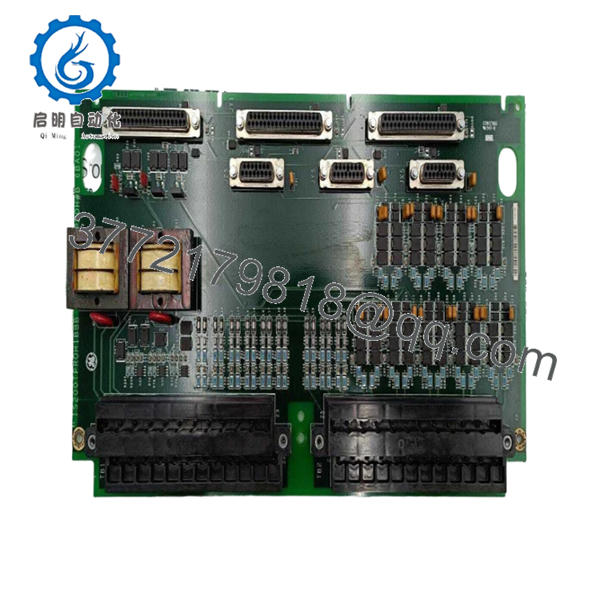
- IS200TPROH1B
5. Installation & Configuration Guide
Stage 1: Pre-Installation Preparation (Estimated Time: 10 minutes)
⚠️ Safety First: Notify operations of downtime. Confirm turbine shutdown status. Apply lockout/tagout procedures. Remove control power and wait 5 minutes before opening the cabinet.
Tools Required
- ESD wrist strap
- PH1 screwdriver
- Fluke 115 multimeter
- Wire labels
- Smartphone for photographs
- ESD work mat
Data Backup
- Export current controller backups.
- Record terminal assignments.
- Photograph all wiring positions.
- Capture connector routing and labels.
- Document all jumpers and hardware revisions.
⚠️ Mark VI systems often accumulate undocumented modifications after years of outages and upgrades. I’ve opened cabinets where actual wiring looked nothing like the drawings.
Stage 2: Removing the Old Module (Estimated Time: 5 minutes)
- Open cabinet access covers.
- Label every wire before disconnecting.
- Disconnect terminal wiring carefully.
- Release retaining hardware.
- Pull the board straight outward.
⚠️ Never twist or rock the board.
I watched a technician bend a backplane connector pin during a rushed outage. The board replacement finished quickly. The cabinet repair did not.
Inspect for:
- Bent connector pins
- Dust contamination
- Corrosion
- Heat damage
- Loose terminal hardware
⚠️ Keep the original board available until startup testing finishes.
Stage 3: Installing the New Module (Estimated Time: 5–10 minutes)
- Wear ESD protection before handling.
- Verify exact part number: IS200TPROH1B
- Configuration Clone (Crucial): Duplicate jumper positions and hardware settings.
- Align board guides carefully.
- Insert evenly and verify seating.
- Reconnect wiring.
Self-Checklist:
[ ] Jumpers match
[ ] Wiring secure
[ ] Connectors seated
[ ] Retainers locked
⚠️ This is the most common rookie mistake, but it happens constantly. Take a picture before removal. I can’t stress this enough.
Stage 4: Power-On & Testing (Estimated Time: 10 minutes)
Pre-Power Check
Verify no short exists on the 24 VDC rail using a multimeter.
Power sequence:
- Energize control rack only
- Observe startup LEDs
- Verify communication status
- Connect engineering workstation
- Validate protection signals
- Execute dry-run testing
Expected status:
- Green RUN = Normal
- Red ERR = Fault
⚠️ Troubleshooting Note:
Solid faults immediately after installation often point toward revision mismatch or connector seating problems.
Technical Pitfall & Survival Guide
❗ Firmware Revision Mismatch
I’ve seen technicians swap a newer revision board into an operating Mark VI cabinet and spend two days chasing communication faults.
The issue was revision mismatch.
Avoidance:
- Record hardware revisions before shutdown
- Match firmware ranges
- Request exact revision levels during procurement
❗ DIP Switch / Jumper Misconfiguration
Factory defaults almost never match installed field settings.
Take pictures first.
❗ Terminal Block Variations
GE hardware revisions can change connector styles.
For IS200TPROH1B, references note differences in terminal styles between revisions.
Always verify:
- Wiring diagrams
- Connector keying
- Grounding methods
- Pin assignments
Never wire from memory.
❗ Power Consumption Margin
Protection boards rarely operate in isolation.
Maintain at least 20% spare power margin when calculating cabinet loading.
❗ ESD Damage
I watched a technician handle a board without a grounding strap during winter maintenance. Immediate startup failure followed.
That became a very expensive lesson.
Use:
- ESD wrist strap
- Anti-static packaging
- Grounded work surface
Keep these checks in mind and you’ll save yourself 90% of typical rework time.
6. Frequently Asked Questions (FAQ)
Q1: Can I hot-swap IS200TPROH1B?
No.
Do not hot-swap this board. Mark VI protection hardware was not intended for powered insertion. Pulling a board under power risks backplane damage and protection faults.
Q2: What exactly does IS200TPROH1B do?
The IS200TPROH1B functions as a protective termination board handling turbine speed, generator voltage, bus voltage, and trip-related signals used by VPRO protection systems.
Q3: Is IS200TPROH1B obsolete?
Yes.
Current inventory largely comes through surplus stock channels and specialist turbine suppliers rather than active GE production. Multiple listings identify availability through inventory stock rather than factory manufacture.
Q4: Is this really new inventory?
Usually “New Original” means unused OEM surplus inventory.
Request:
- Serial numbers
- Packaging photos
- Test reports
- Manufacturing labels
Q5: Why does this board use VPRO modules?
TPRO and VPRO work together to create an independent emergency overspeed and synchronization protection architecture for turbine systems.
Q6: Will I lose logic if I replace this board?
Normally no.
Protection logic generally exists elsewhere in the architecture. Still, back up everything before touching hardware.
I’ve seen undocumented edits surprise experienced maintenance teams.
Q7: How do you test inventory before shipment?
Inspection sequence:
- OEM source traceability verification
- Serial number validation and anti-counterfeit checks
- Visual inspection for scratches, corrosion, yellowing, and rework marks
- Functional testing on compatible GE hardware
- Communication verification
- 500 V Megger insulation test (>10 MΩ)
- QC sign-off and ESD packaging
Testing videos and startup photos are available upon request.



