
 WhatsApp: +86 16626708626
 Email:
  Phone: +86 16626708626
Description
Key Technical Specifications
- Part Number: IS220PSVOH1B
- Manufacturer: General Electric
- Series: Mark VIe
- Product Type: Servo Control I/O Pack
- Function: Electrical interface between I/O Ethernet and TSVO terminal board
- Servo Outputs: 2
- LVDT Inputs: 8
- Supply Voltage: 28 V dc
- A/D Converter Resolution: 14-bit
- Scan Time: 250 ms normal scan
- Operating Temperature: -30 C to +65 C
- Manual Reference: GEH-6721D
Product Introduction
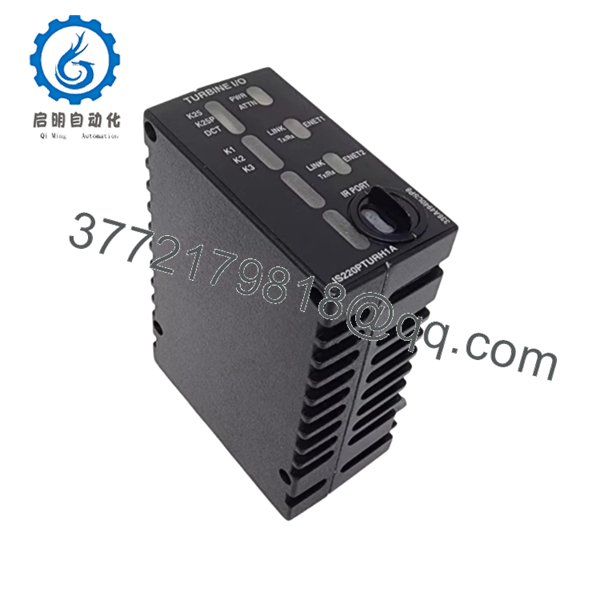
GE IS220PSVOH1B is a Mark VIe servo control I/O pack used in GE turbine and industrial control systems. It connects one or two I/O Ethernet networks to a TSVO servo terminal board and supports servo valve position control through the WSVO driver module.
This part is commonly ordered as a direct replacement when the site already runs a GE Mark VIe platform. The critical checks are suffix match, firmware version, and the exact terminal board setup, because a wrong variant can pass visual inspection and still fail at startup.
Troubleshooting Quick Reference
| Symptom | Possible Cause | Relevance to This Part | Quick Check Method | Recommendation |
|---|---|---|---|---|
| No network link LEDs on power-up | No 28 V dc supply, bad Ethernet cabling, or failed pack | ✅ High | Measure 28 V dc at the terminal board and verify both RJ45 links | Check supply and cabling first, then replace the pack if power is correct |
| Servo loop unstable or hunting | Wrong configuration, bad LVDT feedback, or driver mismatch | ✅ High | Compare feedback wiring, watch LVDT values in diagnostics, confirm TSVO/WSVO pairing | Verify field wiring and configuration before condemning the module |
| Only one servo channel fails | Field valve issue or channel-specific wiring fault | ⚠️ Medium | Swap the suspect channel at the field side and check response | Replace the valve or wiring before replacing the full pack |
| Red attention LED stays on | Internal fault, comms issue, or revision mismatch | ✅ High | Read the alarm/status buffer and confirm firmware version | Match the firmware requirement and verify the exact suffix |
| Module boots but no control response | Ethernet network issue or terminal board mismatch | ✅ High | Check network continuity, controller diagnostics, and terminal board type | Confirm network path and hardware family before replacement |
| Repeated faults after install | Wrong model variant or old settings not copied | ✅ High | Compare the removed unit label, firmware, and original setup photos | Mirror the original configuration exactly |
If you get stuck, send technical support clear photos of the label, terminal board, wiring, and diagnostic logs.

- IS220PSVOH1B
- IS220PSVOH1B
Frequently Asked Questions
Q: Is IS220PSVOH1B a servo control module or a power supply?
A: It is a servo control I/O pack, not a power supply. It sits between the I/O Ethernet network and the TSVO terminal board and handles servo-related control functions.
Q: Is this part hot-swappable?
A: I would not treat it as hot-swappable unless the OEM documentation for your exact system says otherwise. Pulling it under power can create a rack fault or damage the module.
Q: What firmware should I watch for?
A: One listing notes that IS220PSVOH1B requires firmware V04.09 or later. That matters, because a board with the wrong firmware can look fine but still fail in service.
Q: What condition should I expect when buying surplus?
A: Most buyers see new surplus, unused, or tested used stock. The lower price usually reflects inventory source and condition, so ask for photos, test status, and warranty terms before you commit.
Q: Can I replace it with IS220PSVOH1A?
A: Not without checking compatibility. The H1B revision has specific hardware and firmware requirements, and a close-looking variant may not behave the same in your cabinet.
Q: What should I verify before ordering?
A: Match the exact part number, revision, firmware range, and terminal board family. Also confirm the supply voltage, because this pack is specified for 28 V dc.
Q: What is the safest install habit on this part?
A: Take photos of the old unit, copy the original settings, and confirm the rack power is clean before insertion. That simple step avoids most of the rework I see in the field.



