
 WhatsApp: +86 16626708626
 Email:
  Phone: +86 16626708626
Description
3. Key Technical Specifications
| Parameter | Specification |
| Manufacturer | Mitsubishi Electric |
| Model Code | GT1695M-XTBD |
| Display Type | 15.0-inch TFT Color LCD (65,536 colors) |
| Resolution | XGA (1024 x 768 pixels) |
| Power Supply Input | 24 V DC (+25% / -20%) |
| Power Consumption | 45 W or less (20 W or less with display off) |
| Operating Temperature | -20 °C to +65 °C (-4 °F to 149 °F) |
| Internal User Memory | 15 MB Flash Memory |
| Communication Ports | RS-232, RS-422/485, Ethernet (10BASE-T/100BASE-TX), USB Host/Device |
| Protection Rating | IP67F / NEMA 4X (front panel when mounted) |
| Dimensions (W x H x D) | 397 mm x 296 mm x 60 mm (15.63″ x 11.65″ x 2.36″) |
| Weight | 4.8 kg (10.58 lbs) |
4. Product Introduction & Supply Chain Strategy
The Mitsubishi GT1695M-XTBD is a high-performance 15-inch GOT1000 operator interface terminal built specifically for harsh outdoor and extreme-temperature industrial environments. Operations teams in oil and gas, water treatment, and heavy manufacturing rely on its ruggedized enclosure, high-contrast XGA TFT display, and multi-protocol communications to monitor critical automation assets.
As Mitsubishi has phased out the GOT1000 series in favor of the GOT2000 platform, procuring this exact unit as New Surplus is a crucial strategic move. Swapping an operator panel with an unverified, refurbished unit exposes your plant to worn touchscreen digitizers, degraded CCFL/LED backlights, and compromised IP67 gaskets. Stocking a factory-sealed unit ensures pristine screen clarity, unswapped memory boards, and instant drop-in replacement without expensive panel cutout modifications or GT Works software rewrites.
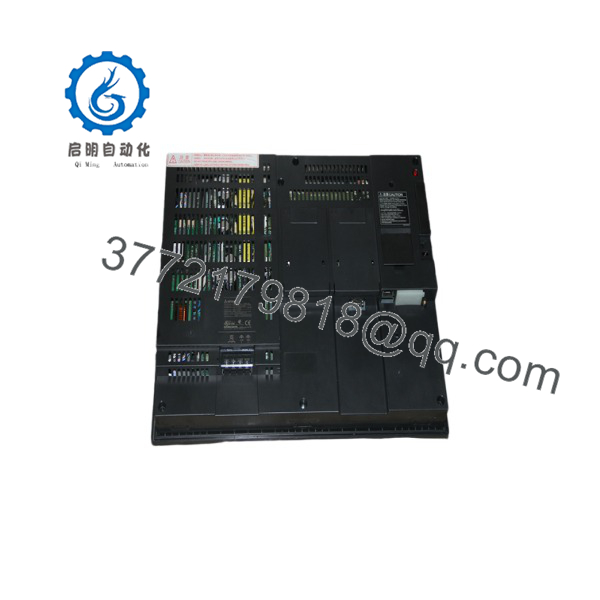
GT1695M-XTBD
5. Installation & Configuration Guide
Stage 1: Pre-Installation (Prep & Safety)
- Enforce Lock-Out/Tag-Out (LOTO) protocols on the main 24 V DC power feed supplying the operator panel cutout.
- Wear an anti-static wrist strap connected to a verified earth ground.
- Verify panel cutout dimensions (383.5 mm x 282.5 mm) and inspect the mounting seal gasket for proper seating.
Stage 2: Removal
- Unplug the 24 V DC power terminal block, Ethernet cable, and any serial communication connectors (RS-232/RS-422).
- Loosen and remove the rear panel mounting clamps securing the HMI chassis to the enclosure door.
- Carefully pull the old display unit forward out of the cutout, taking care not to scratch the surrounding powder coat.
Stage 3: Installation (Clone & Seat)
- Insert the new GT1695M-XTBD into the cabinet cutout from the front, ensuring the front sealing gasket stays aligned.
- Install the rear mounting clamps and tighten them evenly to the specified torque (0.36 to 0.48 N·m) to maintain the IP67F liquid/dust seal.
- Reattach serial, Ethernet, and USB cables. Reconnect the 24 V DC power terminal block, ensuring correct wire polarity (+ / – / FG).
Stage 4: Power-On & Testing
- Apply 24 V DC power and confirm the front power LED lights solid green during bootup.
- Insert a CF card or USB drive containing the compiled GT Designer project file (
.G1S/.G2Sformat) and perform a project download via GT Designer3 software. - Verify touch calibration across all four screen quadrants and confirm live PLC tag polling over the fieldbus network.
6. Firmware/Software Versions & Upgrade Notes
- Programming Software: Programmed via GT Designer3 (GOT1000 Edition) Version 1.00U or higher.
- Core Operating System (OS): Comes pre-installed with standard GOT1000 Core OS. If uploading a project created in a newer version of GT Designer3, allow the software to automatically update the terminal’s Core OS and communication drivers before project deployment.
- Migration Warning: Upgrading from GOT1000 (GT16) to GOT2000 (GT27) requires panel cutout adapter plates and project conversion in GT Designer3. Installing this drop-in New Surplus replacement avoids system downtime and engineering conversion overhead.
7. Frequently Asked Questions (FAQ)
Q: Is this GT1695M-XTBD terminal brand new or recovered from a decommissioned panel?
This module is 100% genuine New Surplus stock. It has never seen field deployment, was never mounted in a control panel, and is not a refurbished display. It remains factory-sealed in its original packaging.
Q: Why choose New Surplus over lower-cost refurbished or used HMIs?
Used and refurbished HMIs usually suffer from dimmed backlights, degraded touch digitizer responsiveness, and hardened, leaking waterproof gaskets. Purchasing verified New Surplus guarantees 100% remaining backlight lifespan, responsive touch controls, and complete IP67 sealing protection.
Q: What makes the “XT” version different from standard GT1695 units?
The “XT” designation indicates the Extended Temperature model, engineered to operate in extreme ambient environments from -20 °C up to +65 °C (-4 °F to 149 °F) without requiring additional enclosure heating or cooling units.
Q: Can I transfer my project file directly from an old GT1695 unit using a CompactFlash card?
Yes. You can back up the boot OS, system application, and project data to a standard GT10-MEM-128AMC (or equivalent CF card) from the utility menu of the original HMI and restore it directly to the new GT1695M-XTBD.
Q: What warranty coverage comes with this touchscreen module?
We back our New Surplus GT1695M-XTBD operator terminals with a full 1-year replacement warranty. If the unit experiences hardware anomalies or screen defects during initial setup or standard operation, we replace it directly from our warehouse stock.



