
 WhatsApp: +86 16626708626
 Email:
  Phone: +86 16626708626
Description
3. Key Technical Specifications
| Parameter | Value |
|---|---|
| Model Number | H4893P4050 |
| Manufacturer | Harland Simon (UK) |
| Product Category | PLC Processor Board / CPU Module |
| Series | Intella 300 / H4893 Series |
| Compatible Models | H4893P4051, H4893P4029, H4893P4074 |
| Platform | Harland Simon Intella 300 |
| Application | Industrial automation, Process control, Machine control |
| Mounting Type | Rack-mounted / Chassis insertion |
| Operating Temperature | 0°C to +55°C (industrial standard) |
| Storage Temperature | -20°C to +70°C |
| Humidity | 5% to 95% RH (non-condensing) |
| Power Requirements | Standard industrial 24 V DC or backplane powered |
| Communication | Proprietary Intella bus architecture |
| Dimensions | Standard rack-mount format |
| Weight | Approx. 0.4 kg |
| Status | Obsolete / Legacy (End-of-Life) |
4. Product Introduction
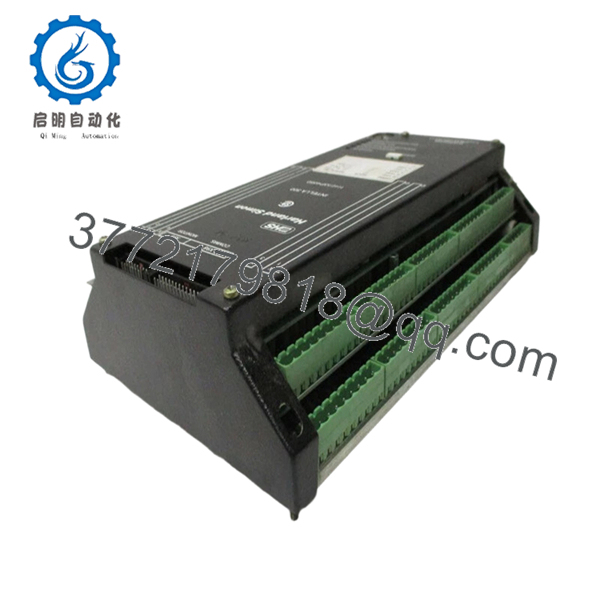
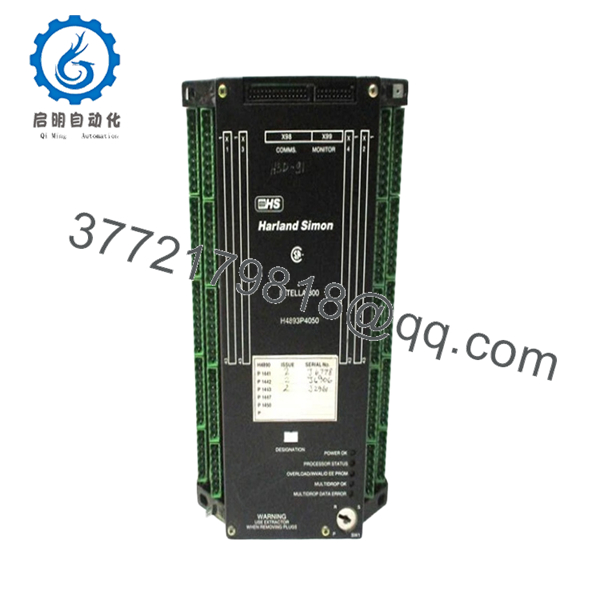
The Harland Simon H4893P4050 is a PLC processor board designed for the Intella 300 industrial control system platform. Manufactured by Harland Simon—a UK-based specialist in industrial automation—this CPU module serves as the central processing unit within the Intella 300 programmable logic controller architecture. It is commonly deployed in manufacturing plants, process industries, and utility operations where Harland Simon’s Intella series control systems were implemented.This processor board provides reliable control and computation for legacy installations requiring spare parts to maintain operational continuity. While Harland Simon has moved toward newer control platforms, the H4893P4050 remains critical for facilities running established Intella 300 infrastructure. Engineers select this module for its proven field reliability, direct compatibility with existing Intella 300 chassis configurations, and its role in maintaining control system operations without costly full-system replacement.

- H4893P4050
- H4893P4050
5. Installation & Configuration Guide
Stage 1: Pre-Installation Preparation (10 minutes)
⚠️ Safety First: Notify operations of planned downtime. Verify the Intella 300 system is in a safe state. Lock out/tag out (LOTO) all power sources to the rack. Wait 5 minutes for capacitor discharge on the backplane before handling any modules.Tools Required:
- ESD wrist strap (grounded)
- PH1 Phillips screwdriver
- Digital multimeter (Fluke 115 or equivalent)
- Wire labeling tape or markers
- Smartphone/camera (for documentation)
Data Backup:
- Export all running control logic from the Intella 300 programming software
- Document current node addresses, communication settings, and I/O configurations
- Photograph all DIP switches, jumpers, and terminal wiring layouts before removal
Stage 2: Removing the Old Module (5 minutes)
- Remove the front bezel or protective cover if present.
- Label and disconnect all wiring from the front terminal block. Do not force connectors—they should release with gentle pressure.
- Release the rack locking tabs (typically top and bottom) and pull the module straight out to protect backplane pins.
- Inspect the backplane slot for bent pins, dust accumulation, or corrosion. Clean with compressed air if necessary.
- ⚠️ Note: Keep the old module for reference until the new unit is fully operational. Do not discard until commissioning is complete.
Stage 3: Installing the New Module (8 minutes)
- ESD prep: Verify your wrist strap is properly grounded to the rack chassis.
- Configuration Clone (Critical): Replicate all DIP switches and jumpers from your reference photo. Pay special attention to:
- Node address settings
- Bus termination resistors (if applicable)
- Communication baud rate selectors
- Insert the H4893P4050 into the rack slot. Push firmly until both locking tabs engage with an audible click. Ensure proper seating—no gaps between module and backplane.
- Reattach wiring using torque-appropriate screwdriver. Do not overtighten terminal screws.
Self-Checklist:
- [ ] DIP switch positions match reference photo exactly
- [ ] All wiring secured and labeled correctly
- [ ] Rack locking tabs fully engaged
- [ ] No loose hardware inside the chassis
Stage 4: Power-On & Testing (7 minutes)
Pre-Power Check: Use your multimeter to verify no shorts on the 24V backplane rail before applying power.Power-On Steps:
- Power up the rack only (keep field devices isolated initially).
- Observe LED indicators on the H4893P4050:
- Green RUN = Normal operation
- Red ERR = Fault condition
- Flashing LEDs = Boot sequence or communication handshake
- Connect via Intella 300 programming software. Verify:
- Firmware version matches expected revision
- Node ID is correctly recognized on the network
- Communication handshake successful
- Download backup logic if required.
- Perform dry-run I/O testing before bringing field devices online.
⚠️ Troubleshooting Note: If the ERR LED remains solid red, suspect a firmware revision mismatch or incorrect DIP switch configuration. If no communication is established, verify network cabling, termination resistors, and switch port settings.
6. Frequently Asked Questions (FAQ)
Q: Can I hot-swap the H4893P4050 while the system is powered?
A: No. This is not a hot-swappable module. Attempting to remove or insert the processor board while power is applied can damage the Intella 300 backplane, corrupt the firmware, or destroy the CPU entirely. Always perform a controlled shutdown and wait for capacitor discharge before handling. I’ve seen maintenance teams try to “quick swap” these Intella boards during production—resulting in blown backplane traces that took entire control systems down for days.
Q: Is the H4893P4050 obsolete, and is your stock genuinely new?
A: Yes, this model is officially obsolete from Harland Simon. Our inventory consists of new surplus stock—units manufactured during the original production run but never deployed. These are factory-sealed or tested units stored in climate-controlled conditions. We also offer refurbished units that have undergone full functional testing. Each unit ships with a detailed test report and 1-year warranty.
Q: What is the direct replacement if the H4893P4050 is out of stock?
A: The H4893P4051 is the closest compatible alternative within the Intella 300 series. The H4893P4074 (Intella 310) may also be compatible depending on your system revision. However, verify firmware compatibility before ordering—some revisions have subtle timing differences that affect communication with specific I/O modules. The H4893P4029 power supply module is also part of this series and may be relevant for full system spare parts planning.
Q: Will I lose my programming logic when I replace the processor board?
A: Yes—unless you have a backup. The H4893P4050 stores application logic in onboard memory that is lost when power is removed. You must download your program from the Intella 300 engineering workstation after installation. If you don’t have the original source code, extract it from the old processor before removal using Harland Simon’s programming tools. I’ve seen plants lose years of accumulated control logic because someone pulled the CPU without backing up first.
Q: Why is your price lower than the OEM factory list price?
A: Harland Simon no longer manufactures this part, so “factory list price” is largely academic. Our pricing reflects the new surplus market reality—unused inventory acquired from plant closures, system upgrades, and distributor liquidations. We test every unit and pass the savings from bypassing traditional distribution channels directly to you. You’re buying proven hardware at market rates, not paying inflated prices for obsolete catalog listings.
Q: What firmware version should I request?
A: Document your current firmware revision before ordering. The Intella 300 series had several firmware iterations that affected communication timing and I/O handling. If your system runs older firmware, a newer processor may require I/O module firmware updates as well. When in doubt, request the exact revision currently installed—or be prepared to update the entire rack’s firmware suite.
Q: Is this compatible with Intella 310 systems?
A: The H4893P4050 is specifically designed for the Intella 300 platform. While the H4893P4074 is listed for Intella 310 systems, some cross-compatibility may exist depending on firmware revisions. Always verify with your system documentation or contact a Harland Simon specialist before mixing series components.



